EasyManua.ls Logo

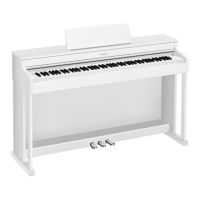
Celviano AP-470 - User Manual

Celviano AP-470
62 pages
Print Icon
To Next Page IconTo Next Page
Loading...
AP470-E-3A
EN
USER’S GUIDE (Full)
Before using this Digital Piano for the first time,
be sure to read the separate USER’S GUIDE to
familiarize yourself with basic operations.
AP
-
470

Table of Contents

Questions and Answers

Summary

General Guide and Basic Operations

FUNCTION Button Usage

Explains the FUNCTION button's use in combination with other buttons and keys for settings.

Auto Resume and Operation Lock

Describes how the piano saves settings and locks buttons to prevent operation errors.

Power Outlet and Settings Management

Turning Power On or Off

Instructions for powering the digital piano on and off.

Factory Default Settings Reset

Procedure to return the digital piano's settings to their initial factory defaults.

Playing with Different Tones

Selecting and Playing a Tone

Explains how to choose and adjust the volume of the 22 built-in tones.

Using Built-in Songs and Audio Playback

Concert Play Practice Modes

Details how to listen to, practice, and play along with Concert Play songs.

Recording and Playback Operations

Recording to Built-in MIDI Recorder

Explains the MIDI recorder, tracks, memory, and recorded data types.

Recording to USB Flash Drive (Audio)

Explains recording piano play as audio WAV files to a USB flash drive.

Configuring Settings with the Keyboard

General Configuration Procedure

Outlines the general procedure for configuring settings using the FUNCTION button and keyboard keys.

Parameter List: Tones

Details parameters, settings, and descriptions for tone configuration.

USB Flash Drive Operations

Supported Operations and Data Types

Lists supported operations and data types for USB flash drives.

USB Flash Drive Handling Precautions

Provides important precautions for connecting and using USB flash drives.

Error Indicators

Shows how lamps indicate error types during data transfer or other issues.

Connecting to a Computer

Minimum Computer System Requirements

Lists the minimum OS and hardware requirements for MIDI data exchange.

Getting Ready: Setup and Connections

Assembling the Stand

Provides instructions and cautions for assembling the piano stand.

Connecting the Cable

Guides on connecting the pedal unit cable and the AC adaptor.

Reference and Specifications

Troubleshooting Common Issues

Provides solutions for common problems encountered with the digital piano.

Product Specifications

Lists the technical specifications of the digital piano, including model, dimensions, and features.

MIDI Implementation Chart

MIDI Implementation Chart Details

Details MIDI functions, transmitted/recognized messages, and control changes.

Celviano AP-470 Specifications

General IconGeneral
Keyboard88 keys, Tri-sensor Scaled Hammer Action Keyboard II
Touch Response3 sensitivity levels, off
Sound SourceMulti-dimensional Morphing AiR
Polyphony256 notes
Pedals3 pedals (damper, soft, sostenuto)
Amplifier Output20W + 20W
Weight43.4 kg
Tones22 built-in tones
Digital EffectsReverb (4 types), Chorus (4 types), Brilliance, DSP (some tones)
Lesson FunctionYes
Recorder2 tracks, 1 song
Data CapacityApproximately 5, 000 notes total
Metronome0 to 9 beats; tempo range: 20 to 255
Key Transpose-12 to 0 to +12 semitones
Tuning ControlA4 = 415.5 Hz ~ 440.0 Hz ~ 465.9 Hz
Speakers12cm x 2
ConnectorsHeadphones (2), USB to Host, Pedal Connector
BluetoothBluetooth Audio
Power SupplyAC adaptor
Included AccessoriesAC adaptor, Music stand, Score book