24
Note:
1. Do not use old batteries or batteries of the wrong type. This may lead to RC
malfunctions.
2. If you do not use the RC unit for more than 1 month, remove the batteries from
the RC unit as they may leak and damage the unit.
3. The service life of the batteries if used daily is approximately 6 months.
4. Replace the batteries if there is no audio signal confirming receipt of the RC
commands or no command signal on the display.
5. AIR CONDITIONER MAINTENANCE
ATTENTION! Disconnect the AC from power supply before performing any
maintenance operations.
INDOOR UNIT FRONT PANEL MAINTENANCE
Careful maintenance and regular cleaning will help extend the service life of the
appliance and reduce power consumption.
Observe the following suggestions when cleaning the appliance:
– do not stand on an unstable surface when wiping the appliance; you may fall
down and injure yourself and damage the appliance;
– do not touch the metal parts of the housing when removing the front panel
to avoid injury;
– use a dry cloth to clean the front panel and the RC unit, if the contamination
will not come off use a damp cloth.
Note:
1. Do not submerge or wash the appliance and the RC unit in water!
2. Do not use alcohol-containing liquids, gasoline, oils or polishers to clean the
unit.
3. Do not apply too much force to the front panel as this may cause it to fall off.
4. Do not use abrasive cleaners or metallic sponges to avoid damage of the
appliance’s surface.
5. Do not use water with a temperature exceeding 45
0
С. This may cause warping
and discoloration of the plastic.
AIR FILTER CLEANING
1. Raise the front panel to the stop, then lift the protruding part of the filter
and remove it.
2. Clean the filter with a vacuum cleaner or rinse it with water. If the filter is
heavily contaminated wash it in warm water with a mild detergent. Let the
filter dry completely in a shaded place.
3. Reinstall the filter and close the front panel.
MAINTENANCE
At the end of a season
The following action should be taken:
– turn on the AC in the VENTILATION for a prolonged time;
– disconnect the appliance from power supply;
– clean the air filter;
– wipe the indoor and outdoor units with a soft dry cloth;
– remove the batteries from the RC unit.
At the beginning of a season
The following action should be taken:
– ensure that the intake and exhaust openings on the indoor and outdoor units
are not blocked;
– ensure there is no corrosion or rust on the outdoor unit;
– ensure that the air filter has been cleaned;
– connect the AC to power supply;
– install the batteries into the RC unit.
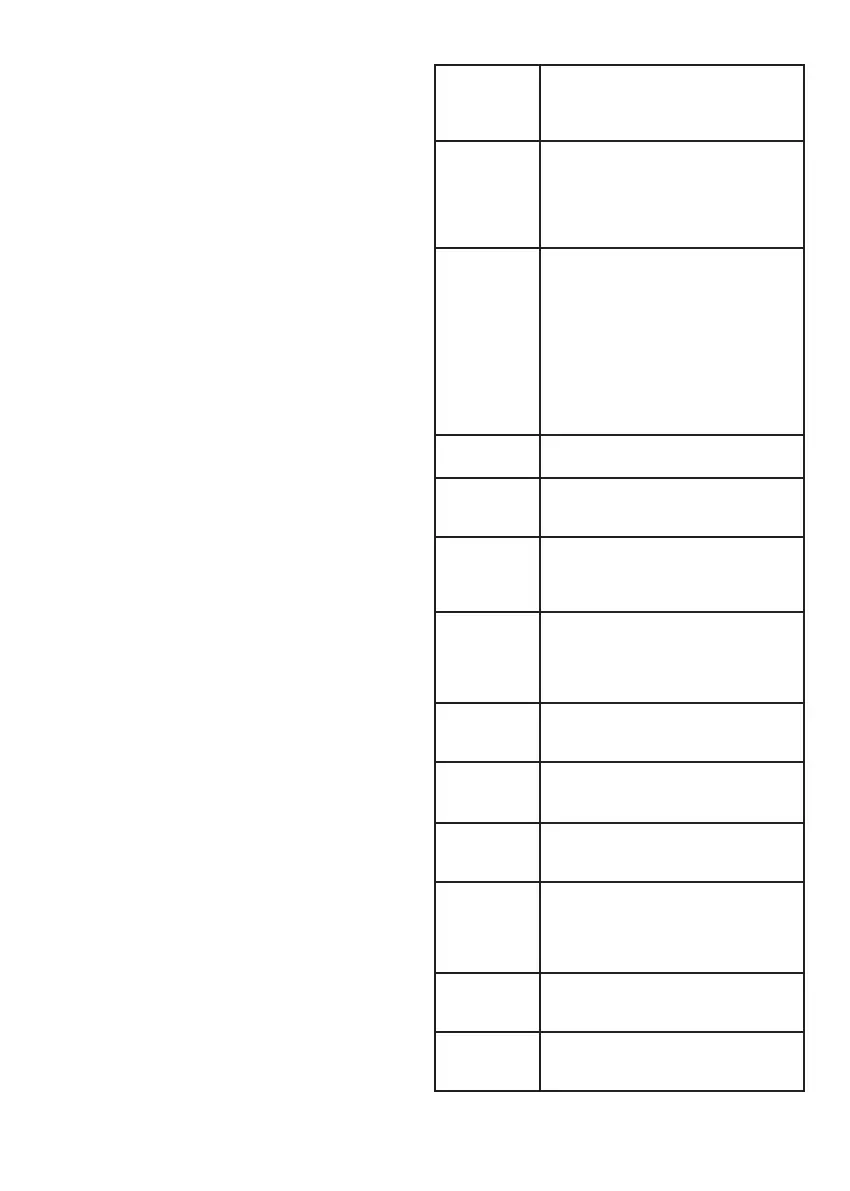
6. TROUBLESHOOTING
The appliance will
not turn on
Check power supply connection. The safety device has
tripped; try to turn the AC on after waiting for at least
3 minutes. Power supply voltage too high or too low.
Check if a turn-on delay timer has been eventually set
The AC does not
respond to RC
commands
Possible influence of electromagnetic interference.
Try to disconnect the AC from power supply and
connect it again in 1 minute. Ensure that the RC unit
is within the signal coverage. Check the RC batteries,
replace them if necessary. Check the RC unit for
damage
Low cooling or
heating efficiency
Check correctness of the target temperature setting.
Check if the inlet and outlet openings of the indoor
unit have been blocked. Check the indoor unit air
filter, heat exchanger and fan for contamination,
have them cleaned if necessary. Ensure that
warm/cold air is not coming from an open door or
window. Check correctness of the fan speed set. The
cooling efficiency can be insufficient if the outdoor
temperature is too high. The heating efficiency can
be insufficient if the outdoor temperature is too low.
Check for additional heat sources in the room
Delayed operating
mode change
Operating mode changes during operation may take
up to 3 minutes
Delayed activation
of the heating
mode
A delay of 2 to 5 minutes is required for heating up the
indoor unit heat exchanger. This is not a malfunction
Unusual smell
An AC can amplify the smells present in the room,
such as cigarette smoke, perfume, furniture smells,
etc. Contact a service centre if the odor persists for
a prolonged time
The sound of
running or
bubbling water
coming from the
indoor unit
These sounds are caused by the refrigerant flowing
in the tubes and boiling in the indoor unit evaporator.
This is not a malfunction
Crackling sound
coming from the
indoor unit
The crackling is caused by the temperature expansion
or contraction of the front panel. This is not a
malfunction
Faint mechanical
noise coming from
the indoor unit
The noise occurs when the indoor unit fan turns on
and off. This is not a malfunction
Hissing noise
coming from the
indoor unit
The noise occurs when the refrigerant flow changes
direction. This is not a malfunction
Indoor unit housing
discoloration
This may be the result of different factors (e.g.
ultraviolet radiation, temperatures, etc.); the plastic
housing can change color, which does not affect
the functionality of the appliance. This is not a
malfunction
Fog coming from
the indoor unit
outlet
If the indoor humidity and temperature is high, fog
can be formed at the AC outlet. It will disappear after
some time, as the indoor temperature decreases
Water flowing from
the outdoor unit
This is the condensate from the outdoor unit forming
during operation in the heating mode and at the start
of the defrosting mode. This is not a malfunction



 To Next Page
 Loading...