30
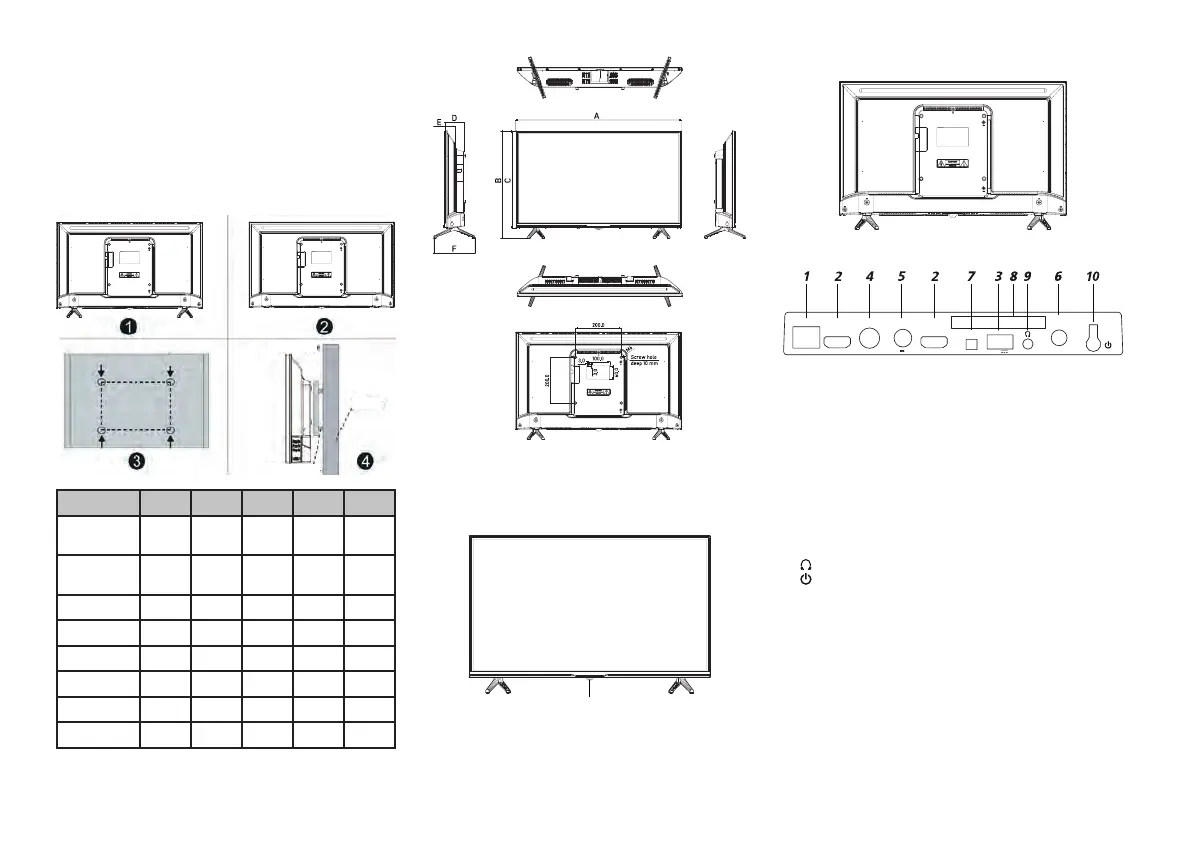
5. Use a screwdriver to screw in the bolts on the back side of the TV as shown in
Fig 4. Place the TV on the wall.
NOTE:
1. The TV wall mount complies with the VESA standard.
2. The use of the wall mount is optional.
3. There should be no other objects on or near the wall when mounting the TV.
4. The TV should be mounted to the wall by a skilled technician.
5. Observe the assembly instruction when mounting the TV.
6. The pictures are shown for reference.
Wall mount
Wall
Wall
Anchor bolt
Model CT-8724 CT-8732 CT-8740 CT-8743 CT-8750
Size without
stand (mm)
553x333 724х425 898х515 963х561 1117х648
Size with
stand (mm)
553x370 724х471 898х562 963х611 1117х708
A (mm) 553 724 898 963 1117
B (mm) 370 471 562 611 708
C (mm) 333 425 515 561 648
D (mm) 75 84 83 82 89
E (mm) 40 47 47 47 46
F (mm) 144 181 183 226 274
4. STARTING OPERTION
Front panel of the TV
Please carefully read the relevant sections “Important Notices and Warnings” and
“Safety Precautions” before operating the appliance.
Remote control sensor / Power indicator
Back panel of the TV
Side panel of the TV
HDMI2
ANT1
DIGITAL
AUDIO OUT
13/18 V 400 mA
ANT2
(SATELLITE)
AV
HDMI1(ARC)
LAN
COMMON
INTERFACE
1.
LAN – LAN RJ-45 local area network connection port. Use a LAN cable with
RJ-45 connector (not included).
2. HDMI – HDMI port allowing the connection of an external speaker system via
the audio return channel (ARC) HDMI. HDMI1 — with ARC function.
3.
USB – port for connecting USB 2.0 type devices (operates in “Media player”
mode).
4. ANT1 – antenna connection port (75 Ohm).
5. ANT2 (SATELLITE) – satellite antenna connection port.
6. DIGITAL AUDIO OUT – coaxial digital audio outlet.
7.
AV – TV inlet connections for left/right audio channels from different sources
with a composite intake signal connected, uses a miniAV connector (3.5 mm
- 3хRCA connector required).
8. COMMON INTERFACE – slot for CAM module connection.
9.
– headphone connection port.
10.
– Power ON/OFF button.
NOTE: the inlet/outlet connection options may differ depending on the specific
model.
STARTING OPERATION
Using the Remote Control
-
Pint the RC unit towards the RC sensor located on the TV. The RC may not work
if is some object located between it and the RC sensor on the TV.
- The RC may not work properly if the TV is operated in a brightly lit room.
-
The maximum effective range for proper operation of the RC unit is
approximately 7 meters.


 To Next Page
 Loading...