Operation Instructions
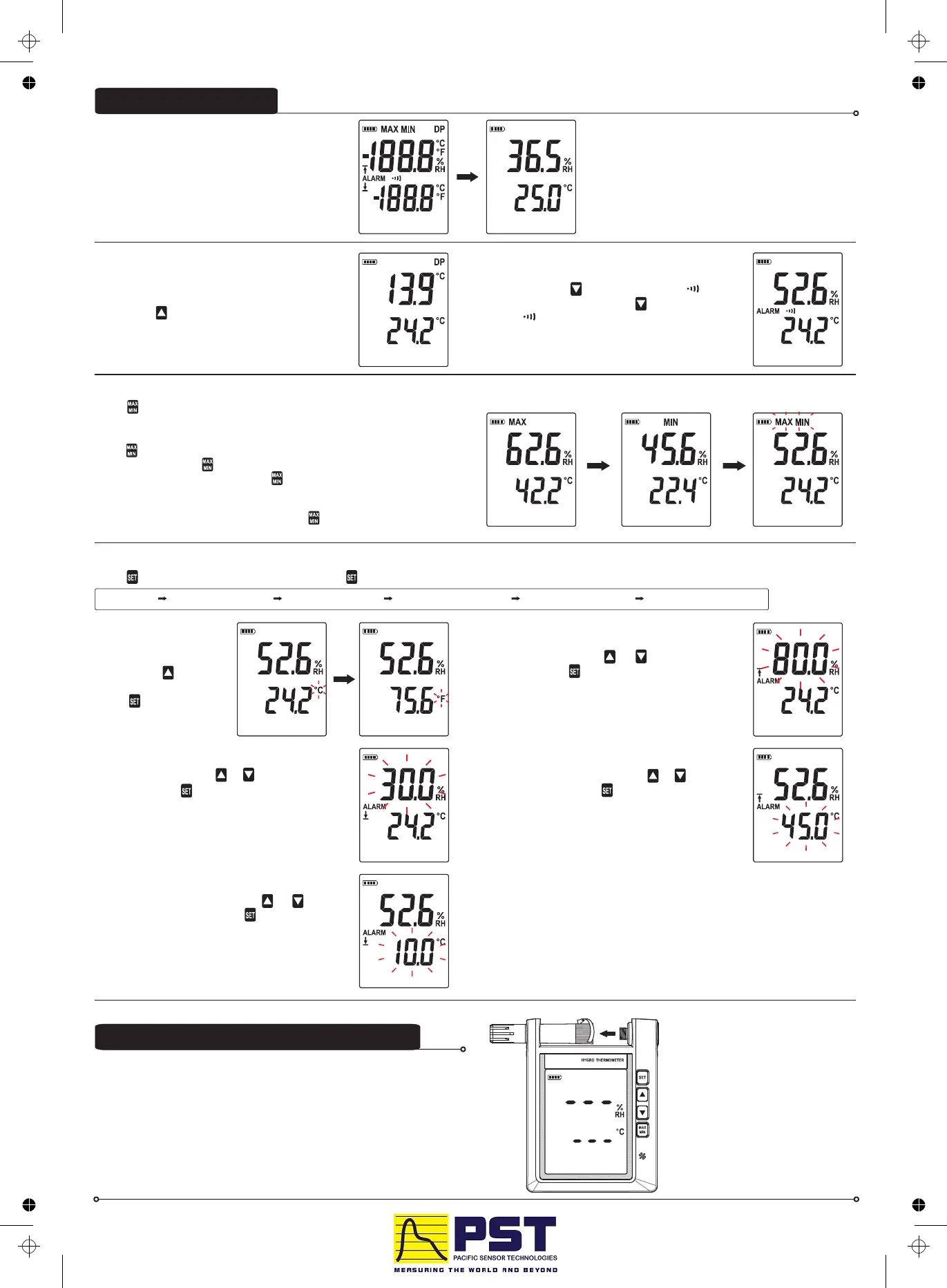
The LCD will display a self-checking screen for
about 2 seconds right after the batteries are
inserted.
(1) Switch between Relative Humidity (RH)
and Dew Point (DP) Mode:
By default, the LCD displays relative humidity
(RH). Press button to switch between RH and
DP mode. When displaying dew point, the DP
symbol will appear.
(2) Turn On/Off Alarm Function:
To turn on, press . The ALARM symbol
will show up. To turn off, press button again. The
ALARM symbol disappears.
button
(3) MAX/MIN Operation:
Press button to enter MAX/MIN mode. Under this mode the maximum
value and minimum value is kept in the memory simultaneously and
updated with every new data reading.
Press button, MAX indicator and the Maximum value shows
on the display. Press again, MIN indicator will display and the Minimum
value shows on the display. Press again, MAX and MIN indicators will
blink together. This means that these data have been updated in the
memory and the reading is the present temperature and humidity.
To exit the MAX/MIN mode, press and hold for two seconds.
will display
(4) Enter Settings Mode:
Press to enter settings mode. Each time was pressed, it enters next setting as follows:
Set °C/°F set highest RH limit set lowest RH limit set highest Temp limit set lowest Temp limit Quit setup mode
button
4-1. Set °C/°F:
When ℃ (or ℉ ) symbol
blinks, press button to
switch between ℃ and ℉.
Press button to next
setting.
4-3. Set Lo Limit RH:
When RH blinks, press or to adjust
limit value. Press button to next setting.
button
4-2. Set Up Limit RH:
When RH blinks, press or to adjust
limit value. Press button to next setting.
button
4-4. Set Up limit Temperature:
When blinks, press or to
adjust limit value. Press button to next setting.
Temperature button
4-5. Set Lo Limit Temperature:
When Temperature blinks, press or
to adjust limit value. Press button to next
setting.
button
4-6. Press SET to quit setting mode:
Note:
Default Up Limit RH: 80.0 %RH
Lo Limit RH: 30.0 %RH
Up Limit Temperature: 45.0 ℃
Lo Limit Temperature: 10.0 ℃
Buzzer Alarm Function: OFF
The probe can be connected or disconnected from the main unit by the
fastening screw as shown in the graph. Rotate only the fastening screw
rather than the probe body to prevent damage the probe.
Connection between probe and Main unit :



 To Previous Page
 Loading...





