Need help?
Do you have a question about the CenturyLink C4000XG and is the answer not in the manual?
Instructions for automatically connecting the C4000XG to the internet via ISP detection.
Guide to manually configure the C4000XG's internet connection via its Web UI.
How to use WPS for a quick and secure wireless network connection.
Steps to manually configure wireless settings for the C4000XG.
Lists model number, standards, memory, IP versions, and wireless/wired speeds.
Provides physical dimensions and weight of the C4000XG gateway.
Details power requirements, certifications, and operating temperature ranges.
The C4000XG is a high-performance Wi-Fi 6 router designed to provide robust internet access for both wired and wireless clients. This device serves as a central hub for your home network, enabling seamless connectivity and efficient data transfer. Its design emphasizes ease of use and reliable performance, making it suitable for a variety of home networking needs.
At its core, the C4000XG functions as a powerful router, leveraging Wi-Fi 6 (802.11ax) technology to deliver superior wireless speeds and improved network efficiency. This advanced Wi-Fi standard allows for faster data rates, better performance in congested environments, and enhanced capacity to handle multiple connected devices simultaneously. Whether you're streaming high-definition video, engaging in online gaming, or managing smart home devices, the C4000XG is engineered to provide a stable and responsive wireless experience.
Beyond its wireless capabilities, the C4000XG integrates a four-port Gigabit Ethernet switch. These ports allow you to connect wired devices such as desktop computers, gaming consoles, or network-attached storage (NAS) directly to the router, ensuring maximum speed and stability for critical connections. The inclusion of Gigabit Ethernet ports means that even your wired connections can benefit from high-speed data transfer, making it ideal for tasks that demand significant bandwidth.
A notable feature of the C4000XG is its versatile WAN/LAN port. This port can be configured to serve either as an additional LAN port, expanding your wired network capacity, or as a WAN connection, allowing the router to connect to various types of internet services. This flexibility makes the C4000XG adaptable to different network setups and internet service provider requirements.
For enhanced connectivity options, the C4000XG also includes an SFP+ cage. This cage is designed to accommodate CenturyLink-approved SFP modules, which can provide access to the internet through various fiber-optic or other high-speed connectivity options. This feature future-proofs the router, allowing it to adapt to evolving internet technologies and higher bandwidth demands.
Setting up the C4000XG is designed to be straightforward, with both automatic and manual configuration options. For most users, the automatic connection feature simplifies the process: simply plug in the power and Ethernet cables, and the device will attempt to detect and configure your DSL connection. A green LED ring on the device indicates a successful internet connection, providing a clear visual cue of network status. If a PPPoE connection is required, users will be prompted to enter their ISP-provided username and password.
For users who prefer more control or encounter issues with automatic setup, the C4000XG offers a manual configuration option through its web-based user interface (UI). By accessing the router's IP address in a web browser, users can log in with default credentials (admin and a password found on the device label) to manually configure internet settings, including PPP username and password, and time zone settings. The web UI provides a comprehensive interface for managing various aspects of the router's operation.
Establishing a wireless network with the C4000XG is also user-friendly, offering two primary methods: WPS (Wi-Fi Protected Setup) and manual configuration. WPS provides a quick and secure way to connect compatible devices to your wireless network. By pressing the WPS button on the router for a few seconds, the device enters a pairing mode, indicated by a blinking white light. Pressing the WPS button on a client device then initiates a secure connection. A successful WPS connection is visually confirmed by the LED ring alternating green and white, eventually settling on solid green for normal operation.
For manual wireless setup, the C4000XG's wireless LAN is enabled by default. The necessary wireless settings, such as the SSID (network name) and password, are conveniently located on a label on the bottom of the device. Users can then configure their wireless client devices to use these settings to connect to the C4000XG's network. This method provides full control over the wireless network parameters.
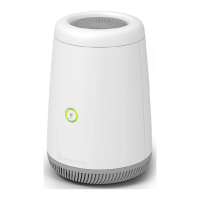
The physical design of the C4000XG is both functional and aesthetically pleasing. The front of the device features a WPS button and an LED ring, which serves as a status indicator for various operations, including internet connectivity and WPS pairing. The LED ring's color and blinking patterns provide immediate feedback on the router's status, making it easy to troubleshoot or monitor.
The back of the C4000XG houses all the essential ports and connectors. These include a USB port, which can be used for various functions such as connecting external storage or sharing a printer across the network. The four Ethernet ports provide wired connectivity for multiple devices. The dedicated WAN/LAN port offers flexibility for internet connection or network expansion. The SFP+ cage is present for advanced connectivity options. Finally, the reset button and power ports are located at the bottom, allowing for easy power connection and device reset when needed.
Maintenance of the C4000XG is generally minimal, focusing on ensuring proper connections and occasional software updates. The device is designed for continuous operation, and its robust build quality contributes to its longevity. In case of internet connectivity issues, the LED ring's status (e.g., red light) provides an initial indication, prompting users to check connections or consult the web UI for more detailed diagnostics. Regular checks of the web UI can also help in monitoring network performance and making any necessary adjustments.
The C4000XG is designed to be a reliable and high-performing router, offering a blend of advanced Wi-Fi technology, versatile wired connectivity, and user-friendly setup and management features. Its ability to support various internet connection types and its future-proof SFP+ cage make it a comprehensive solution for modern home networking.
 General
| Wi-Fi Standard | Wi-Fi 6 (802.11ax) |
|---|---|
| Ethernet Ports | 4 x Gigabit Ethernet |
| USB Ports | 1 x USB 3.0 |
| Security | WPA3 |
| MU-MIMO | Yes |
| WAN Port Type | Gigabit Ethernet |
| Frequency Bands | 2.4 GHz, 5 GHz |
| Security Features | Firewall |

 To Next Page