8
Remote Control
Avoid pressing two remote buttons simultaneously as this may cause malfunctions.
Avoid using the remote in areas with extreme temperature fluctuations.
If the remote will not be used for extended periods of time, remove the battery.
The remote control’s range is approximately 5-7.01 Meter. Use it within this range.
Use 2 x 1.5V AAA dry battery.
Remember: small batteries are easily swallowed by young children. Keep batteries away
from children.
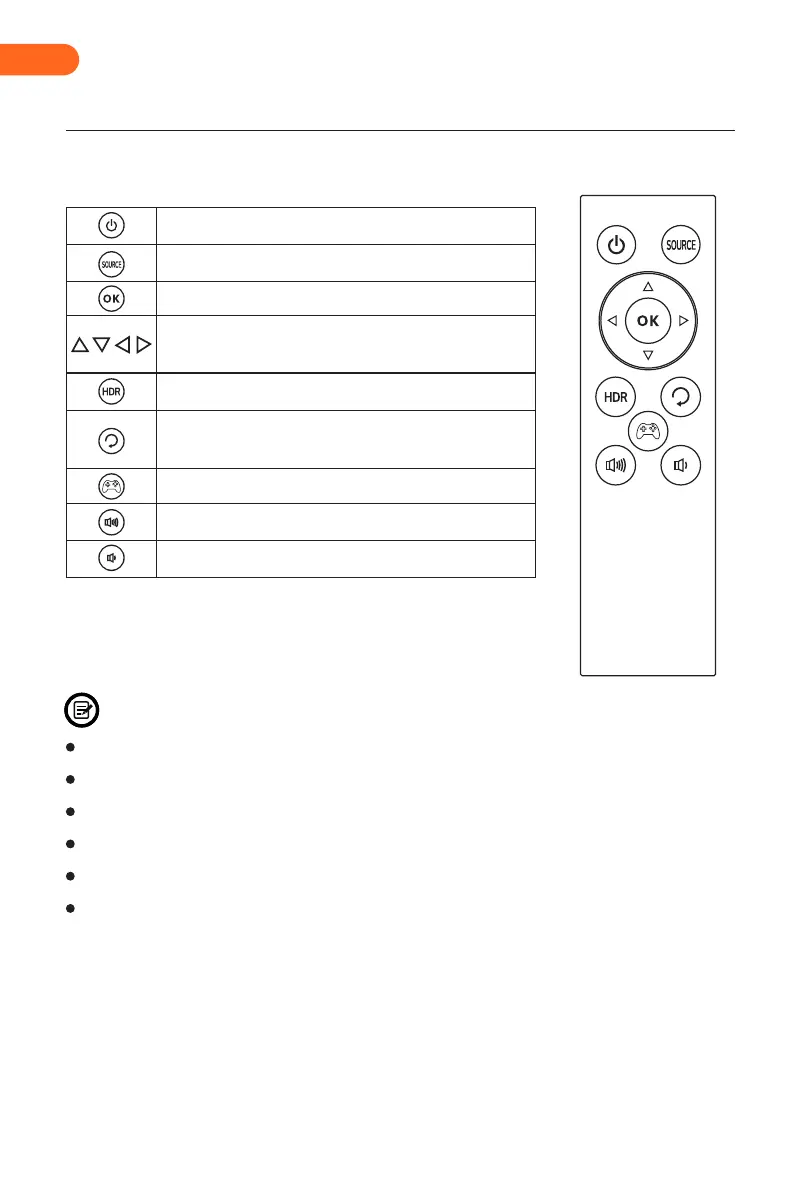
Press to turn the monitor on or off.
Press to enter the Input Signal.
Press to enter the OSD menu or press to confirm.
Press to turn HDR on or off.
After entering the OSD settings menu, press any of the
arrow buttons to move within the menu.
Press to exit the OSD menu or return to the previous
menu.
Press to enter the game crosshair mode.
Press to increase volume.
Press to decrease volume.
EN


 To Next Page