7
Usage
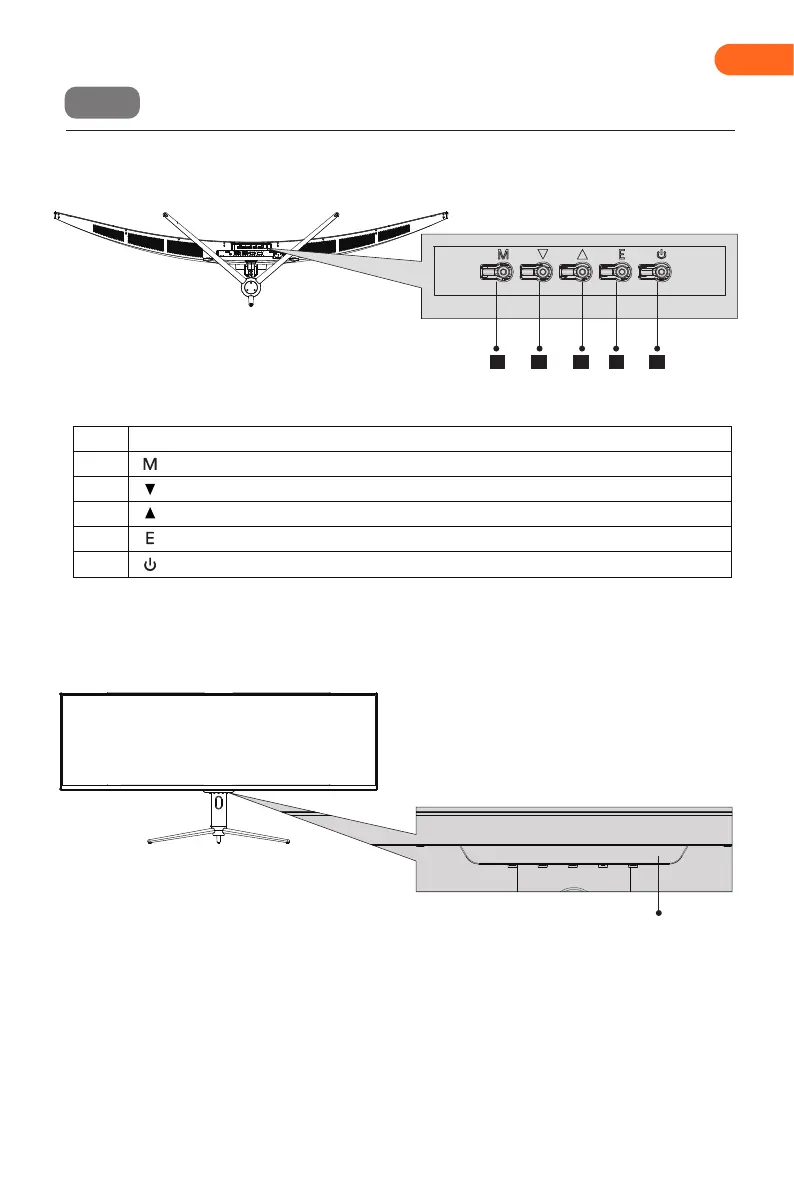
Description of buttons
Explanation of indicators
Menu button: Press to enter sub-menus/ quickly enter the main menu.
Up button: Press to move up in the menu/quickly enter the contextual mode.
Exit/hot key: Quickly enter the Input Signal or go back to the previous menu/exit.
Down button: Press to move down in the menu/quickly enter the game crosshair mode.
Power button: Press to turn on/off the monitor.
Button Function
1
2
3
4
5
Indicator: Solid blue light indicates power is on and the monitor is operating normally. Flashing blue
light indicates no video source has been detected. Please ensure your computer is on and all video
cables are fully inserted and or Connected.
1 2 3 4 5
Indicator
EN


 To Next Page