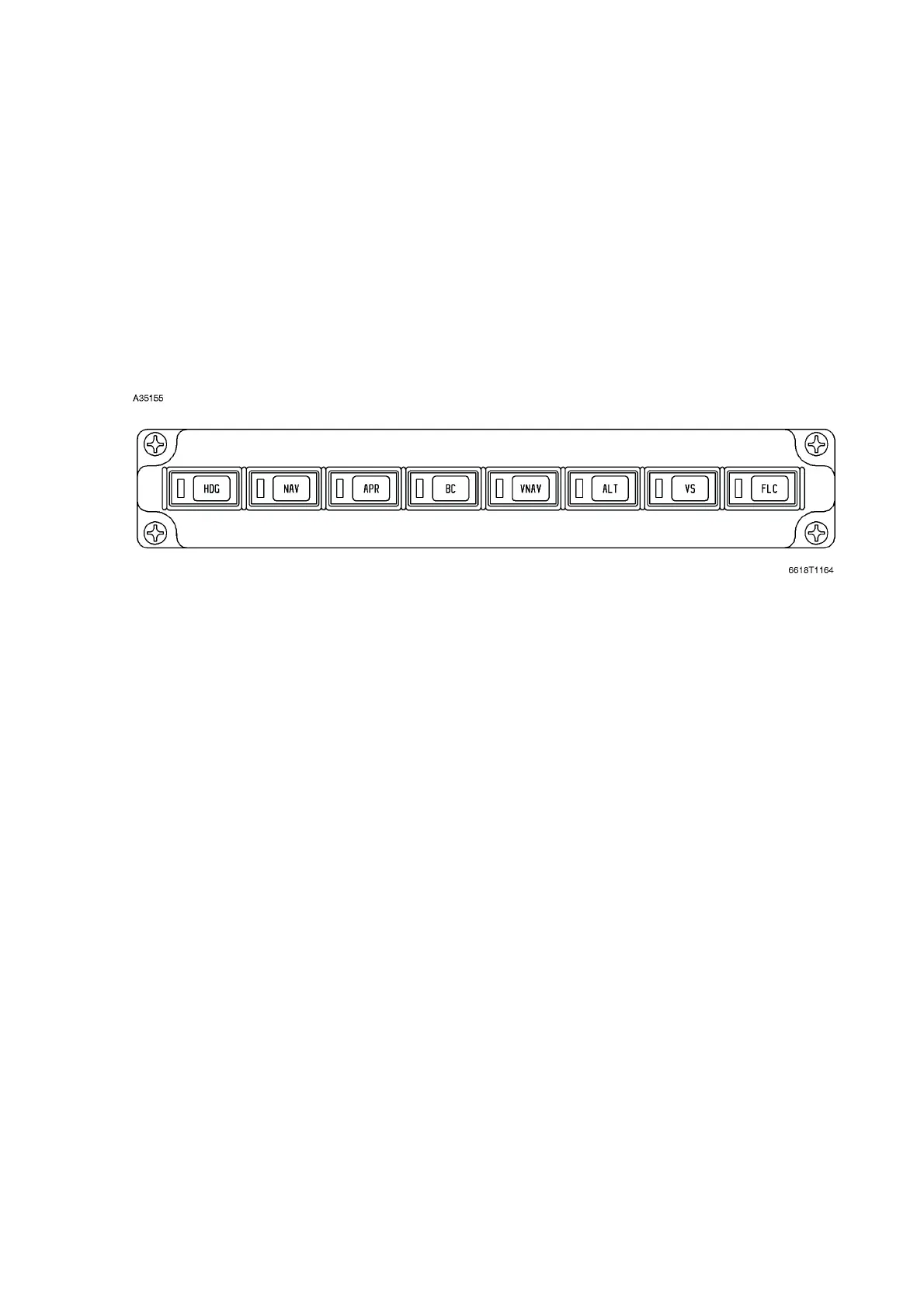
FLIGHT DIRECTOR MODE SELECTOR
The flight director mode selector consists of eight push-on, push-off switches that select various flight
director/autopilot modes of operation. The green mode activation light in the switch (button) will be
illuminated if the corresponding mode is in the arm or capture state.
The status of the selected mode is displayed in white letters (annunciations) in the primary flight
display (PFD) when armed, and in green when capture has occurred (or when selected on, for those
modes where capture occurs immediately).
The flight director can be selected off by deselecting all of the modes on the MS-560 Flight Director
Mode Selector. The command bars will bias out of view. If no modes are selected on the MS-560
mode selector the autopilot will engage in a basic heading hold/pitch hold mode which will be
annunciated (PIT and ROL) in the primary flight display (PFD).
Operation of the various modes is explained under Primus 1000 System Operation below. The pilot
and copilot may select either NAV 1 or NAV 2 for display on the course deviation indicator (CDI) of
their respective primary flight display (PFD), by means of the NAV button on the DC-550 display
controller. The respective NAV will be automatically selected upon power up; the sequence of
selection will then be NAV2/NAV1/NAV2 etc. for the pilot and NAV1/NAV2/NAV1 etc. for the copilot. If
both sides have been selected to the same source, the annunciation of VOR 1, etc., in the PFD will
be in amber. The selection of NAV 1, NAV 2 or FMS is annunciated above and to the right of the HSI
display in the PFD as VOR 1, VOR 2 and FMS respectively.
The selection of NAV 1, NAV 2 or FMS on the DC-550 display controller push-buttons controls the
source of navigation information to the flight director, as well as selects the source of navigation
information displayed on the EFIS course deviation indicator of the PFD. A switch (AP XFER FD1/AP
XFER FD2) is installed (on the center instrument panel) to determine which flight director controls
the autopilot. The position of this switch can be changed with the autopilot engaged or disengaged,
however, the flight director modes will drop out. The autopilot will remain engaged, if it is already
engaged, but will revert to basic autopilot modes of pitch and heading hold.
MS-560 MODE SELECTOR PANEL
Figure 3-14
Cessna Citation XLS - Instrumentation & Avionics



 To Next Page