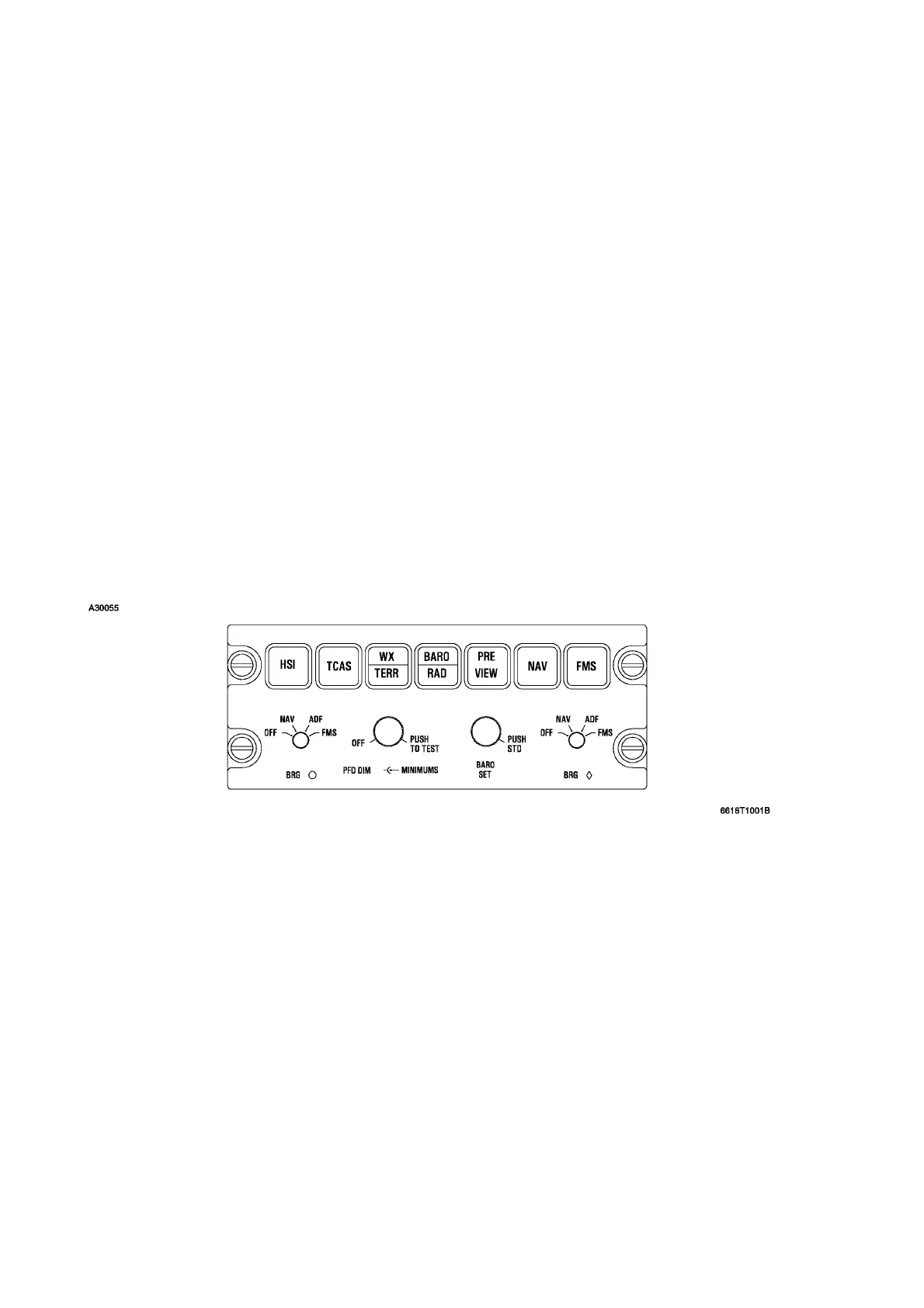
Selections for navigation sources and bearing needle presentations are controlled by means of
buttons and knobs on the DC-550 display controller (DC). The selected sources are annunciated on
the primary flight displays. Each pilot may choose full or arc mode for compass display, (pressing the
HSI button on the display controller cycles the display), single cue or cross pointer flight director
display, and elapsed time (ET). NAV 1 or NAV 2, or FMS may be selected for navigation display and
control of the flight director. These functions are explained under Display Controller below. Additional
knobs which select various navigation equipment for display (only) on the EFIS are also discussed
below.
Operation of the EFIS is similar to a standard flight director system except for the presentation of
additional information on the small format of two electronic display units. More information is
available in a more compact arrangement and the format is variable as desired. Presentations that
are not necessary or desired can be removed and replaced with more appropriate data for the
existing flight conditions. Control of the system is discussed below.
EFIS DISPLAY CONTROLLER
The display controller, located near the respective PFD on the pilot’s and copilot’s instrument panels,
allows selection of the different display formats and provides for selection of required navigation
sources and bearing data.
The individual controls are:
EFIS DISPLAY CONTROLLER
Figure 3-17
HSI Button Controls FULL or ARC (partial compass display). Displays 360° in FULL
mode and 90° in ARC mode. Successive pushes change the mode back and
forth.
TCAS Toggles the PFD to overlay TCAS display on the compass in either arc or
map mode. If the display is in full compass mode, selection of TCAS for
display will set the compass to arc mode.
WX/TERR Toggles the PFD HSI between compass mode (power-up/default display),
arc wx, arc EGPWS and arc (no WX/TERR), or between map mode, map
wx, and map EGPWS.
Cessna Citation XLS - Instrumentation & Avionics




 To Next Page