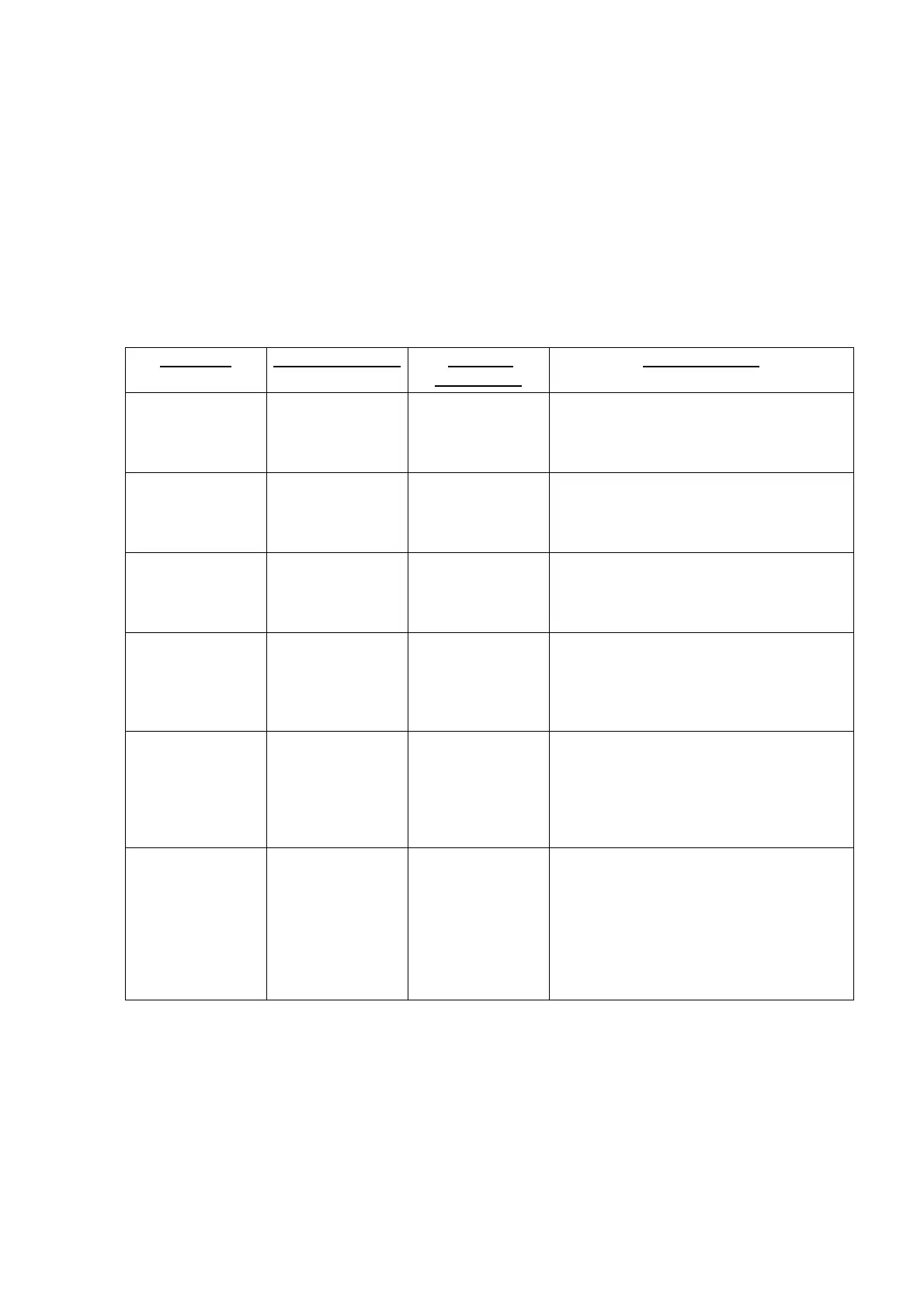
EFIS EQUIPMENT FAILURE CHECKLIST
Failure of equipment feeding information to EFIS will be annunciated by flags or dashes. Failure
effects of EFIS equipment are listed.
For detailed information related to the operation of the Primus 1000 system, consult the Primus 1000
Control Display System Pilot’s Manual for the Citation XLS. For detailed emergency/abnormal
procedures refer to the Emergency and Abnormal Procedures of the basic FAA Approved Airplane
Flight Manual.
FAILURE ANNUNCIATION FLIGHT
DIRECTOR
PILOT ACTION
Symbol
Generator
Failure
Red X on PFD or
display blank
All modes cancel Select opposite symbol generator on RI-
552 SG1/NORM/SG2 switch, to drive all
displays.
Display
Controller
Failure
Display cannot be
changed
N/A Select opposite symbol generator on RI-
552 SG1/NORM/SG2 switch, to drive all
displays.
Display Failure Display goes
blank
None Rotate dim knob - to turn display off.
Opposite pilot flies airplane, or fly from
standby instruments.
Heading Failure Red HDG FAIL on
HSI, map, bearing
pointers etc.
removed
Command Bars
out of view
Select opposite heading AHRS source
by pressing appropriate HDG REV
button.
Attitude Failure ATT FAIL
annunciation; No
pitch scale or roll
pointer, sphere all
blue
None Select opposite vertical AHRS source by
pressing appropriate ATT REV button.
Flight Director
Failure
FD FAIL on PFD
in upper left of
ADI display
FD Cues and
Mode
Annunciations
Removed
Select opposite flight director on AP
XFER FD1/AP XFER FD2 Switch and
select opposite SG on instrument panel
SG1/NORM/SG2 switch. Mode and
display selections must be made on
opposite Mode Selector and Display
Controller respectively.
Cessna Citation XLS - Instrumentation & Avionics



 To Next Page