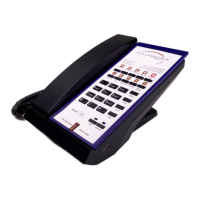
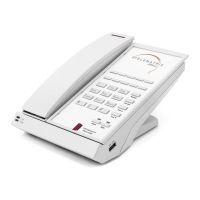
The TeleMatrix 3500IP SIP 2 is a Voice over IP (VoIP) phone designed for hospitality environments, offering a range of features for both guests and administrators. It supports various models, including corded and trimline versions, with options for DECT cordless handsets. The phone integrates with SIP PBX/servers and can be configured through a web interface or keypad shortcuts.
Function Description
The primary function of the 3500IP SIP 2 is to provide reliable voice communication over an IP network. It supports standard call features such as basic calling, hold, resume, mute, and volume control. For enhanced communication, it offers multi-function memory keys that can be programmed for speed dial, conference calls, or call transfer. The phone also supports three-way conversations, allowing multiple parties to connect.
For guest services, the phone includes dedicated guest service keys, which can be customized for quick access to services like front desk, concierge, or in-room dining. A OneTouch message-waiting light notifies guests of new voicemail messages.
The phone is designed for easy deployment and management. It supports DHCP for automatic IP address assignment and PPPoE for connecting to ADSL or cable modems. Firmware and configuration updates can be performed via HTTP, HTTPS, FTP, and TFTP, ensuring the device stays up-to-date and secure.
Usage Features
Basic Call Operations:
- Dialing: Calls can be placed using either the handset or the speakerphone. To dial, lift the handset or press the speakerphone key, dial the number, and then press '#' to send the digits to the SIP server.
- Hold and Resume: During an active call, pressing the "Hold" key places the call on hold. Pressing "Hold" again or the corresponding line key resumes the call. Corded phones allow one active call at a time, while two-line cordless phones can manage two active conversations.
- Volume Control: Dedicated VOL+ and VOL- keys allow users to adjust the call volume.
- Mute: The "Mute" key silences the microphone, preventing the called party from hearing the user's end of the conversation or background noise. The user can still hear the called party. This is particularly useful during conference calls.
- Redial: Pressing the "Redial" key dials the last number called. This feature is designed with guest privacy in mind, with the last dialed number typically erased after 60 minutes (configurable).
- Multi-Function Memory Keys: These keys can be programmed for various functions, including speed dial, hold, Do Not Disturb (DND), transfer, and conference. This customization allows quick access to frequently used features or contacts.
- Three-Way Conversation: If one line is on hold and another is active, pressing the conference key initiates a three-way conversation.
- Call Transfer: The phone supports both blind and attended transfers. In a blind transfer, the user transfers a call to a third party without speaking to them first. In an attended transfer, the user speaks to the third party before completing the transfer.
- Call Park: The "Hold" key can be configured to act as a "Call Park" key, allowing an active call to be placed in a "parking spot" on the server, from where it can be retrieved later.
Handset-Specific Features (for DECT models):
- Handset Registration: Handsets can be registered manually by pressing the "Page" key on the base unit and then the '*' key on the handset, or automatically by placing the handset in the base cradle. The message waiting light indicates registration status.
- Switching Between Base and Handset: During an active call, users can seamlessly switch between the base phone and the cordless handset by pressing the corresponding line key.
- Switching Between Lines: For two-line phones, users can switch between Line 1 and Line 2, placing one on hold while activating the other.
- Independent Conversations: The base phone and cordless handset can maintain independent conversations on separate lines, offering true two-line functionality.
Administrator and Configuration Features:
- Web Interface Access: The phone's web interface allows administrators to configure network settings, VoIP parameters, QoS, provisioning, and system settings. Access is secured with a username and password (default: admin/admin).
- Network Settings: Configure WAN and LAN settings, including static IP, DHCP, PPPoE, 802.1X authentication, and LLDP for network discovery and VLAN provisioning.
- VoIP Settings: Set up SIP accounts, audio codecs, call features (hotline, warm line, auto answer, call waiting, DND, ban outgoing), dialing rules, and multicast paging.
- Provisioning: Manage configuration and firmware updates through various methods, including DHCP options, auto-redirection servers, and manual file imports.
- System Settings: Configure logging servers, time settings (including Daylight Savings Time and SNTP), user management, and system actions (factory reset, reboot).
- DECT Settings: For cordless models, adjust DECT signal power level, frequency, and line sharing features.
- QuickKey DialPad Shortcuts: A set of keypad commands allows for quick access to information like IP address, firmware version, VLAN ID, TFTP server address, and to perform actions like rebooting the phone or toggling Daylight Savings.
Maintenance Features
- Firmware and Configuration Updates: The phone supports updating its firmware and configuration files remotely via HTTP, HTTPS, FTP, and TFTP, simplifying maintenance and ensuring the device runs the latest software.
- Provisioning Options: Administrators can set up provisioning servers to automatically download configuration files, which is crucial for large-scale deployments. The phone can be configured to check for updates at specific times.
- Logging Server: The phone can send system logs to a designated logging server, aiding in troubleshooting and monitoring device performance.
- Factory Reset: The "Reset to Factory Default" option in the web interface allows administrators to restore all settings to their original factory state, useful for troubleshooting or re-deploying devices.
- Reboot Device: A "Reboot Device" option is available in the web interface and via a QuickKey shortcut for restarting the phone.
- Handset Deletion: For DECT models, individual handsets can be deleted from the base unit, allowing for management of registered devices.
- Guest Privacy: The redial memory is automatically cleared after a configurable period (default 60 minutes) to protect guest privacy.
- Troubleshooting Shortcuts: QuickKey dial pad shortcuts provide immediate access to diagnostic information such as IP address, firmware version, and VLAN ID, facilitating on-site troubleshooting.
- Network Diagnostics: LLDP (Link Layer Discovery Protocol) is enabled by default to help the phone navigate the network and obtain its IP address via DHCP, assisting in network setup and diagnostics. The LAN port can also be mirrored to the WAN port for diagnostic troubleshooting.

 Need help?
 General

 To Next Page