DRAINAGE
While the water tank is full, the compressor will stop and the water full indicator light will
illuminate.
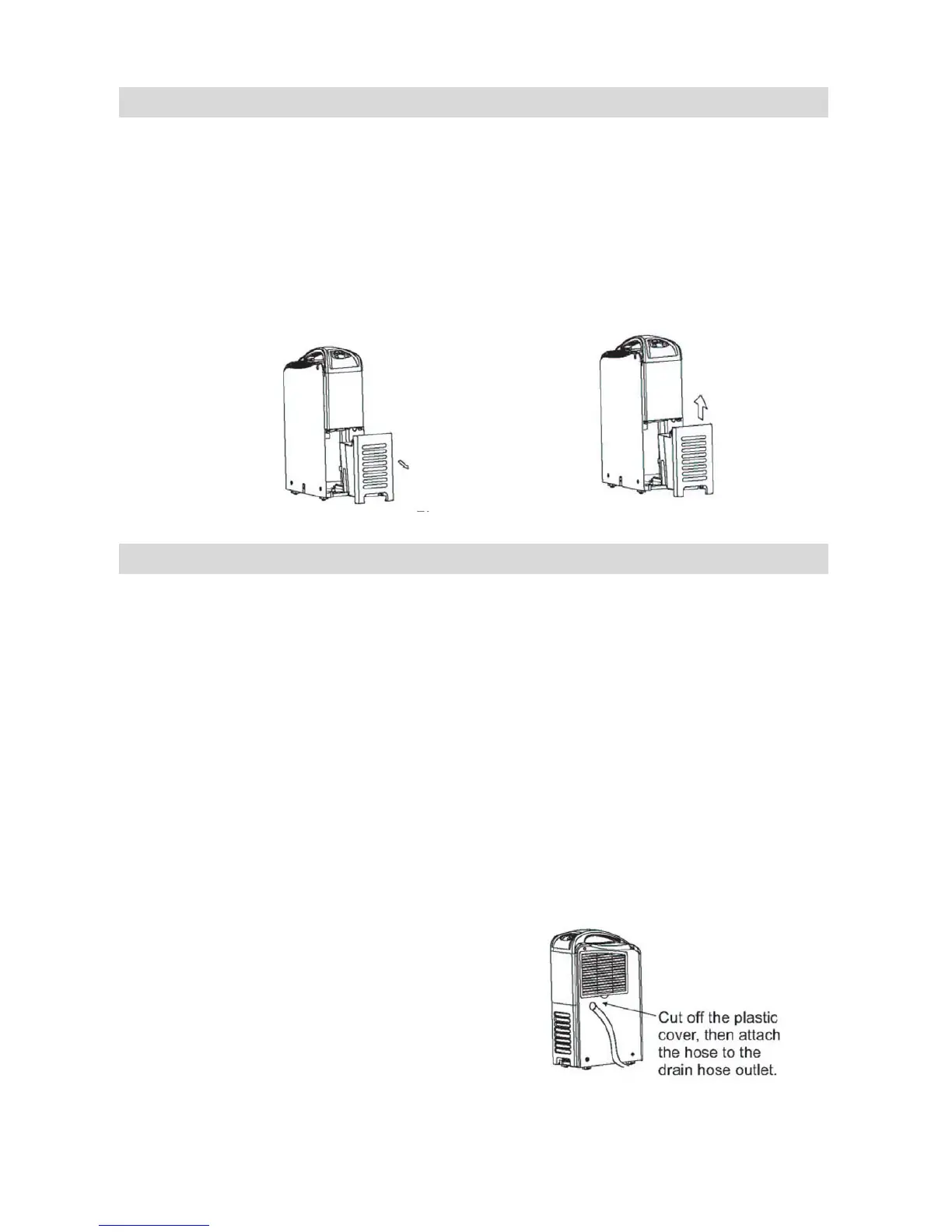
To remove the water tank, pull it out carefully from the unit.
After empting the water tank, place the tank back to the unit. Make sure it is properly
positioned, in order for the water full indicator light to go out and your dehumidifier is
operating.
Please note, in case, the water tank has not been positioned well, the water full indicator
light will still illuminate.
CONTINUOUS DRAINAGE
When the dehumidifier is operated at very high humidity levels, the water tank will require
more frequent drainage. In this situation, it may be more convenient to set the unit up for
continuous drainage with the following procedures:
1. Remove the water tank. Cut off the plastic cover located at drain hose outlet by a
scissor.
2. Prepare the water tube (not included) with 16mm internal diameter and 1.5mm
thickness. Connect to the continuous drainage hole. Ensure the water tube must be fixed
securely.
3. Put the water tank back to main body. Ensure the water will always drain away freely
and the tube will remain in right place & the water tank is in correct position.
NOTE : In very cold weather conditions, precaution should be taken to prevent the water
tube from freezing.
If it is no longer to use the continuous drainage, please follow the below procedures :
1. Remove the water tank.
2. Disconnect the water tube from the hole.
3. Put the water tank back to main unit.


 To Next Page