EasyManua.ls Logo

Chamberlain 375LM - User Manual

Chamberlain 375LM
2 pages
Print Icon
To Next Page IconTo Next Page
Loading...
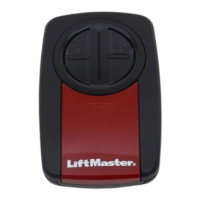
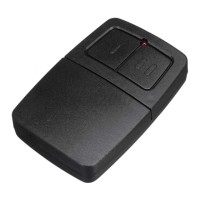
UNIVERSAL REMOTE CONTROL
MODELS 375LM & 375LMC
To prevent possible SERIOUS INJURY or DEATH from a moving gate or garage door:
ALWAYS keep remote controls out of reach of children. NEVER permit children to operate,
or play with remote control transmitters.
Activate gate or door ONLY when it can be seen clearly, is properly adjusted and there are
no obstructions to door travel.
ALWAYS keep gate or garage door in sight until completely closed. NEVER permit anyone to
cross path of moving gate or door.
To prevent possible SERIOUS INJURY or DEATH:
• NEVER allow small children near batteries.
• If battery is swallowed, immediately notify doctor.
To reduce risk of fire, explosion or chemical burn:
• Replace ONLY with 3V2032 coin batteries.
• DO NOT recharge, disassemble, heat above 212°F (100°C) or incinerate.
NOTICE: To comply with FCC and or Industry Canada (IC) rules, adjustment or modifications of this receiver and/or transmitter are
prohibited, except for changing the code setting or replacing the battery. THERE ARE NO OTHER USER SERVICEABLE PARTS.
Tested to Comply with FCC Standards FOR HOME OR OFFICE USE. Operation is subject to the following two conditions: (1) this device
may not cause harmful interference, and (2)this device must accept any interference received, including interference that may cause
undesired operation.
Chamberlain and LiftMaster are Trademarks of Chamberlain Group. Genie is a Trademark of Overhead Door Corporation. Overhead Door is a Trademark of Overhead Door Corporation. Linear is a Trademark of Linear Corporation.
Master Mechanic is a Trademark of TruServ. Sears is a Trademark of Sears & Roebuck. Stanley is a Trademark of The Stanley Works. Wayne Dalton is a trademark of Wayne Dalton Corporation. Do It is a trademark of Do It Best Corporation.
REMOTE CONTROL BATTERY
Battery
Dispose of old batteries properly.
Replace ONLY with 3V2032 coin batteries.
www.liftmaster.com
1-800-442-1255
PROGRAMMING
1 Start with your gate or garage door closed.
NOTE: The SMART/LEARN button or DIP SWITCHES are located either on the product or in
an external receiver on or near the product. Consult your product owner’s manual to locate
the SMART/LEARN button or DIP SWITCHES.
1211109853 7641 2
Button 1 Button 2
Program Button
DIP Switches
Battery Cover
LED
Read instructions thoroughly BEFORE beginning. If using the Universal Remote
Control with residential door openers, the Universal Remote Control must be
used only with door openers manufactured after 1993 that utilize photoelectric
sensors. The photoelectric sensors are always located on or near the bottom of
the door track.
The Universal Remote Control can be programmed to activate up to two
products, such as a garage door opener, gate operator, or commercial door operator. Each button
on the Universal Remote Control works independently of the other and must be programmed
separately. The second button on the Universal Remote Control can be programmed to different
products without affecting the first button programmed. The images throughout this manual are
for reference only and your product may look different.
3 Press and release the SMART/LEARN button on your product.
Match the remote control DIP SWITCHES to the existing receiver or existing remote control.
4 Press and release the button. When the LED stops flashing, continue to press and
release the button until a click is heard from the garage door opener, a light on
the garage door opener blinks, the garage door opens/closes, or a beep is heard
from the gate operator (maximum 18 times).
OR
Press and release the Universal Remote Control button…
... 8 times Chamberlain
®
*
Yellow Button 2011-Current
... 3 times Chamberlain
®
*
Purple Button 2005-Current
... 2 times Chamberlain
®
* Orange Button 1997-2005
... 4 times Chamberlain
®
*
Green Button 1993-1996
... 5 times Genie Overhead Door
®
Intellicode 1995-Current
... 6 times Genie Overhead Door
®
Intellicode 2005-Current
... 1 time Linear
®
Mega-Code 1997-Current
... 7 times Stanely
®
Security Code 1998
... 9 times Wayne Dalton
®
Rolling Code 372.5 MHz
1999-Current
... 14 times Linear
Multicode
®
10 Position Dip Switch
... 16 times Stanley
Multicode
®
10 Position Dip Switch
... 18 times Linear
®
8 Position Dip Switch
The LED on the Universal Remote Control MUST stop blinking between each press of
the button. The code is accepted when a click or beep is heard, a light blinks, or the
door/gate activates.
* LiftMaster, Do-It, Master Mechanic, Raynor, True Value and Sears Craftsman are
compatible with Chamberlain technology.
5 Press the program button to exit programming mode.
Programming is now complete.
6 Press the programmed button to activate your product. If product
does not activate, repeat the programming steps 3-6 again.
NOTE: If you have a 2 position DIP SWITCH and programming
fails, reverse DIP SWITCHES (OFF to ON and ON to OFF).
STOP
LEARN
XMITTER CONTROL BOARD
SMART/LEARN
BUTTON
1211109853 7641 2
RECEIVER REMOTEDIP SWITCHES
2 Open the remote control by sliding the battery cover down. Press and hold the program
button until the LED lights (approximately 2 seconds).
OR
LED
Program
Button
For more information, please visit www.devancocanada.com or call toll free at 855-931-3334

Question and Answer IconNeed help?

Do you have a question about the Chamberlain 375LM and is the answer not in the manual?

Summary

Safety Precautions

General Operation Warnings

Critical safety warnings for operating garage doors or gates with the remote control.

Battery Safety and Compliance

Safety guidelines for battery handling, replacement, and FCC/IC compliance notices.

Universal Remote Control Programming

Programming Procedure

Step-by-step instructions for programming the remote control to a garage door opener or gate.

Code Sequence Selection

Specific button press counts for different brands to match the remote to the receiver.

Testing and DIP Switch Adjustment

Instructions for testing the programmed remote and adjusting DIP switches for compatibility.

Ordering Repair Parts

Information Required for Parts Orders

Details on the information needed when ordering replacement parts for LiftMaster products.

Overview

This document describes the LiftMaster Universal Remote Control, models 375LM and 375LMC, designed for operating residential garage door openers, gate operators, and commercial door operators.

Function Description:

The Universal Remote Control is a versatile device capable of activating up to two different products independently. Each button on the remote control can be programmed separately to control a distinct device. This means one button could operate a garage door opener, while another button could operate a gate operator, without affecting the first programmed function. The remote is specifically designed for use with residential door openers manufactured after 1993 that utilize photoelectric sensors, which are typically located on or near the bottom of the door track.

Important Technical Specifications:

The remote control operates using a 3V2032 coin battery. It is designed to be compatible with a wide range of garage door opener and gate operator technologies, including:

  • Chamberlain® (Yellow Button 2011-Current, Purple Button 2005-Current, Orange Button 1997-2005, Green Button 1993-1996). LiftMaster, Do-It, Master Mechanic, Raynor, True Value, and Sears Craftsman are noted as compatible with Chamberlain technology.
  • Genie Overhead Door® Intellicode (1995-Current and 2005-Current).
  • Linear® Mega-Code (1997-Current).
  • Stanley® Security Code (1998).
  • Wayne Dalton® Rolling Code 372.5 MHz (1999-Current).
  • Linear Multicode® 10 Position Dip Switch.
  • Stanley Multicode® 10 Position Dip Switch.
  • Linear® 8 Position Dip Switch.

The device complies with FCC and Industry Canada (IC) rules, prohibiting adjustments or modifications other than changing the code setting or replacing the battery. It is tested to comply with FCC Standards for home or office use, with operation subject to the conditions that it does not cause harmful interference and must accept any interference received.

Usage Features:

Programming:

  1. Preparation: Ensure the gate or garage door is closed.
  2. Access Program Button: Open the remote control by sliding down the battery cover. Press and hold the program button until the LED lights (approximately 2 seconds).
  3. Activate Product's Learn Mode: Press and release the SMART/LEARN button on the product (garage door opener, gate operator, or commercial door operator). Alternatively, if the product uses DIP switches, match the remote control DIP SWITCHES to the existing receiver or remote control. The SMART/LEARN button or DIP SWITCHES are located either on the product itself or in an external receiver.
  4. Remote Control Programming: Press and release the desired button on the Universal Remote Control a specific number of times corresponding to the product's technology:
    • 8 times for Chamberlain® Yellow Button (2011-Current)
    • 3 times for Chamberlain® Purple Button (2005-Current)
    • 2 times for Chamberlain® Orange Button (1997-2005)
    • 4 times for Chamberlain® Green Button (1993-1996)
    • 5 times for Genie Overhead Door® Intellicode (1995-Current)
    • 6 times for Genie Overhead Door® Intellicode (2005-Current)
    • 1 time for Linear® Mega-Code (1997-Current)
    • 7 times for Stanley® Security Code (1998)
    • 9 times for Wayne Dalton® Rolling Code 372.5 MHz (1999-Current)
    • 14 times for Linear Multicode® 10 Position Dip Switch
    • 16 times for Stanley Multicode® 10 Position Dip Switch
    • 18 times for Linear® 8 Position Dip Switch The LED on the Universal Remote Control must stop blinking between each press of the button. The code is accepted when a click or beep is heard, a light blinks, or the door/gate activates.
  5. Exit Programming: Press the program button to exit programming mode.
  6. Test: Press the programmed button to activate the product. If it does not activate, repeat programming steps 3-6. If a 2-position DIP SWITCH is used and programming fails, reverse the DIP SWITCHES (OFF to ON and ON to OFF).

Safety Warnings:

  • To prevent serious injury or death from a moving gate or garage door, remote controls must always be kept out of reach of children. Children should never be permitted to operate or play with remote control transmitters.
  • Activate the gate or door ONLY when it can be seen clearly, is properly adjusted, and there are no obstructions to door travel.
  • Always keep the gate or garage door in sight until completely closed. Never permit anyone to cross the path of a moving gate or door.

Maintenance Features:

Battery Replacement:

  • The remote control uses a 3V2032 coin battery.
  • To replace, slide down the battery cover.
  • Safety Warning: To prevent serious injury or death, never allow small children near batteries. If a battery is swallowed, immediately notify a doctor.
  • Safety Warning: To reduce the risk of fire, explosion, or chemical burn, replace ONLY with 3V2032 coin batteries. Do not recharge, disassemble, heat above 212°F (100°C), or incinerate.
  • Dispose of old batteries properly.

Ordering Repair Parts:

To order repair parts, contact Devanco Canada.

  • Address: 19192 Hay Road, Unit Q, Summerstown, ON K0C 2E0
  • Toll Free: 855-931-3334
  • Website: www.devancocanada.com When ordering, supply the part number, description, and model number.

Chamberlain 375LM Specifications

General IconGeneral
BrandChamberlain
Model375LM
CategoryRemote Control
LanguageEnglish

Related product manuals