Limits
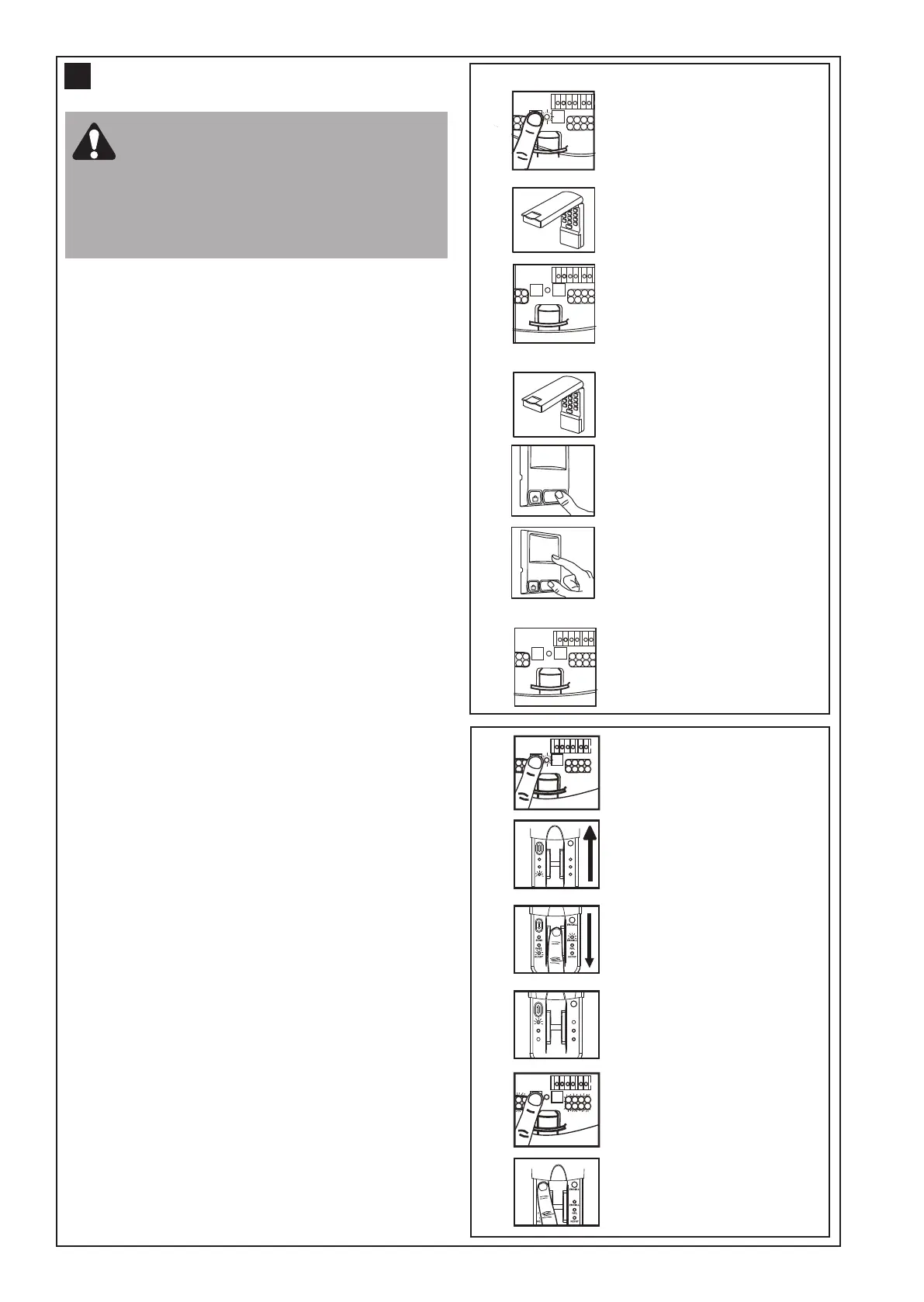
Press the purple
(learn) button, orange
LED will light
Slide the cover plate
up (A)
Swipe finger at a
steady speed (B)
Yellow LED will indicate
successful swipe (C)
Courtesy LEDs
will flash once
Test reader by pressing
the send button (D)
Limits
ENROLL
FAIL
RETRY
SEND
PASS
READY
ENROLL
#
ENROLL
FAIL
RETRY
SEND
PASS
READY
ENROLL
%
$
&
Wireless fingerprint access system C379
Full instructions are available with this accessory.
Once you have enrolled your user into the C379 you
can program the unit into your opener.
Using the learn button:
1. Press and release the learn button on the opener, the
orange LED will light.
2. Within 30 seconds, slide the cover of the C379 up as
illustrated (A). Swipe your finger on the reader head at
a steady speed (B) until the yellow LED turns on (C).
3. When the courtesy LEDs flash it has learned the
code. Ensure
there are no obstacles in the path of the
door, then press the send button (D) to test the door.
Wireless Keypad 8747AML
Using the (purple) learn button:
1. Press and release the (purple) learn button (1) on the
opener (the orange LED will light).
2. Within 30 seconds, enter a four digit personal
identification number (PIN) of your choice on the
keypad (2), then press and hold the ENTER button.
3. Release the button when the opener courtesy LEDs
flash once (3) (the code is learned).
Alternate programming method using the multi-
function control panel (optional accessory):
NOTE: This
method requires two people if the
keyless entry is already mounted outside the
garage.
1. Enter a four digit personal identification number (PIN)
of your choice on the keypad (then press and hold
ENTER).
2. While holding the ENTER button, press and hold the
LIGHT button on the multi-function control panel.
3. Continue holding the ENTER and LIGHT buttons while
you press the push bar on the multi-function control
panel (all three buttons are held).
4. Release bu ttons when the opener courtesy LEDs
flash once.
Activate the opener only when the door is
in full view, free of obstruction and
properly adjusted. No one should enter or
leave garage whilst the door is in motion. Do not
allow children to operate push button(s) or
transmitter(s). Do not allow children to play near
the door.
19
11
KEYLESS DEVICE PROGRAMMING
(OPTIONAL ACCESSORIES )
1
2
1
2
3
4
Limits
Press the purple
(learn) button, orange
LED will light
Orange LED will turn off
and courtesy LEDs will
flash once
Enter 4 digit PIN at
keypad (within 30s)
Limits
Learn
Limits
Learn
3
Enter 4 digit PIN at
keypad (within 30s)
Press and hold down
LIGHT button on the
motion detecting
control panel
With the LIGHT button
pressed, press and
hold the PUSH BAR on
the motion detecting
control panel
Release the button when
the courtesy LEDs flash
once
LOCK
LIGHT
LOCK
LIGHT
Learn button programming
Programming via multi-function control panel



 To Next Page