Section 360-080-102
4
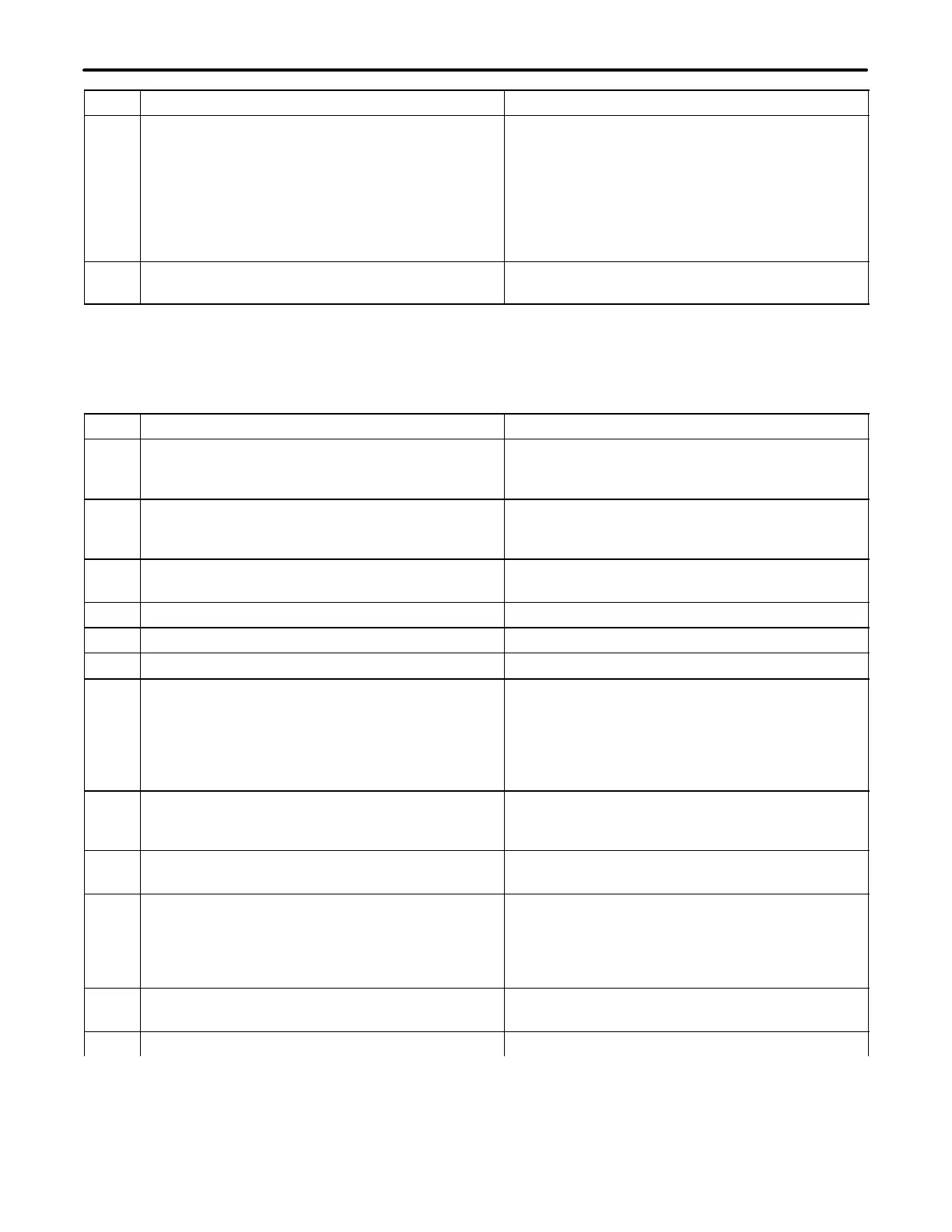
Step System ResponseAction
5. If the Network Management System (NMS) Soft-
ware will be used, do the following. Otherwise,
skip to the next step.
a. Select the IP Address option
b. Configure the IP Address and network
for the controlling PC
c. Select the Apply Changes button.
The system is automatically restarted and control
verification is ended.
6. Use the down arrow to move to Logout and press
<Enter>.
The terminal emulator displays Please Press
ENTER to login.
4.2 Control Verification Using the Network Management System (NMS)
The procedure Control Verification Using a Craft Terminal, located in this document, must be performed in order
for the NMS software to communicate with the ICB. Refer to the NMS documentation while performing the follow-
ing steps.
Step Action System Response
1. Set all the switches for the Address ID to the down
(zero) position. The address ID switches are lo-
cated on the front panel of the T1-S.
2. Using a PC with the NMS software installed, con-
nect the ethernet from the PC to the network con-
trol terminal J2 on the rear of the T1-S.
3. Activate the NMS software on the PC. The NMS
may start with the window minimized.
4. Select Setup Supervisor Login.
5. Login as a Supervisor using the password 123.
6. Select Database Equipment Management.
7. Enter the information for the fields as follows:
Address = 1
Description = To indicate bank identifier
IP Address = Same as the T1 Controller
IP address
8. Select the Close button. The equipment description will appear on the NMS
screen on both the left and right sides of the win-
dow.
9. Double-click on the equipment description that ap-
pears on the right-side of the window.
The IAD Management System window will appear.
10. In the ICB Management System, login using the
following:
ID = piad
Password = 1234.
The graphical user interface will display a repre-
sentation of the ICB with the T1-S in the lower
right-hand slot. The LED status of the unit will be
displayed, and all the software options will be
available.
11. Perform a primary near-end line T1 loopback with
either the craft terminal or NMS interface.
12. Close the loopback screen.



 To Next Page