Need help?
Do you have a question about the Charter Spectrum D3.1 eMTA and is the answer not in the manual?
Ground coaxial cable to earth as close as practical to the building entrance.
Unit requires specific power adapter; ensure it's fully inserted for snug connection.
Disconnect if abnormal; install within 104°F (40°C) and 5000m altitude.
Unpack and confirm modem, Ethernet cable, and power adapter are present.
Details MAC address, firmware, compatibility, Ethernet speeds, and web UI access.
Identifies Ethernet, Voice 1-2, and Cable ports on the rear panel.
Illustrates connections for RF cable, Ethernet, analog phones, and power adapter.
Use Reset button for power cycle (4 sec) or factory reset (10 sec).
Connect coaxial, Ethernet, and phone cables, then the power adapter.
Provides dimensions (A, B, C) for recommended mounting screws.
Install screws 140mm apart, ensure protrusion, use anchors for drywall.
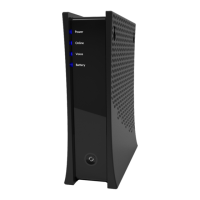
Details status lights for Power, Online, and Voice ports.
Explains status lights for Battery, Reset button, and Ethernet connection.
Device complies with FCC Part 15 rules; guidance on correcting interference.
Equipment complies with FCC radiation limits; maintain 20cm distance from body.
 General
| Modem Type | eMTA |
|---|---|
| DOCSIS Version | 3.1 |
| Voice Support | Yes |
| Number of Telephone Ports | 2 |
| Wireless | No |
| Compatibility | Charter Spectrum |
| Weight | 1.5 lbs |
| Channels | 32x8 |

 To Next Page