4.
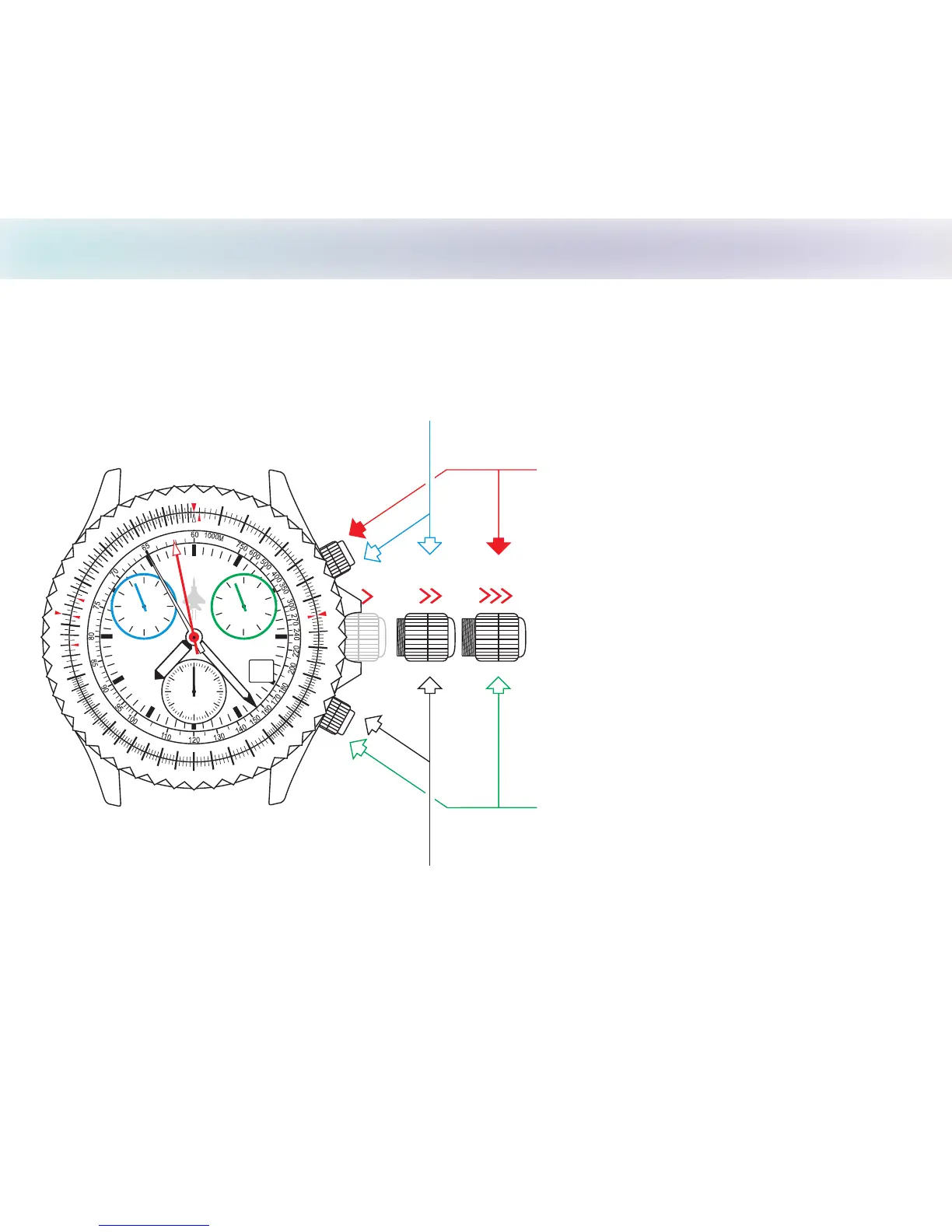
Resetting Chronograph Hands to Zero
CHASE-DURER
1
0
1
1
12
13
14
1
5
16
1
7
8
1
1
9
20
2
1
2
2
2
3
24
2
5
3
0
35
4
0
45
0
5
55
7
0
80
90
06
65
75
85
95
FALCON
COMMAND
31
60
40 20
10
30
50
10
8 2
46
9 3
12
6
8 4
12
6
2
10
5
3
.
T
U
A
N
0
4
.
T
A
T
S
1
0
11
2
1
31
41
15
6
1
1
7
1
8
1
9
2
0
2
1
2
2
2
3
2
4
52
0
3
45
05
5
5
7
0
80
90
M
PH
65
7
5
85
9
5
The chronograph hands can be set at zero or another time zone.
NOTE:
Do not keep setting crown in
position 2 for more than 20 minutes
(time could be lost).
When crown is pulled out to
position 3, movement will stop
immediately; second hand stops.
Setting
crown
Set the counter at 012 hour
Set the counter at 060 minute
Set the counter at 01/10 second
Set the counter at 060 second
A
B
Note: Press PUSHBUTTONS longer than 1 second to advance hands quickly
3
1
2


 To Next Page