ChatterBox USA Page 7 of 20
2. Getting to know your X1slim
Buttons and inputs
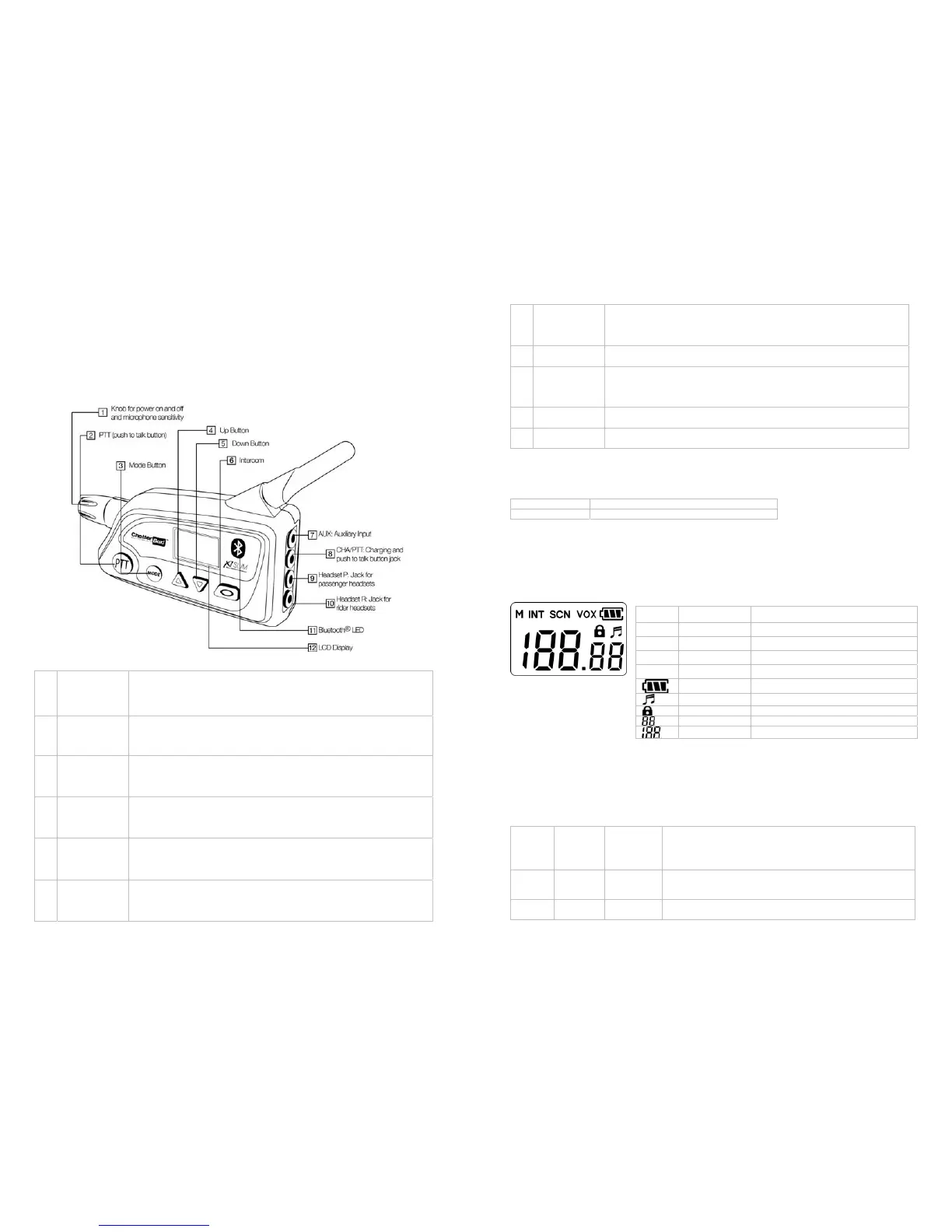
The X1slim is packed with many features in a light compact casing. Please refer to the picture below which
will show each button and its description.
Buttons &
Inputs
Description
These are brief descriptions of the buttons and inputs. Detailed descriptions and specific
instructions will be provided later in the manual
1 Knob for Power
& microphone
sensitivity
Turn the X1slim on and off
Increase or decrease microphones sensitivity for voice activation
2 PTT (push to
talk )
Transmit to other riders or your passenger.
Pair an optional wireless PTT
Select the settings in each mode
3 Mode
Access the different mode functions.
Answer and end the phone calls
Choose the preset FM radio stations.
4 Up
Increase Volume, main Channel, Talk group, and FM radio channel.
Skip music tracks. (When listening to music via Bluetooth)
Activate the Bluetooth mode on.
5 Down
Decrease Volume, main Channel, Talk group, and FM radio channel.
Reverse music tracks. (When listening to music via Bluetooth)
Activate the FM Radio mode.
ChatterBox USA Page 8 of 20
6 Intercom
Activate/deactivate the rider to passenger private conversation mode.
End Bluetooth and FM radio mode
Pair Bluetooth devices
7 AUX
Connect a wired audio device
8 CHA/PTT
Wall charger input
Power filter cord input
Wired push to talk button input
9 Headset P
Input for Passenger Headset
10 Headset R
Input for Rider headset
Multi-function buttons: Each button handles more than one function. The following are two ways of
pressing the buttons in order to control the different functions of the X1slim.
Long press Press the button and hold it for 3 seconds
Short Press Press the button for half second
LCD Display
The X1slim is equipped with an LCD display that shows the status of the X1slim. The table below shows the
icons and what they mean.
Mode button
The MODE button is used to choose the desired function setting. The table below shows the different
settings that you can use along with a brief description.
Press
Mode
button
Setting
control
for:
LCD
Display
Description of mode
1 time Channel
Press Up or Down button to set desired main channel from
1 to 22. Press PTT button to set.
2 times Talk
Group
Press Up or Down button to set desired talk group from 00
to 38. Press PTT button to set.
Description Appears when;
M
Mode You press mode button
INT
Intercom You long press INTERCOM button
SCN
Scan You let X1slim to scan open channels
VOX
VOX You press and hold PTT button
Battery meter (Shows status of battery power)
Sound You turn the sound on
Lock You turn the lock on
Talk group (Shows talking group number)
Channel (Shows Channel number)


 To Next Page