7.3 CONNECTING A PAIRED STEREO BLUETOOTH® ADAPTOR AND PAIRED
BLUETOOTH® PHONE AT THE SAME TIME
1. Turn XBi2 unit on
2. Turn on audio source and turn on or plug in stereo Bluetooth® adaptor
3. Audio source will automatically start playing through the XBi2 unit when connection is complete
4. Momentarily press (approximately 1 second) and release the Power button *
5. Bluetooth® symbol will light up on phone display
6. Press end call button on phone
* When doing this procedure some phones will try to dial the last number dialed. Once connected be prepared
to press the end call button on your phone
8. SPECIFICATION
8.1 ELECTRICAL SPECIFICATION
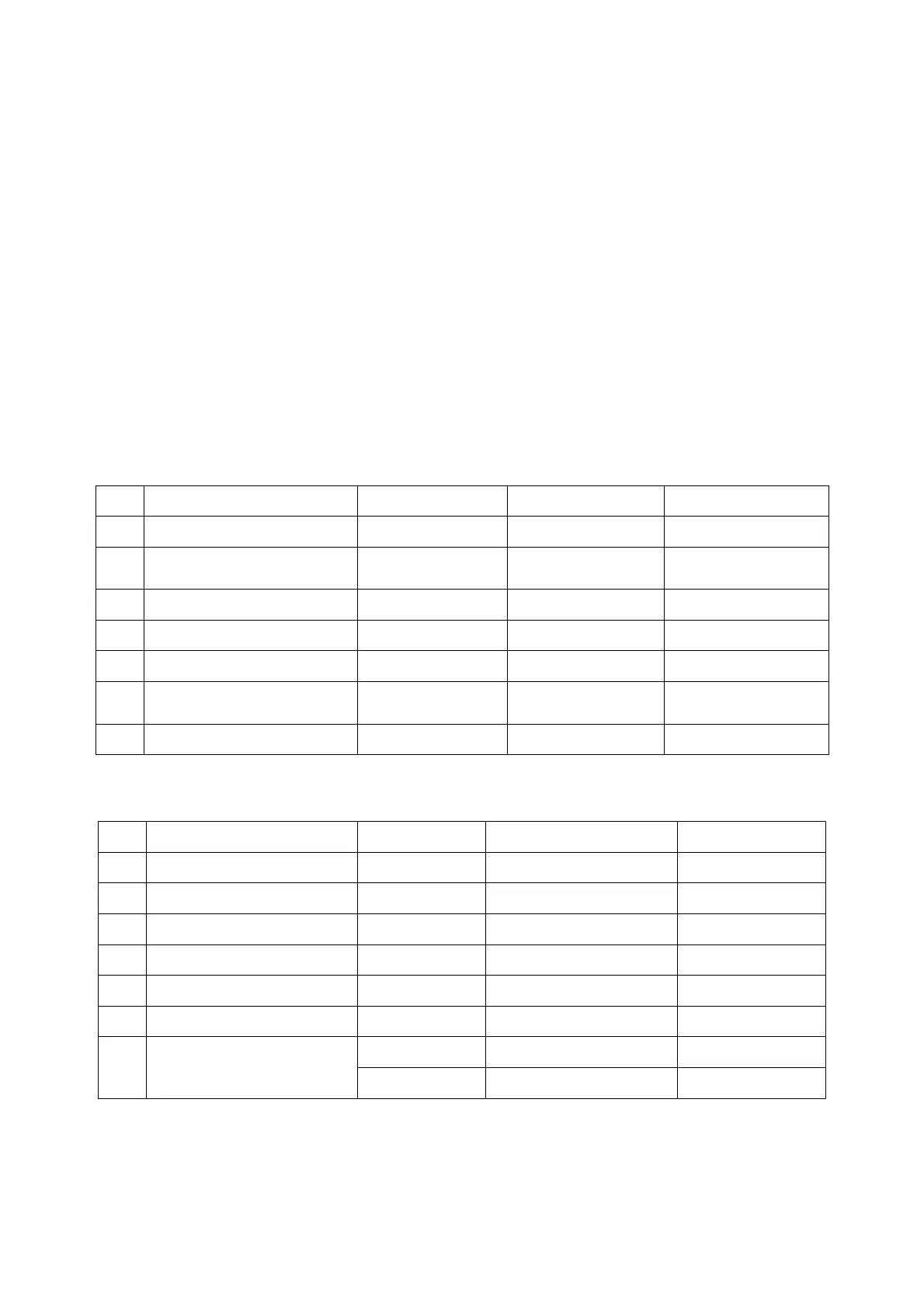
NO. PARAMETER BLUETOOTH® BINARY CDMA REMARK
1 FREQUENCY RANGE 2402 ~ 2480 MHz 2403 ~ 2477 MHz
2 POWER OUTPUT
+0dBm
CLASS 2
+10dBm
CLASS 1
3 RECEIVE SENSITIVITY - 82 dBm - 83 dBm 0.1% BER
4 SERVICE AREA Within 10 m Within 100 m L.O.S.
5 PROFILE HFP, HSP, A2DP
6
CURRENT
CONSUMPTION
50 mA 110 mA
7 OPERATING TEMP.
-10 ~ +55 ℃ -10 ~ +80 ℃
8.2 PRODUCT SPECIFICATION
NO. FUNCTION CONDITION SPECIFICATION REMARK
1 DC IN
2 OPERATING VOLTAGE +3.1V ~ +4.2 V
3 BATTERY Li-Polymer 630mAh
4 AUDIO POWER 120mW [max.]
@ 32Ω
5 CHARGING TIME 3 hours
6 OPERATION TEMP.
-10 ~ +55 ℃
Stand-by 15-16 hours
7 OPERATING TIME
Continuity 6-7 hours


 To Next Page