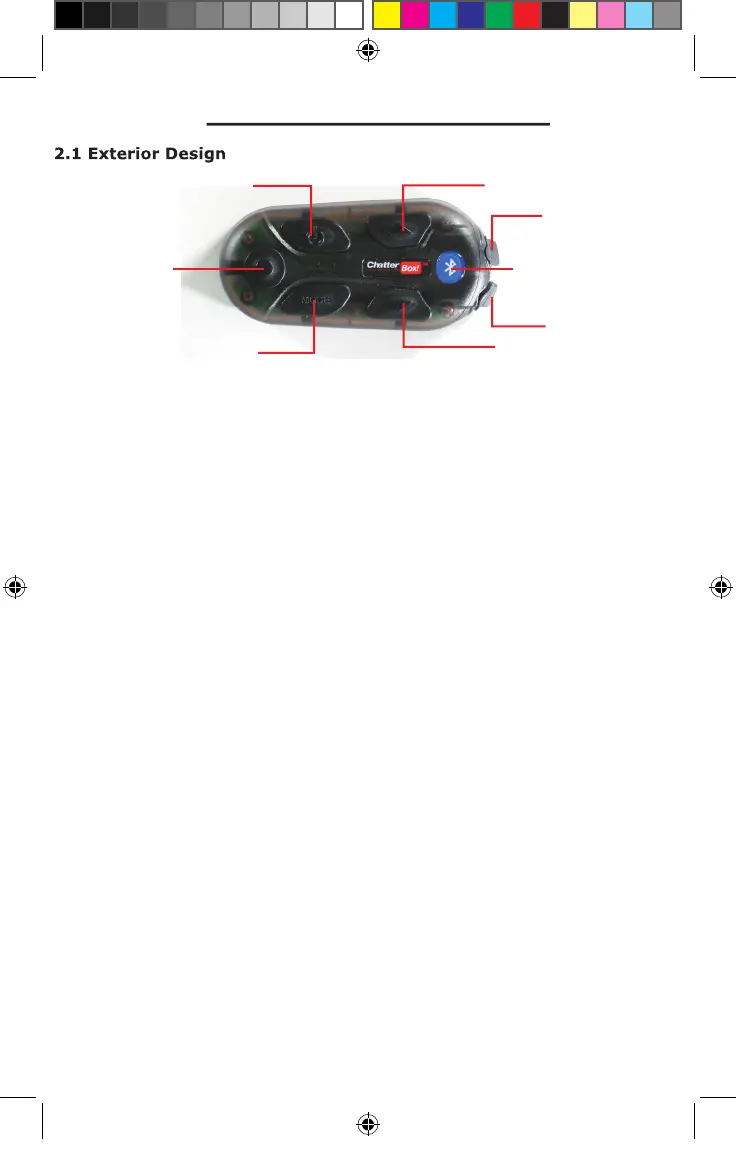
*Power ON/OFF of main unit
*When the BLUETOOTH® phone is connected, use hands-free mode (An
GROUP INTERCOM pairing mode (with MODE button)
*MP3 mode source select between BLUETOOTH® MP3 and AUX MP3
*GROUP INTERCOM pairing mode (with POWER button)
*GROUP INTERCOM select – voice communication with other XBi2
*Primary Function = charge cord port
*Secondary Function = optional auxiliary audio cord input
*Primary Function = headset cord port
*RED = Primary Function = XBi2 unit On/Off status
Secondary Function = GROUP INTERCOM pairing status
*BLUE = Primary Function = BLUETOOTH® status
Secondary Function = charging status
Power
Intercom
Mode
Volume Up
Volume Down
Headset Port
Charge Port
LED
xbi2_maual.indd 7 4/15/09 3:40:45 PM


 To Next Page