2
Replacing a Transceiver
If your expansion line card contains removable transceivers, you can install and
replace these transceivers.
For a list of supported transceivers, see:
Smart-1 525, Smart-1 5050, and Smart-1 5150 Security Management
Appliances
https://www.checkpoint.com/downloads/product-related/datasheets/ds-smart-
1-appliances.pdf
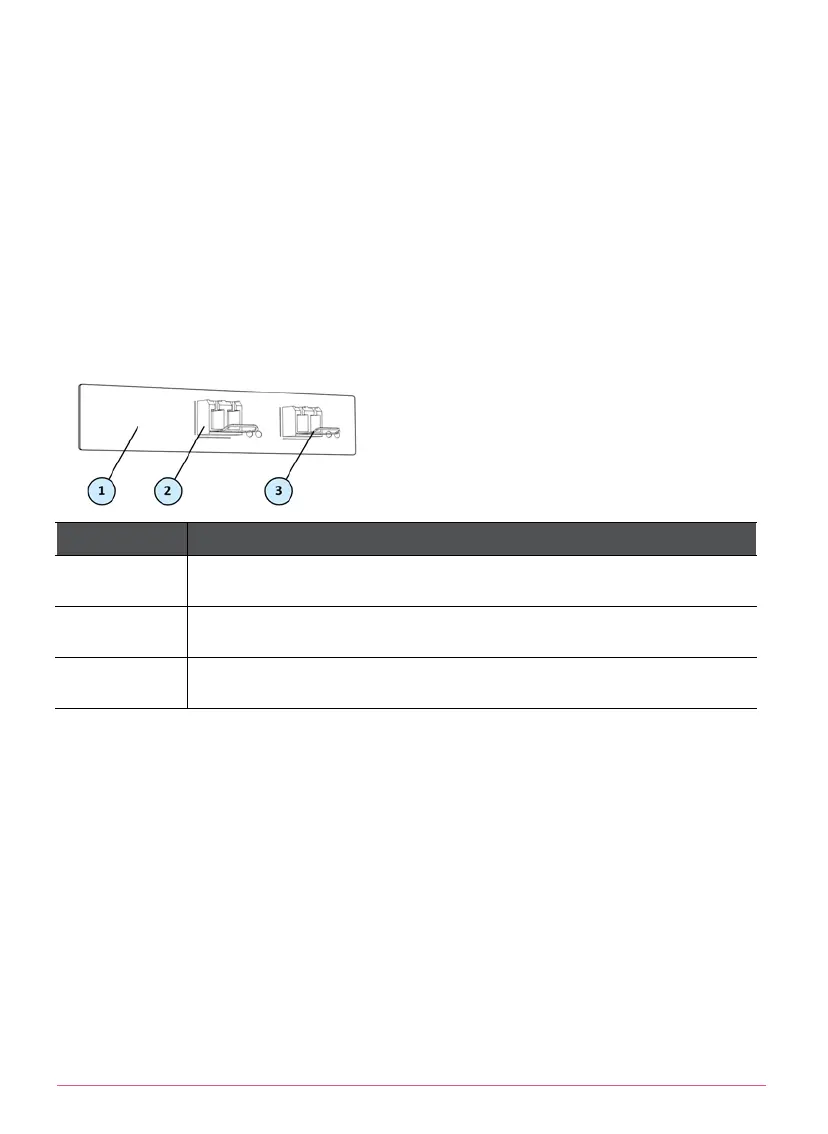
Item Description
1 Expansion line card with fiber optic ports
2 Transceiver
3 Transceiver latch
To install a transceiver:
1. Push the transceiver into an expansion line card port until it snaps into
position.
2. Turn the transceiver latch lever up to lock into the expansion line card.
3. Connect the fiber optic cable to the transceiver.
To remove a transceiver:
1. Disconnect the fiber optic cables from the transceiver.
2. Pull the latch lever down to release the transceiver.
3. Gently, pull the transceiver out of the expansion line card.


 To Previous Page
 Loading...