
 Need help?
Do you have a question about the Cherry MX BOARD 3.0S and is the answer not in the manual?
Initiates the CHERRY gaming software for keyboard control and customization.
Manages keyboard backlighting on/off and adjusts brightness levels.
Controls the speed and type of keyboard lighting effects.
Locks specific keys and combinations to prevent accidental activation during gaming.
Addresses Repetitive Strain Injury (RSI) with ergonomic advice and posture tips.
Instructions on connecting the keyboard to a PC or laptop via USB.
Guide to installing software for full functionality, light effects, and macros.
Explains how to use FN key combinations for special functions and lighting.
Details on adjusting light effects via dedicated keys or the gaming software.
Instructions for activating/deactivating the special CHERRY key function.
Procedure for resetting the keyboard and guidelines for safe cleaning.
Information on proper disposal of the device according to legal regulations.
Lists key technical specifications like supply voltage and operating temperature.
Provides contact details for Cherry GmbH and Cherry Americas.
Details compliance with FCC rules regarding radio frequency interference.
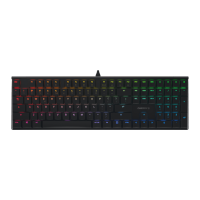
The CHERRY MX BOARD 3.0S is a corded gaming keyboard designed for use with PCs and laptops. It offers a range of functionalities tailored for gaming, including customizable lighting effects and a dedicated gaming mode. The keyboard is available in standard, backlight, and RGB versions, allowing users to choose based on their aesthetic and functional preferences.
The primary function of the CHERRY MX BOARD 3.0S is to serve as an input device for computers, specifically optimized for gaming. It features a full layout with F-keys (F1-F12) that double as additional function keys, accessible via the FN key. These additional functions include multimedia controls, lighting adjustments, and system shortcuts.
The keyboard incorporates a dedicated "CHERRY key" which, when pressed and held for 3 seconds, opens the CHERRY gaming software. This software is crucial for unlocking the full potential of the keyboard, enabling users to customize light effects and assign macros to individual keys. The CHERRY key itself can be activated or deactivated to prevent unintentional triggering of its functions, which is particularly useful during intense gaming sessions.
A key feature for gamers is the "Gaming mode." When activated, this mode locks or unlocks specific keys and key combinations that might interfere with gameplay, such as the Windows key, Menu key, ALT + F4, ALT + Tab, ALT GR + Tab, and CTRL + ALT + DEL. This ensures an uninterrupted gaming experience by preventing accidental exits to the desktop or other system functions.
The keyboard also offers extensive lighting customization. Users can switch backlighting on or off, and when reactivated, the keys will illuminate with the most recently set brightness. There are dedicated functions to make the backlight brighter or darker, and to control the speed of light effects. For RGB versions, a function to change colors to rainbow colors is available. Furthermore, the keyboard supports individual key lighting, allowing users to activate, deactivate, or change the lighting of specific keys through a dedicated setting mode. This mode can be exited by pressing the space bar, discarding any unsaved settings.
Multimedia control is integrated through the F-keys. Users can easily adjust sound levels (sound on/off, sound down, sound up) and open common applications like a web browser or Windows browser. The FN key serves to activate these secondary functions of the F keys, providing quick access to frequently used controls without needing to navigate through software menus.
To maximize the functionality of the CHERRY MX BOARD 3.0S, it is recommended to install the CHERRY gaming software. While the keyboard is ready to use immediately after connecting to a USB port without any software installation, the software allows for advanced customization of light effects and macro assignments. The software is intuitive and includes a help function, making it user-friendly for both novice and experienced users. The latest version of the software can be downloaded from the official CHERRY website.
The additional functions located on the F1 to F12 keys are accessed by pressing the FN key simultaneously with the desired F-key. For instance, to toggle sound, one would press FN + F1. For users who prefer constant access to these functions, the FN key can be constantly activated by pressing CTRL and FN keys at the same time. This feature provides flexibility depending on the user's workflow or gaming style.
The gaming mode is a significant advantage for competitive gamers. By locking disruptive key combinations, it prevents accidental interruptions during critical moments. This ensures that the user remains focused on the game without worrying about inadvertently minimizing the game or triggering system commands.
The lighting customization options are extensive. Users can cycle through different light effects and adjust their speed, adding a personalized touch to their setup. The ability to individually light specific keys is particularly useful for highlighting important gaming keys or creating custom visual layouts. This level of control enhances both the aesthetic appeal and the functional utility of the keyboard.
For safety and ergonomic considerations, the manual emphasizes the importance of setting up the workspace ergonomically to prevent Repetitive Strain Injury (RSI). This includes positioning the keyboard and mouse correctly, taking short breaks with stretching exercises, and changing posture often. These recommendations are crucial for maintaining comfort and health during long periods of use, especially for gamers.
Maintaining the CHERRY MX BOARD 3.0S is straightforward, with specific guidelines provided to ensure its longevity and optimal performance. Regular cleaning is recommended to keep the keyboard in good condition.
Before cleaning, it is essential to switch off the PC/laptop or disconnect the USB plug to prevent accidental inputs or electrical hazards. Users are advised against using aggressive cleaning agents or liquids such as gasoline, alcohol, scouring agents, or scouring sponges, as these can damage the keyboard's surface and internal components. It is also crucial to prevent any liquids from entering the keyboard to avoid damage to the electronics.
The manual explicitly states that users should not remove the keycaps of the keyboard for cleaning. Instead, the keyboard should be cleaned with a slightly damp cloth and a mild cleaning agent, such as dishwashing liquid. After cleaning with a damp cloth, the keyboard should be dried off immediately with a soft, lint-free cloth to remove any residual moisture.
In cases where the keyboard is not working as expected, the manual provides troubleshooting steps. If the functions of the CHERRY key are not being executed, it might be deactivated, and users can reactivate it by pressing FN and the CHERRY key simultaneously. Trying another USB port on the PC/laptop is also suggested to rule out port-related issues. To determine if the keyboard itself is defective, testing it with another PC/laptop is recommended. Additionally, users might need to check the PC's BIOS settings and ensure that "USB Keyboard Support" or "USB Legacy Mode" is set to "enabled."
The keyboard also includes a reset function to restore it to its original delivery state. This can be achieved by pressing and holding the FN button and the pause button for 5 seconds. This feature is useful for resolving software-related issues or reverting to default settings after extensive customization.
Proper disposal of the device is also addressed, with a general instruction to dispose of it in accordance with legal regulations, highlighting environmental responsibility.
 General
| Rollover | N-key rollover |
|---|---|
| Certification | CE FCC KCC BSMI |
| Numeric keypad | Yes |
| Keyboard layout | QWERTY |
| Pointing device | No |
| Device interface | USB |
| Keyboard language | US International |
| Recommended usage | Gaming |
| Keyboard key switch | - |
| Keyboard form factor | Full-size (100%) |
| Keyboard number of keys | 110 |
| Keyboard key switch technology | Cherry MX Silent Red |
| Storage temperature (T-T) | -20 - 60 °C |
| Operating temperature (T-T) | 0 - 50 °C |
| Material | Aluminum |
| Product color | Black |
| Backlight type | RGB LED |
| Keyboard style | Straight |
| Backlight color | Multi |
| Surface coloration | Monochromatic |
| Number of products included | 1 pc(s) |
| Package depth | 180 mm |
| Package width | 460 mm |
| Package height | 40 mm |
| Package weight | 1310 g |
| Cable length | 1.8 m |
 Weight and Dimensions
| Keyboard weight | 1025 g |
|---|---|
| Keyboard dimensions (WxDxH) | 430 x 140 x 36 mm |





 To Next Page