34
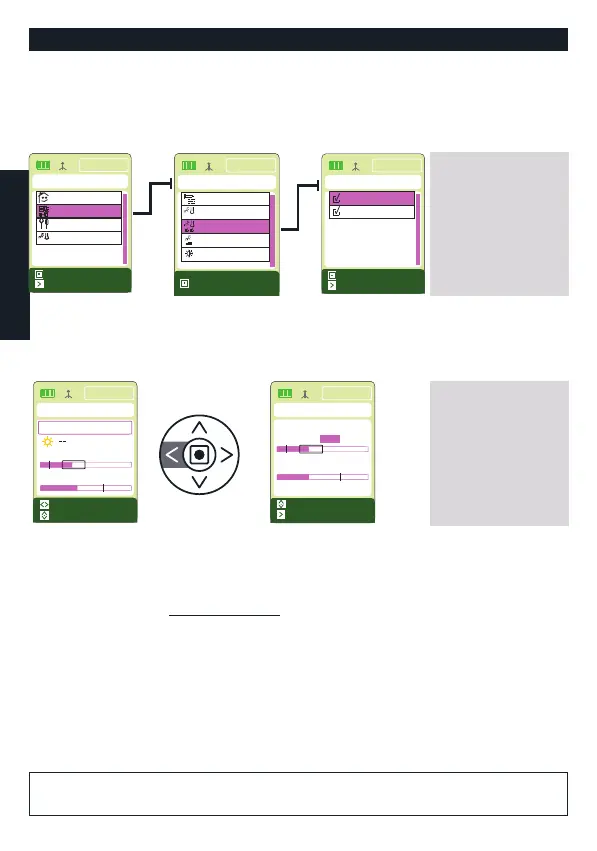
Enable the sensors:
Both sensors are factory enabled.
To disable or enable the brightness or temperature sensors, take the following steps from
the Main Menu:
PROGRAMMING FOR DAILY USE
Adjust the temperature and brightness sensor thresholds:
From the “System Status” screen it is possible to quickly access and adjust the temperature
and brightness sensor thresholds. Proceed as follows:
A and C buttons: to go from
one function list to the next
B button: to enable/disable
the item desired
LFT button: returns to the
Programming Screen without
saving
RT button: saves and returns
to the Programming screen
B button: to go from one
screen to another
A-C buttons: to set the
values desired
LFT button: returns to the
System Status Screen without
saving
RT button: saves and returns
to the System Status Screen
The factory settings are the following:
Brightness: 500 (from 0 to 1000)
Temperature: 35° (from 0° C to 50° C)
For adjustment of the Brightness Sensor, see also “Adjust the hysteresis frame and the
Brightness threshold” on the following page.
The Temperature sensor is managed by the Season Option; the threshold value indicates:
- In “SUMMER”: the maximum temperature that may be reached in the environment,
above which the sensor commands the blind/venetian blind to close or the awning to
open.
- In “WINTER”: the minimum temperature that may be reached in the environment, below
which the sensor commands the blind/venetian blind to open or the awning to close.
ATTENTION! The temperature value MUST NOT correspond to the ideal
temperature for the room being controlled.
ENGLISH
Mar 15:22
PROGRAMMING
Hysteresis
h
Sensors enabling
Timetable
8:00
Device
Season opt.
Select
Mar 15:22
SENSORS ENABLING
Select
Save
Temperature
Light
Mar 15:22
MAIN
Select
Save
Mode
Manual
Settings
Programming
Automation
Sensors Test
TEST
Mar 15:22
SYSTEM STATUS
Automatic
Brightness: 0135
Temperature: 20 °C
Thresh./Main menu
Quick start
Mar 15:22
SENSORS LEVELS
Save
Regolation
Temperature: 35°C
Brightness: 0500


 To Next Page