1-20 In Brief
Driver Information
Center (DIC)
The DIC display is located at the
bottom of the instrument panel
cluster. It shows the status of
many vehicle systems and enables
access to the personalization menu.
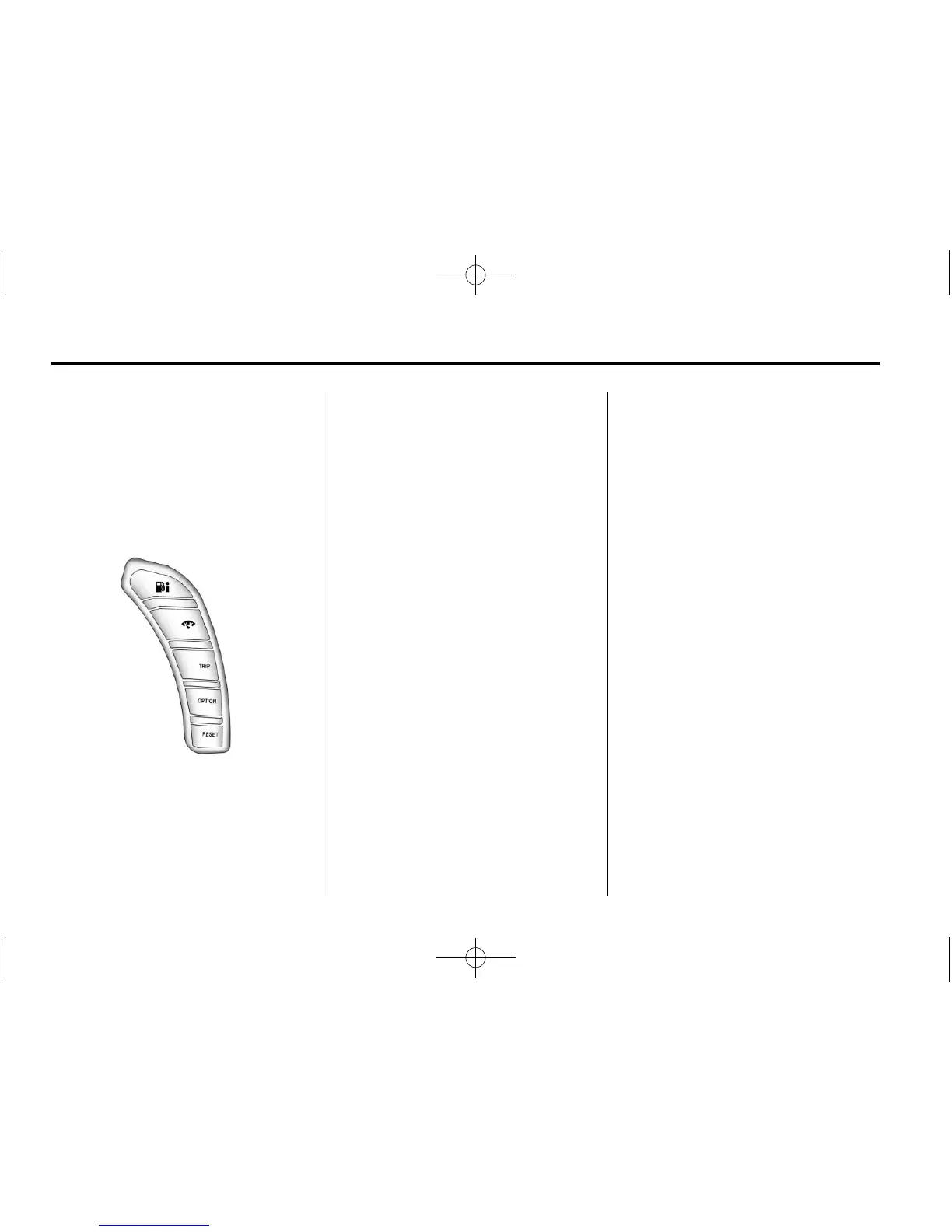
The DIC buttons are located on the
instrument panel to the right of the
instrument panel cluster.
. 4 : Press to display fuel
information such as fuel economy
and range.
2 : Press to display gauge
information like oil pressure and
temperature, coolant temperature,
automatic transmission fluid
temperature (if equipped), battery
voltage, and front/rear tire
pressures.
TRIP: Press to display your total
and trip distance driven, the elapsed
time function, your average speed,
and the engine oil life.
OPTION: Press to choose personal
options that are available on your
vehicle, depending on the options
your vehicle is equipped with, such
as door locks, easy entry seats, and
language.
RESET: Press, along with the other
buttons, to reset system functions,
select personal options, and turn off
or acknowledge messages on
the DIC.
For more information, see Driver
Information Center (DIC) on
page 5‑28.
Vehicle Personalization
Some vehicle features can
be programmed by using the
DIC buttons located to the right
of the instrument panel cluster.
The features that can be
programmed include:
.
Units
.
Memory Features
.
Lighting Features
.
Lock and Unlock Feedback
.
Door Lock and Unlock Settings
.
Language
.
Personalization Name
See Vehicle Personalization on
page 5‑55.












 To Next Page