In Brief 1-19
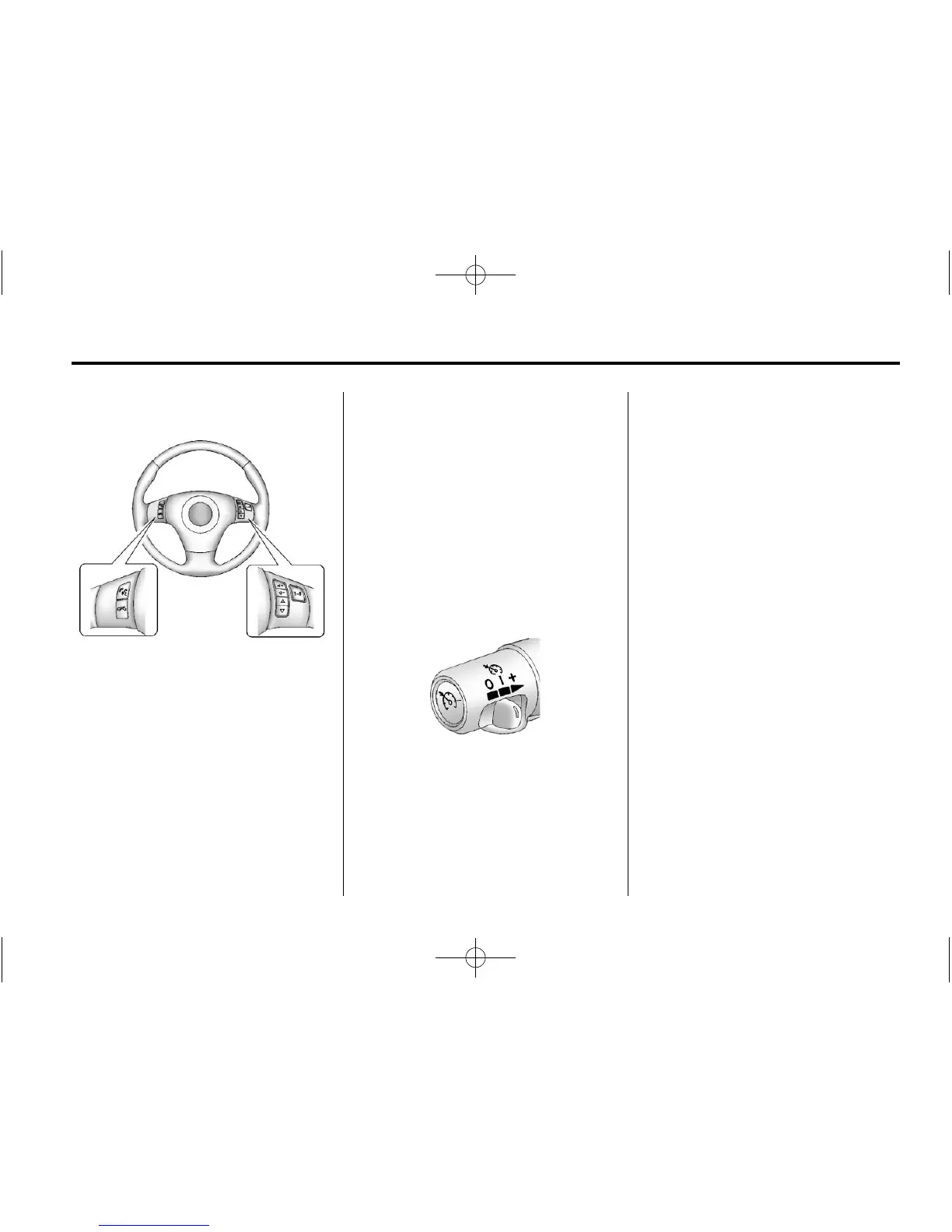
Steering Wheel Controls
For vehicles with steering wheel
controls, some audio controls can
be adjusted at the steering wheel.
b g : Press to turn on and off the
vehicle speakers. Press and hold
longer than two seconds to interact
with the OnStar
®
or Bluetooth
systems.
c : Press to reject an incoming
call, or to end a call.
e + / e − : Press to Increase or
decrease volume.
w / x : Press to change radio
stations or select tracks on a CD.
1 to 6: Press to play stations that
are programmed on the radio preset
pushbuttons.
For more information, see Steering
Wheel Controls on page 5‑3.
Cruise Control
The cruise controls are located at
the end of the multifunction lever.
9 : Turns the system off.
R : Turns the system on.
S : Makes the vehicle accelerate
or resume a previously set speed.
T : Press the button at the end of
the lever to set the speed.
See Cruise Control on page 9‑45.
Navigation System
If the vehicle has a navigation
system, there is a separate
navigation system manual that
includes information on the radio,
audio players, and navigation
system.
The navigation system provides
detailed maps of most major
freeways and roads. After a
destination has been set, the
system provides turn-by-turn
instructions for reaching the
destination. In addition, the system
can help locate a variety of points of
interest (POIs), such as banks,
airports, restaurants, and more.
See the navigation system manual
for more information.














 To Next Page