Chevrolet Malibu Owner Manual (GMNA-Localizing-U.S./Canada-
14584249) - 2021 - CRC - 4/23/20
284 Vehicle Care
Storing the Tire Sealant and
Compressor Kit
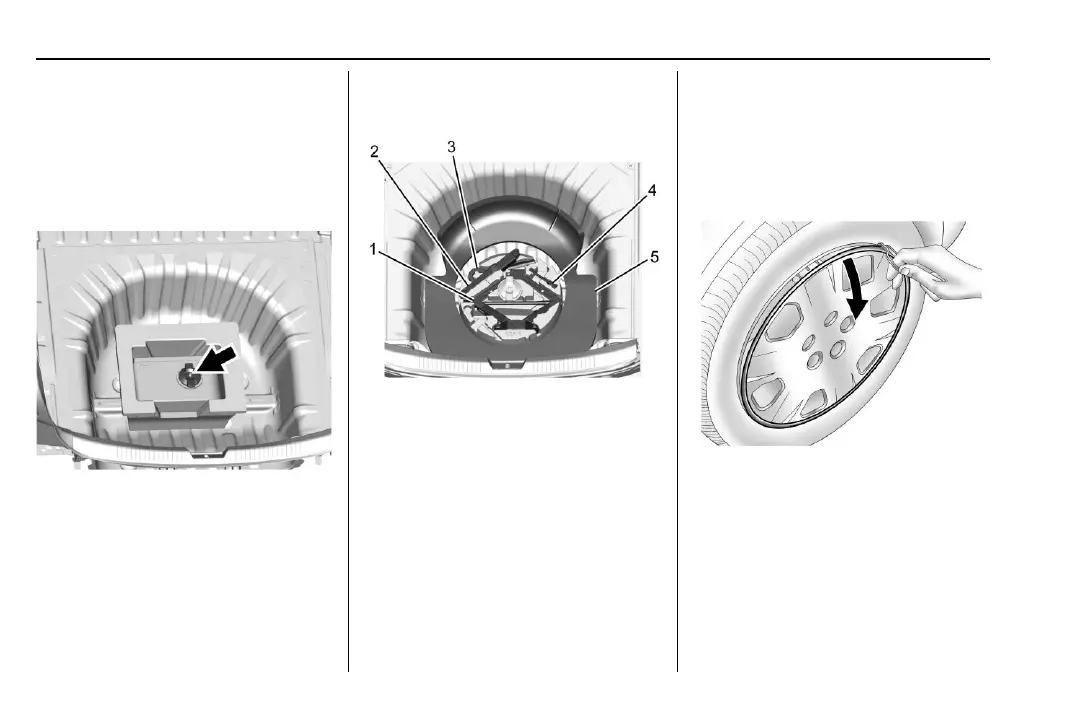
To access the tire sealant and
compressor kit:
1. Open the trunk. See Trunk 0 18.
2. Lift the cover.
3. Turn the wing nut counterclockwise to
remove the tire sealant and compressor
kit bag.
4. Remove the tire sealant and compressor
kit from the bag.
To store the tire sealant and compressor kit,
reverse the steps.
Tire Changing
Removing the Spare Tire and Tools
1. Jack
2. Wrench
3. Tow Hook (If Equipped)
4. Extension Bolt
5. Insulator Pad
To access the spare tire and tools:
1. Open the trunk.
2. Remove the spare tire cover.
3. Turn the retainer nut counterclockwise
and remove the spare tire. Place the
spare tire next to the tire being changed.
4. The jack and tools are stored below the
spare tire. Remove them from their
container and place them near the tire
being changed.
Removing the Flat Tire and Installing the
Spare Tire
Take off the wheel cover or center cap,
if the vehicle has one, to reach the wheel
bolts.
1. Do a safety check before proceeding. See
If a Tire Goes Flat 0 277.
2. Turn the wheel wrench counterclockwise
to loosen and remove the wheel
nut caps.















 To Next Page