16
F
Optional equipment
DRIVER ASSISTANCE SYSTEMS
F
FRONT PEDESTRIAN BRAKING – During daytime driving, the system can detect pedes-
trians directly ahead up to a distance of approximately 131 ft. and displays an amber
indicator. When approaching a detected pedestrian too quickly, a red alert flashes on the
windshield and the Safety Alert Seat pulses or rapid beeps sound (ifselected). The sys-
tem may enhance driver braking or automatically apply hard emergency braking, if you
have not already done so.
To set to Alert and Brake, Alert, or Off, go to Settings > Vehicle > Collision/Detection
Systems > Front Pedestrian Detection.
LANE KEEP ASSIST WITH LANE DEPARTURE WARNING – The system may help you avoid
collisions due to unintentional lane departures. The
Lane Keep Assist indicator
is green if the system is available to assist. If the vehicle approaches a detected lane
marking without using a turn signal in that direction, the system may assist by gently
turning the steering wheel and displaying an amber .
If active driver steering is not detected, the amber
may flash and the Safety Alert
Seat may pulse or beeps may sound (if selected) on the side of the departure direction as
the lane marking is crossed. In order to use this system safely, the driver needs to steer
and be in complete control of the vehicle.
To turn on or off, press the
Lane Keep Assist button on the center of the
instrument panel.
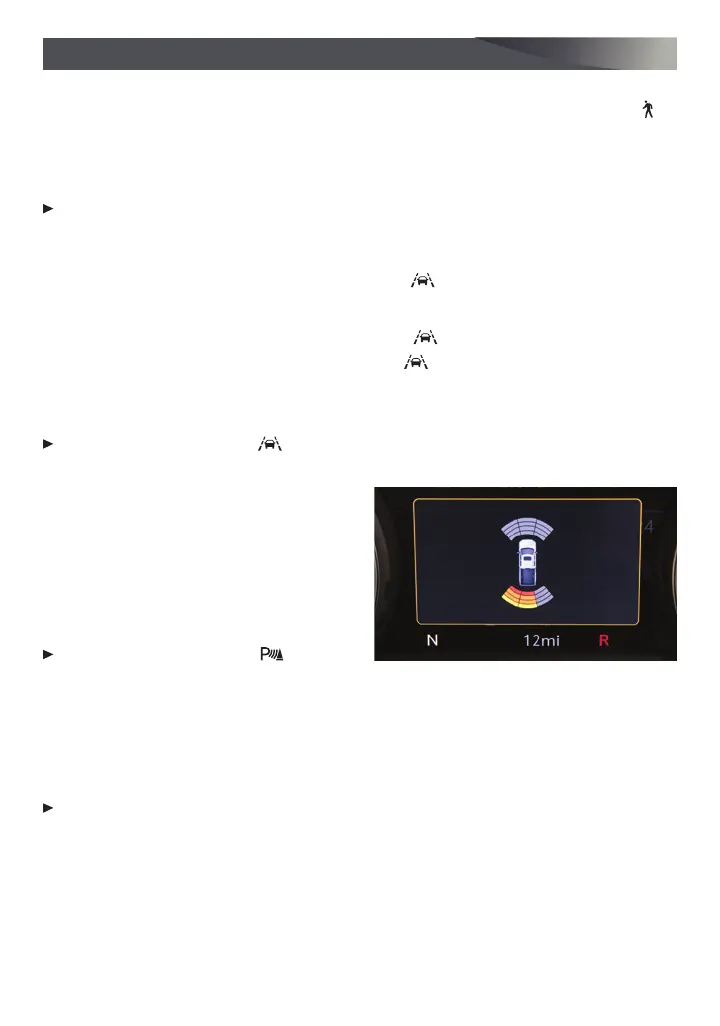
FRONT AND REAR PARK ASSIST – During
low-speed parking maneuvers, the sys-
tem provides “distance to closest object”
information on the Driver Information
Center and the Safety Alert Seat pulses or a
beep sounds (if selected). When an object is
very close, the Safety Alert Seat pulses or a
continuous beep sounds (if selected).
To turn on or off, press the
Park
Assist button on the center of the
instrument panel.
REAR CROSS TRAFFIC ALERT – When in Reverse, the system warns of detected cross-
traffic approaching in either direction by displaying a red triangle with directional arrow
alert on the infotainment screen and pulsing the left or right side of the Safety Alert Seat
or sounding beeps (if selected).
To turn on or off, go to Settings > Vehicle > Collision/Detection Systems > Rear Cross
Traffic Alert.
See Driving and Operating in your Owner’s Manual.








 To Next Page