7
F
Optional equipment
VEHICLE CUSTOMIZATION
F
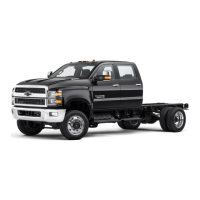
Some features can be turned on/off or cus-
tomized using the Settings menus on the
infotainment screen. The Settings menus
include System, Apps, and Vehicle.
1. Select Settings on the Home page.
2. Select the desired menu tab.
3. Select the desired feature and setting.
4. Press BACK to exit each menu.
See Instruments and Controls in your Owner’s Manual.
POWER MIRRORS
F
/TRAILERING MIRRORS
F
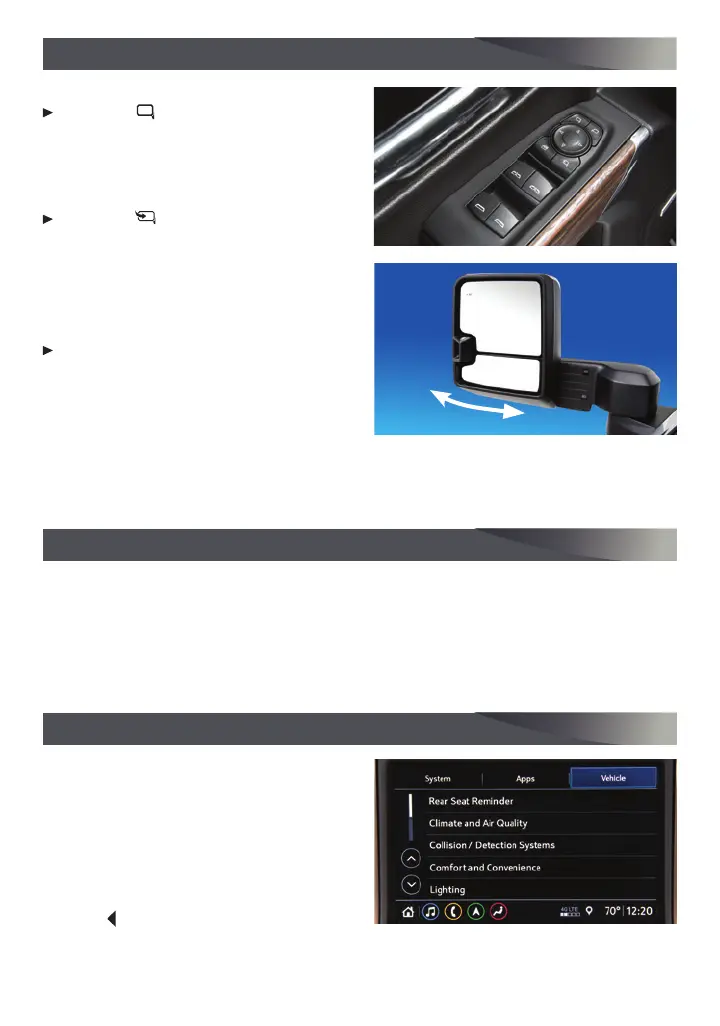
POWER MIRROR ADJUSTMENT
Press the Mirror Selector button to
select the driver or passenger side
mirror; use the four-way control pad to
adjust the mirror.
POWER FOLDING MIRROR
Press the Folding Mirror button to
fold or unfold the mirrors.
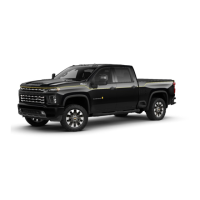
TRAILERING MIRRORS
The mirrors can be extended for better
visibility when towing a trailer. The lower
wide-field view mirror adjusts manually.
To extend the manual mirror, grasp the
mirror housing and pull back and rear-
ward in one motion. The housing extends
on a curved arc. Push in the housing to
return the mirror to its original position.
Note: Reset the power mirrors if they are adjusted manually by using the power controls to fold/unfold
the mirrors to their normal position.
See Keys, Doors and Windows in your Owner’s Manual.
UNIVERSAL REMOTE SYSTEM
The Universal Remote System on the overhead console enables your vehicle to control
3 different devices, ranging from garage doors and gates to home lighting. Go to
homelink.com for detailed videos and instructions on how to program the Universal
Remote System. For additional assistance, call 1-800-355-3515.
See Instruments and Controls in your Owner’s Manual.




 To Next Page