3
Read your Owner’s Manual to
learn about the information being
relayed by the lights, gauges
and indicators on the instrument
cluster.
See Introduction in your
Owner’s Manual.
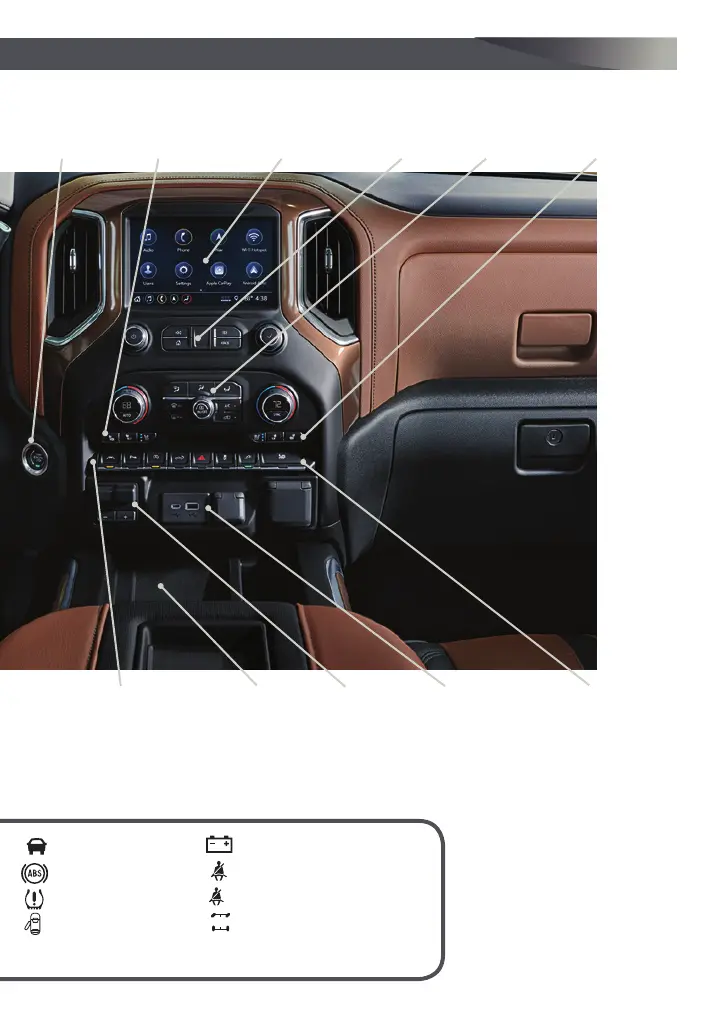
Driver’s Heated/
Ventilated Seat
Buttons
F
Infotainment
System (8-inch*
screen shown
F
)
Passenger’s
Heated/Ventilated
Seat Buttons
F
Infotainment
System
Controls
Climate
Controls
F
USB Ports/
Accessory
Power
Outlet/120-Volt
Power Outlet
F
Engine
Start/
Stop
Button
F
Integrated
Trailer
Brake
Control
F
Wireless
Charging
Pad
F
Lane Keep Assist
F
/Park
Assist
F
/Auto Engine
Stop-Start Disable/Power
Tailgate
F
/Hazard Warning
Flashers Buttons
F
Optional equipment *Screen measured diagonally
Traction Control-
StabiliTrak Off/
Power Outlet
F
/
Hill Descent Control
F
/
Power Windows
F
/Power
Assist Steps
F
Buttons
Vehicle Ahead
Antilock Brake System
Low Tire Pressure
Door Ajar
Charging System
Driver Seat Belt Reminder
Passenger Seat Belt Reminder
TO
4WD Mode




 To Next Page