Second Printing for Chevrolet Tracker Owner’s Manual – 1999
yellowblue
2-29
Windows
Manual Windows
Use the window crank to open and close each
door window.
Power Windows (If Equipped)
JE–12–0012–X
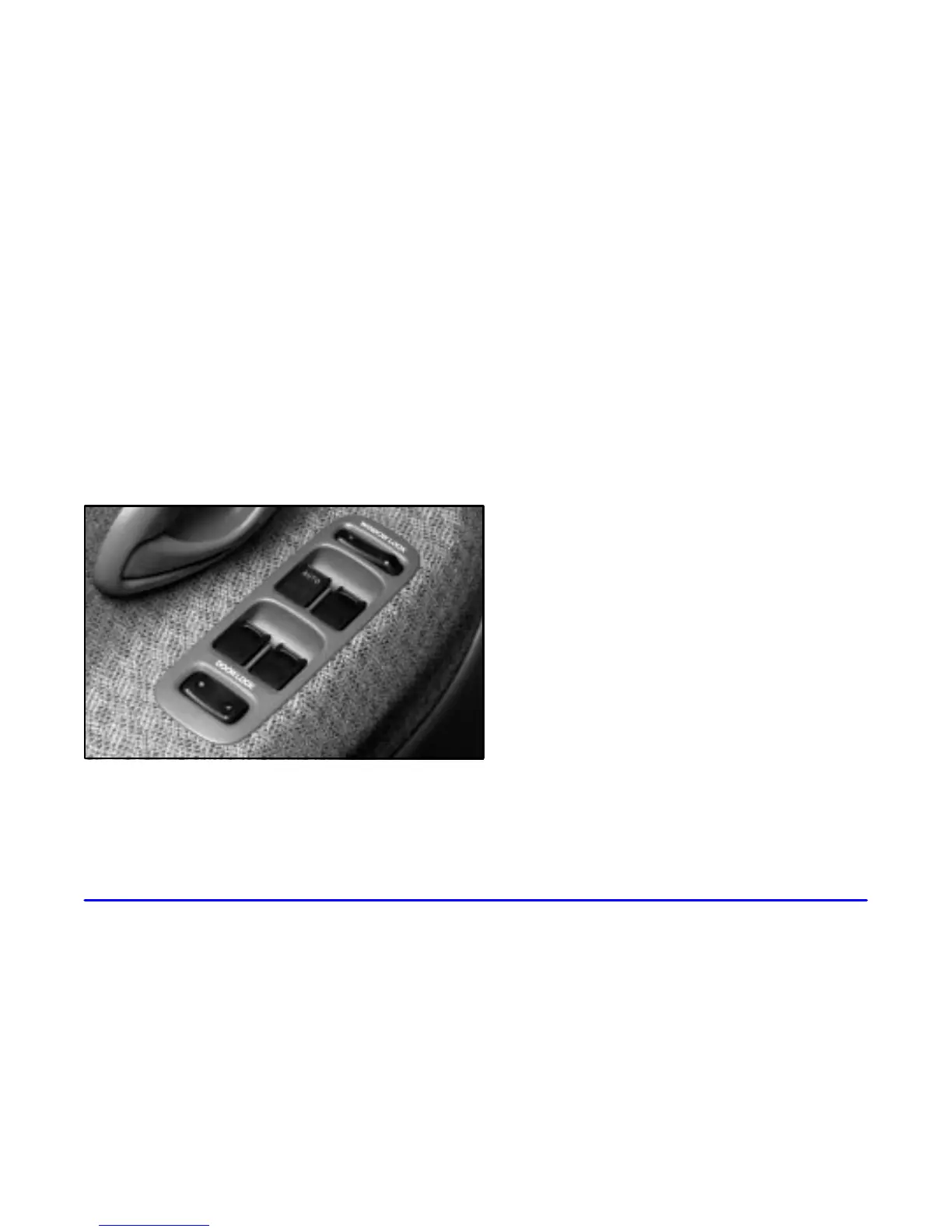
With power windows, switches on the driver’s door
control each window when the ignition is on. Push down
the front of the switch to lower a window and lift the
front of the switch to raise a window.
There are individual controls near each window.
Express Down Window
The AUTO switch for the driver’s window has an
express down feature. To use express down, push the
switch all the way down. Release the switch and the
window will lower completely. Pull up on the switch
lightly and release it to stop the window partway.
Lock
-Out Switch
The driver’s door has a lock
-out switch for the
passenger window(s). When you push the right side of
the switch, the passenger window(s) can’t be raised or
lowered. Push the left side of the switch to unlock
the window(s).
When the window lock
-out switch is engaged, all
passenger window switches will not operate, including
the driver’s controls.
Horn
To sound the horn, press the portion of your
steering wheel marked with the horn symbol.












 To Next Page