Infotainment System 135
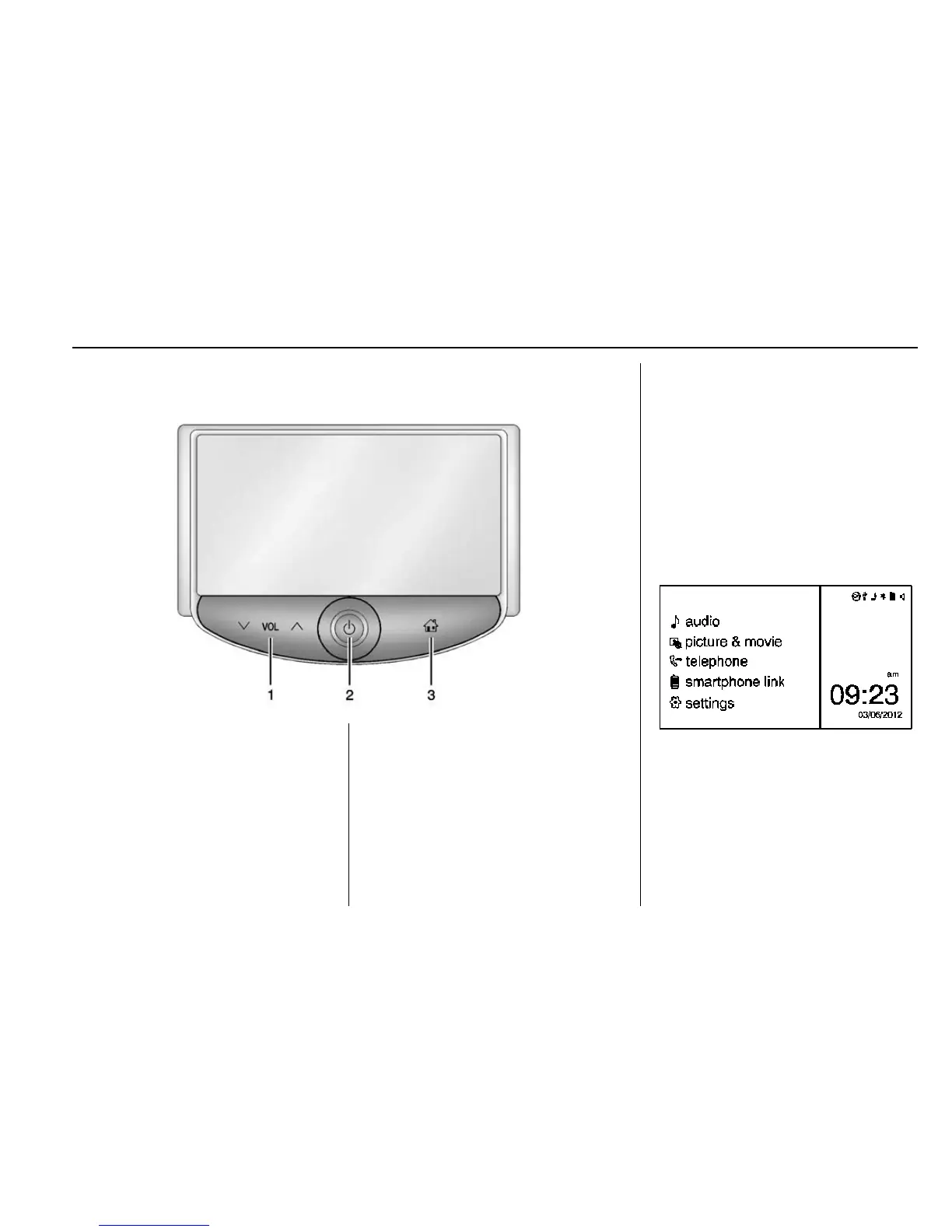
Overview (Radio with Touchscreen)
1. z VOL y (Volume)
.
Press to decrease or
increase the volume.
2.
O (Power)
.
Press and hold to turn the
power on or off.
3.
D (Home Page)
.
Press to go to the Home
Page. See Home Page
(Radio with Touchscreen)
0 135.
Home Page (Radio with
Touchscreen)
Touchscreen Buttons
Touchscreen buttons show on the
screen when available. When a
function is unavailable, the button
may gray out. When a function is
selected, the button may highlight.
Home Page Features
Press F to go to the Home Page.
e audio : Press to select AM, FM,
SiriusXM
®
(if equipped), USB/iPod/
Bluetooth Audio, or AUX.
G picture & movie : Press to view
a picture, movie, or auxiliary video.










 To Next Page