Instruments and Controls 125
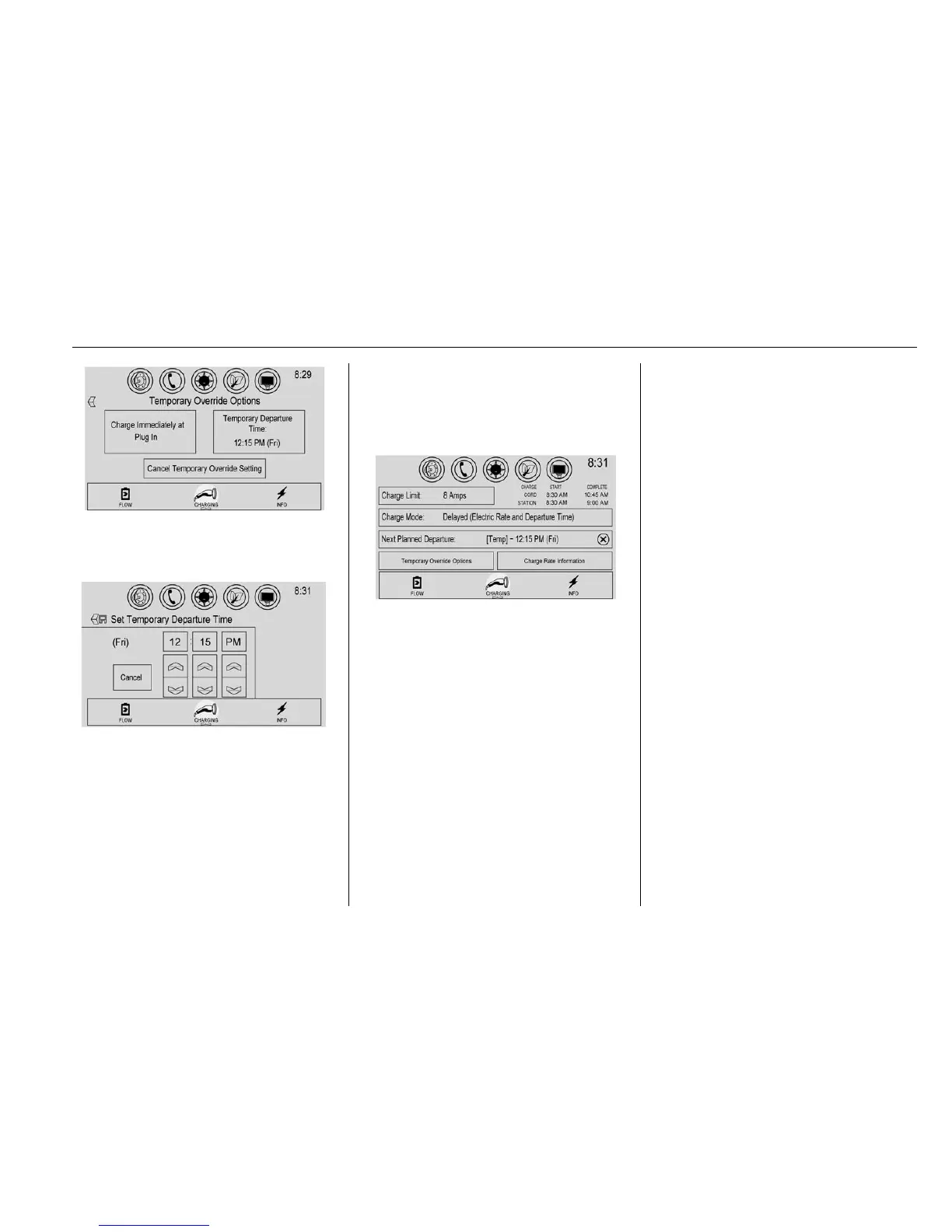
2. Touch Temporary
Departure Time.
3. Touch y or z to change the
Next Departure Time.
4. Touch
S save to confirm a
temporary override of the Next
Planned Departure Time.
The main charging screen will
automatically display the revised
departure time and charge
complete time.
The Temporary Departure Time can
only be updated for the same day
as the original Next Planned
Departure Time. Also, the vehicle
will not accept a Temporary
Departure Time that is before the
present time of day.
To cancel the temporary override of
the Next Planned Departure Time:
.
From the Temporary Override
Options screen, touch Cancel
Temporary Override Setting.
.
From the main charging screen,
touch the X on the right side of
the respective override text.
When you override to an
immediate charge mode, the X
will be on the far right side of
Charge Mode. When you
override the departure time of
either delayed charge mode, the
X will be on the far right side of
Next Planned Departure.
Location Based Charging
This feature allows charging
settings to be customized when the
vehicle is at home or away from
home. The charge mode and charge
level preference will update based
on vehicle location. The charging
customization settings will be the
saved home profile settings at home
and Charge Immediate when away
from home.
Dashes display on the screen when
GPS is unavailable.
Using Location Based Charging
To use location based charging, a
home location must first be stored.
To store a home location:
1. From the Home screen, touch
Settings.











 To Next Page