
 Need help?
Do you have a question about the CHIEF PAC525 and is the answer not in the manual?
Alerts to potential serious injury, death, or equipment damage if instructions are not followed.
Mounts to studs, limits ambient temperature to 120°F max/40°F min.
Follow NEC/CEC, use appropriate receptacles and circuit breakers.
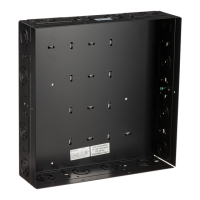
Detailed measurements and diagrams for the PAC525 in-wall box.
Detailed measurements and diagrams for the PAC526 in-wall box.
Symbols and text for tightening and loosening fasteners.
Icons for Phillips/Flathead screwdrivers and marking tools.
Symbols and text for drilling, adjusting, removing, and precision cutting.
Lists essential and optional tools needed for installation.
Identifies main components and hardware included with the product.
Lists optional parts like conduit, boxes, and zip ties not included.
Box is for finished or unfinished walls; requires finishing around opening.
All wiring must be performed by a licensed electrician following local codes.
Site selection, conflict identification, attachment methods, and component planning.
Use level to draw lines, mark cut locations, and cut drywall.
Prepare box by removing knock-outs and adjust depth if needed.
Secure box using chosen methods for drywall or stud attachment.
Use zip-tie hooks to organize and secure cables and components.
Install template cover, modify enclosure cover, and attach cover.
 General
| Certification | UL |
|---|---|
| Product color | Black |
| Maximum weight capacity | 4.5 kg |
 Weight and Dimensions
| Dimensions (WxDxH) | 362 x 99 x 228.6 mm |
|---|

 To Next Page
