EasyManua.ls Logo

ChillaxBaby BCX680 - User Manual

ChillaxBaby BCX680
38 pages
Print Icon
To Next Page IconTo Next Page
Loading...
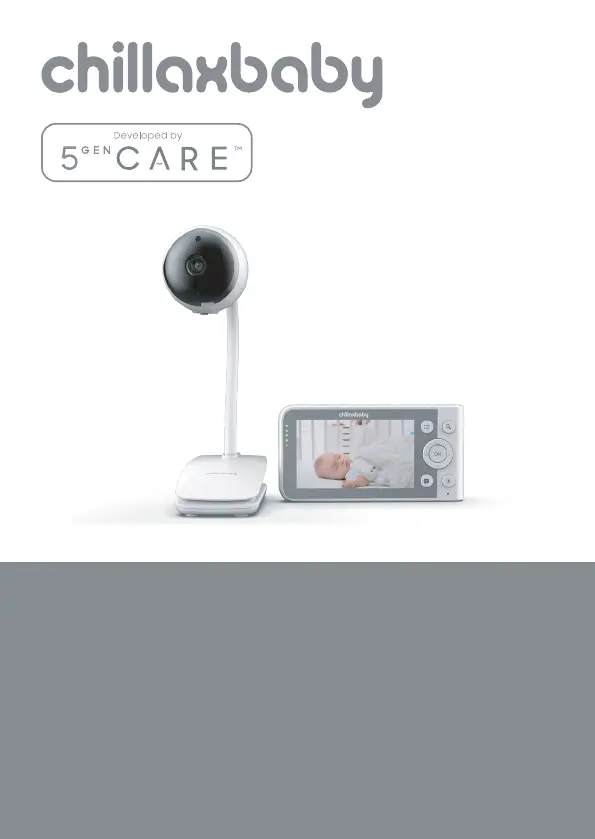
USER’S GUIDE
4.3" Wi-Fi
®
Video Baby Monitor

Questions and Answers

Summary

USERS GUIDE

Inside the Box

Package Contents

Lists all items included in the product package.

Parent Unit Overview

Parent Unit Controls and Features

Details the functions and labels of the parent unit's buttons and display.

Parent Unit Menu Icons

Understanding Parent Unit Icons

Explains the meaning and function of various icons displayed on the parent unit.

Baby Unit Overview

Baby Unit Components

Identifies and describes the different parts of the baby unit.

Installation Guidelines

Provides important advice for optimal placement and signal strength of the baby monitor.

Safety Instructions

Strangulation Hazard Warning

Warns about the danger of strangulation from cords and provides safety measures.

Camera Unit Setup Safety

Details safety precautions and setup advice for the Wi-Fi camera unit.

General Product Safety Precautions

Covers general warnings for product use, assembly, and handling.

Getting Started

Connecting Baby Unit Power

Explains how to connect the power supply to the baby unit.

Multi-Purpose Stand Options

Describes the desktop and wall mounting options for the stand.

Clip Mount Installation

Details how to use the clip mount feature for the camera unit.

Connecting Parent Unit Power

Guides on connecting the power adapter to the parent unit for charging and operation.

Desktop Stand Setup

Explains how to use the integrated desktop stand for the parent unit.

Pairing Baby and Parent Units

Provides step-by-step instructions for pairing the baby unit with the parent unit.

Using the Baby Monitor

SD Card Installation

Explains how to install a microSD card for video recording.

Setting Up the Baby Unit

Details how to position and adjust the baby unit for optimal monitoring.

Night Vision Mode Operation

Describes how the night vision feature activates and functions in low light.

Privacy Protection Mode

Explains how to enable or disable the privacy protection feature.

2-Way Talk Mode Function

Details how to use the two-way audio communication feature.

Video ON;OFF Control

Explains how to turn the parent unit's screen on or off.

Volume Control Adjustment

Guides on adjusting the speaker volume level on the parent unit.

Event Logging (Feeding and Diapering)

Describes how to log feeding and diaper change events.

Temperature Display and Alerts

Details how the temperature readings are displayed and color-coded.

Parent Unit Menu Options

Alarm Settings Configuration

How to set and manage alarm notifications on the parent unit.

Camera Control Features

Overview of camera management features available in the parent unit menu.

Add (Pair) a New Camera

Step-by-step guide to adding a new camera to the system.

View Camera Feed

Instructions on how to view the video feed from a selected camera.

Delete Registered Camera

How to remove a registered camera from the parent unit.

Scan Camera Functionality

Explains how to scan for multiple cameras when more than one unit is present.

Temperature Unit Selection (°C;°F)

How to switch between Celsius (°C) and Fahrenheit (°F) for temperature display.

Video On Timer Settings

How to configure the auto video off timer for battery operation.

Wi-Fi Internet Viewing

Minimum System Requirements

Lists the necessary system requirements for web portal and mobile app access.

Connecting Devices for Remote Viewing

Explains the basic setup and connectivity flow for remote viewing.

Wi-Fi Setup and LED Status

Guides on connecting the camera to the Wi-Fi router and LED status.

Mobile App Setup Requirements

Details what is needed to set up the app on Android or iOS devices.

Powering On and Connecting Camera

Instructions for powering on the camera and establishing a connection.

Downloading the ChillaxCare App

How to download the required mobile application from app stores.

Creating a ChillaxCare Account

Steps for signing up and creating a new user account for the app.

Adding Camera to Your Account

Instructions on how to add the camera device to your ChillaxCare account.

Camera Pairing and QR Code Scan

Details on initiating pairing mode, generating a QR code, and scanning it.

Device Disposal and Environment

Environmental Disposal Guidelines

Advises on proper disposal of the product and its battery for environmental protection.

Cleaning and Care

Cleaning and Care Instructions

Provides guidance on how to clean the baby monitor and essential care tips.

Help and Support

Troubleshooting Display Issues

Solutions for common display problems such as 'no display'.

Resolving Baby Unit Connection Loss

Steps to take if the baby unit loses its connection with the parent unit.

Interference Issues and Solutions

Addresses common interference problems and how to resolve them.

Lost Connection Troubleshooting

Steps to take when the Wi-Fi connection is lost or unstable.

Troubleshooting Wi-Fi Internet Viewing

Account Login and Password Issues

Solutions for problems related to account login, registration, and password retrieval.

Video Interruption and Audio Issues

Explains how to resolve video cut-offs, lost sound, and choppy video.

Adding Cameras and Setup Failures

Solutions for issues encountered when adding cameras or during setup.

Camera Access and Connectivity Problems

Troubleshooting steps for inability to access the camera or connectivity issues.

Internet Connection Errors

Solutions for messages indicating problems accessing the camera due to internet issues.

Remote Access and Wireless Isolation

Addresses issues where the camera appears remote or is affected by wireless isolation settings.

Interference from Other Devices

Explains how to resolve interference caused by other video streaming devices.

Camera LED Status Meanings

Explains the different states indicated by the camera's LED light.

Supported Platforms for Access

Lists the compatible operating systems for accessing the camera.

Remote Camera Audio Troubleshooting

How to ensure audio is heard when accessing a remote camera.

Local vs. Remote Camera Definitions

Clarifies the difference between accessing a camera locally and remotely.

Mobile App Download and Install

Instructions on how to download and install the app on Android and iOS.

Camera Firmware Upgrade Handling

What to do when prompted for a camera firmware upgrade.

Extended Remote Viewing

How to extend viewing time in remote mode beyond the default 5 minutes.

Multi-User Access and Sound Alerts

Information on the number of users supported and adjusting sound alert sensitivity.

Standard Warranty Information

Warranty Coverage Details

Details the scope of the product's limited warranty and its duration.

Warranty Exclusions and Limitations

Lists items and conditions not covered by the limited warranty, including exclusions.

Limitations of Liability

Outlines limitations on Chillax's liability regarding product use and damages.

Warranty Service and Replacements

Explains who is covered by the warranty and how Chillax handles repairs or replacements.

Obtaining Warranty Service

Contact and Information Procedure

Provides contact information and required documentation for warranty service.

Regulatory Compliance

FCC Part 15 Compliance

Details the FCC compliance for Class B digital devices and interference mitigation.

Industry Canada Compliance

Explains compliance with Industry Canada's license-exempt RSS standards.

Radiation Exposure Statements

Information regarding FCC/ISEDC radiation exposure limits and installation recommendations.

Technical Specifications

Camera Unit Specifications

Lists detailed technical specifications for the camera unit.

Parent Unit Specifications

Lists detailed technical specifications for the parent unit.

ChillaxBaby BCX680 Specifications

General IconGeneral
BrandChillaxBaby
ModelBCX680
CategoryBaby Monitor
LanguageEnglish

Related product manuals