Chiltrix Inc. www.chiltrix.com
How to Use Chiltrix Dynamic Outdoor Reset Control
Use With or Without V18-B Backup Heat (Current Model)
Not For Use With V18 (original model)
52
Use the free Excel curve development worksheet tool to create the proper curve and discover correct
parameter settings for P48 and P49. The tool is located at
https://www.chiltrix.com/dynamic-heat-reset
Set parameter P48 and P49 in cx50 controller according to the values used in your curve worksheet.
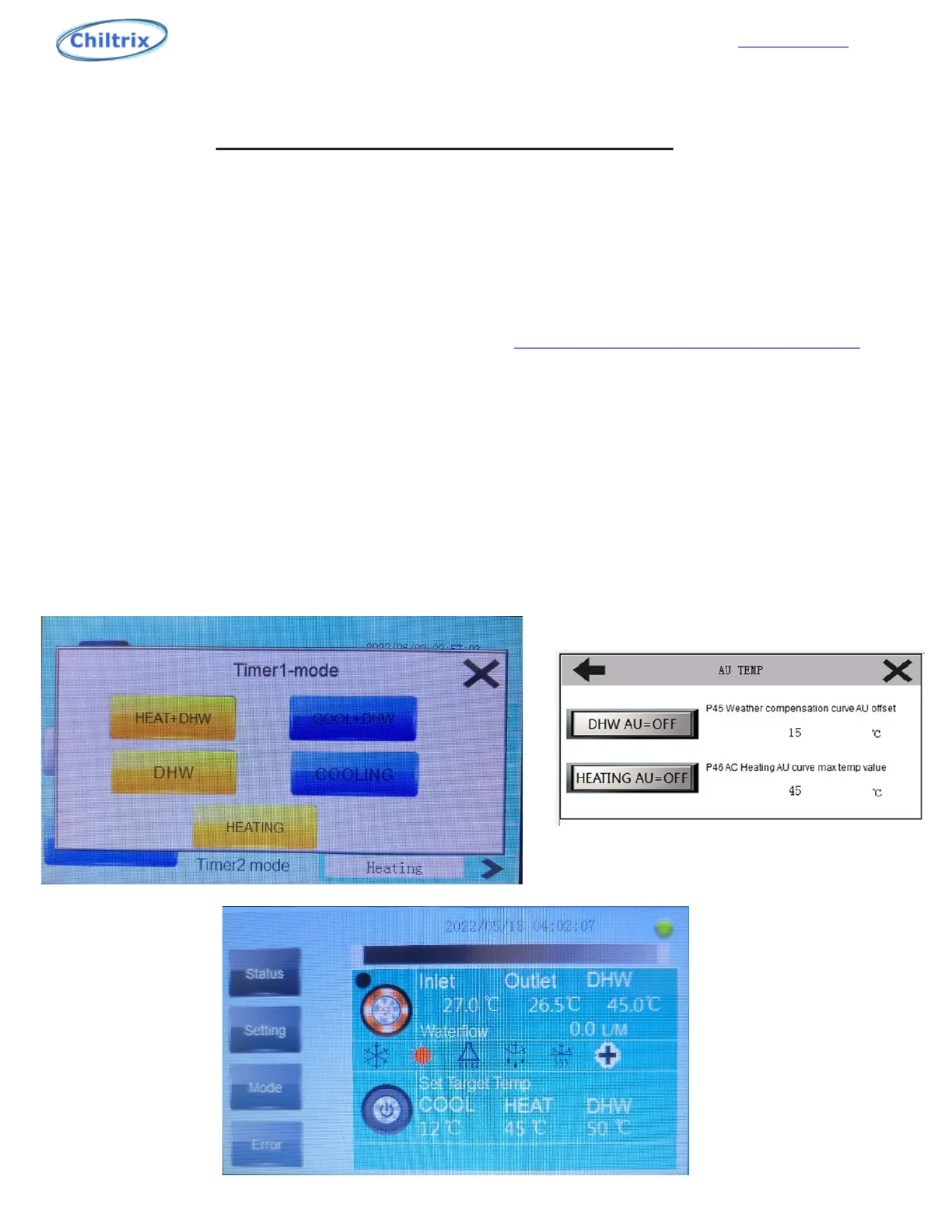
There is an "AU TEMP" icon inside of the mode section of the main screen of the controller. If you press
on it then you will enter the AU TEMP mode screen. You will need to enable “HEATING AU” to ON. With
AU Heating on, it will be displayed as an orange/red color.
From there you can adjust the “weather compensation curve AU offset” and the “AC Heating AU curve
max temp value”. The “AU” will also be illuminated on the main screen around the heat mode.
Enable AU of heat mode as shown below.


 To Next Page