The CYT-133SC is a versatile RS232/RS485/RS422 converter designed to integrate traditional industrial serial devices with Ethernet networks for data access and control. It supports both intranet and internet connectivity.
Function Description:
The device acts as a serial server, enabling serial devices to communicate over TCP/IP networks. It provides 3 sets of Digital Input (DI) and Digital Output (DO) for remote control functionalities. The CYT-133SC supports various connection modes including TCP Server, TCP Client, UDP, Real Com, and Extend I/O, allowing users to select the most suitable option for their application. It also features DHCP Client support for automatic IP address acquisition, PPPoE for dial-up connection simulation, and Dynamic DNS for connecting to dynamic IP addresses via a fixed domain name.
Important Technical Specifications:
- CPU: 16 Bits, 100MHZ
- Memory: 256KB Flash & 2MB SDRAM
- Ethernet: 10/100 Base-T/Tx/, Automatic MSI/MDI-x port
- Communication Ports: RS232, RS422, RS485
- Connectors: DB9(MALE)/RJ-45
- RS-232 Signals: TxD, RxD, RTS, CTS, DTR, DSR, DCD, RI, GND
- RS-422 Signals: Tx+, Tx-, Rx+, Rx-, GND (1200M for the longest distance)
- RS-485 Signals: Data+, Data-, GND (1200M for the longest distance)
- I/O Control: 3 Input (short), 3 Output – Relay Mode (Maximum Voltage DC30V, 1A)
- Power Input:
- PWR1: DC9~24V (500MA MAX) 2-pin Separate terminal
- PWR2: DC9~24V (500MA MAX) DC power to DC socket
- Operating Temperature: 0℃~55℃
- Operating Humidity: 5~95%RH
- Storage Temperature: -20℃~85℃
- Surge Protection: Serial port 15KV ESD, Ethernet port 1.5KV
- LED Indicators: Power / RXD / TXD / ACT / IN1 / IN2 / IN3 / OUT1 / OUT2 / OUT3
- Weight: 340g
- Dimensions (LxWxH): 106.5 (86.5 without ear loop) * 115 (110 without RS232) * 28 mm
Usage Features:
- Easy Installation: The device is designed for easy installation and wiring.
- Web-based Interface: Configuration and management are performed through a simple and intuitive web interface, accessible via any standard web browser (IE, Netscape) without operating system limitations.
- Quick Setup: A "One Page Quick Setup" allows for rapid configuration of essential network and serial port settings.
- Serial Port Configuration: Users can set baud rates (1200 to 230400 and custom), data bits (5, 6, 7, 8), parity check (odd, even, mark, space, none), stop bits (1, 2), and flow control (Xon/Xoff, CTS/RTS, none).
- Connection Modes:
- TCP Server: Allows remote TCP/IP commands to connect to a specified listen port. Supports up to 4 TCP connections simultaneously. Features "Keep Alive Check" to maintain connections.
- TCP Client: Establishes a TCP connection to a remote server. Supports "Start Up" mode for immediate connection upon enablement and "Any Character" mode for connection only when data is received from the serial port.
- UDP: Configures remote connection port, remote host IP, and local listen port. Includes a "Heart Beat" function to periodically send UDP packets to the server, proving connection status.
- Real Com: Enables virtual COM port functionality, allowing for RTS/CTS, DTR/DSR signal transmission.
- Extend I/O: Allows for I/O expansion up to 30 sets of DIO with additional BF-51 (DIO BOX) units.
- I/O Operation Modes:
- Auto Mode: Provides smart I/O control without programming. Users can set trigger rules for outputs based on input conditions (IN1, IN2, IN3) using AND/OR logic. Alarm generation can be enabled to send email notifications when outputs are triggered.
- TCP Server Mode (I/O): Sets a local I/O port and allows for automatic I/O status reporting (disabled, state changed, periodically) via serial or Ethernet.
- TCP Client Mode (I/O): Sets a remote connection port and remote host IP for I/O control. Supports automatic I/O status reporting.
- UDP Mode (I/O): Sets remote connection port, remote host IP, and local listen port for I/O control. Supports automatic I/O status reporting.
- Peer to Peer Mode: Facilitates direct data connection between two CYT-133SC devices.
- I/O State Setup: Configures input states (OPEN/SHORT), device descriptions, and output signals (OPEN/SHORT) with latch times.
- Alert Event E-Mail: Configures email alerts for specific events, including SMTP server settings, recipient addresses, and sender addresses.
- DDNS Setup: Supports TZO and Dyndns services for dynamic DNS configuration, allowing access via a fixed domain name even with dynamic IP addresses.
- Remote Control: Supports remote reset commands (via CGI/URL and proprietary UDP command) and I/O control via CGI/URL commands.
Maintenance Features:
- System Status Monitor: Provides real-time display of product name, firmware version, system uptime, IP configuration, operation mode, connection port, MAC address, IP address, subnet mask, gateway, DNS, serial port settings (baud rate, data bits, parity, stop bits, flow control), and Ethernet/Serial data transmission statistics.
- Backup & Restore Configuration: Allows users to back up current system settings to an encrypted file (.cfg) and restore them later, ensuring data security and easy recovery.
- Firmware Upgrade: Facilitates firmware upgrades through the web interface. Users are warned about the importance of stable power supply during the upgrade process and the risks of using incorrect firmware.
- PING Utility: Provides a network diagnostic tool to test connectivity to remote hosts by sending PING packages.
- Factory Default Reset: A physical button allows for a factory default reset (push for 5 seconds at power on). The web interface also provides a function to reset the system to factory defaults.
- Reboot System: The device can be rebooted via a physical button (push for 2 seconds at power on) or through the web interface.

 Need help?
 General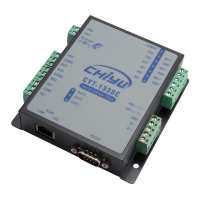

 To Next Page