Chord Electronics
Mojo 2 | User manual
11
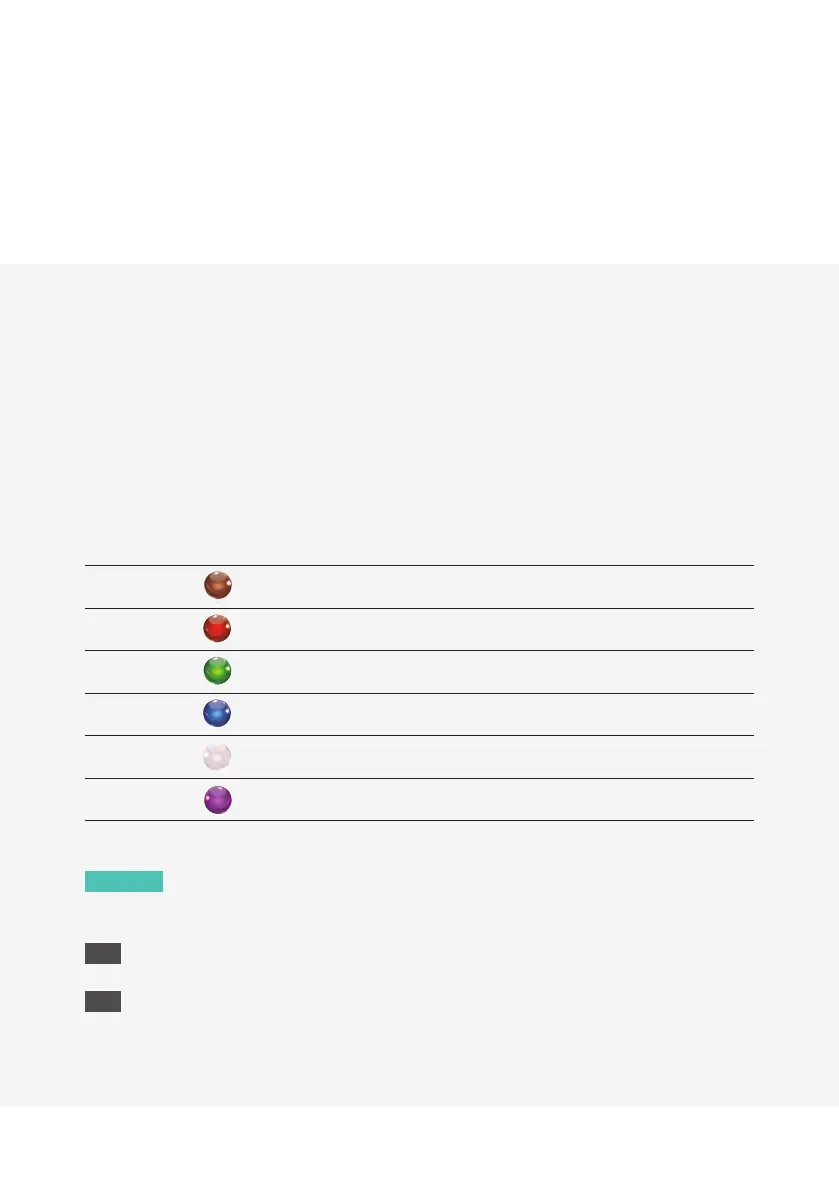
7.2 Menu: button colour information when charging
Additionally, when Mojo 2 is switched o, the menu button displays a colour when charging to indicate
charging current, indicated by the table below. Charging current status can give a useful indicator of the
charger/charging quality available to Mojo 2 and/or battery health.
For example, a white menu button indicates the device is charging at maximum capacity. Green indicates
charging is slow and can be improved with a dierent charger/cable. Red signifies insucient current to
charge.
Battery status VBUS volts Status
-
Needs to re-charge overnight with
Mojo 2 switched o
4.01 Poor (please change the charger)
4.37 Slow charging
4.61 Intermediate charging
>4.85 Maximum charging
Desktop charging Desktop mode
NOTE
Poly users (see section 8) will not achieve a white charge status whilst the devices are
charging simultaneously.
TIP
If the charging LED flashes red for ten seconds and the device shuts down, a recharge is required.
TIP
If the device fails to power-on (possibly suggesting a severely depleted battery) then it needs to be
recharged overnight, with the device switched o.


 To Next Page