Chord Electronics
Mojo 2 | User manual
4
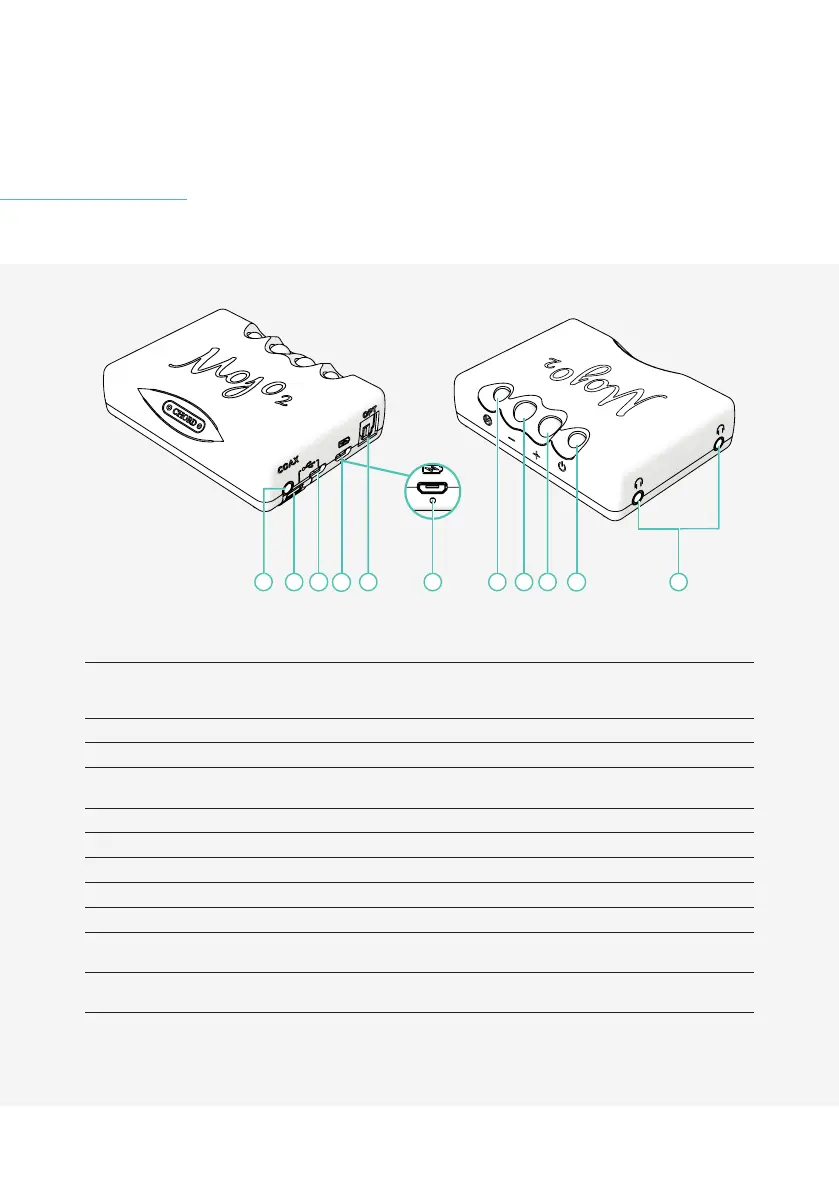
4 Getting to know Mojo 2
A
B
C
D
E H
I
K
G J
F
A Coaxial input (single
input or dual data only)
Connect compatible digital devices using a 3.5mm coaxial digital cable. Single coax:
tip: signal, sleeve: ground. Dual data coax: tip: signal 1, ring: signal 2 sleeve: ground (for
use with Hugo M-Scaler)
B USB-C input Connect compatible digital devices using a USB-C cable for playback
C Micro-USB input Connect compatible digital devices using a Micro-USB cable for playback
D Micro-USB charging
input
Connect to power using the supplied Micro-USB cable (use with a charger capable of a
2 A minimum output)
E Optical input Connect compatible digital devices using an optical cable for playback
F Charge status LED Displays charge and battery status using a polychromatic scale (see section 6.2)
G Menu Press to cycle through the menu options
H Volume down/menu ‘-‘ Decrease volume or adjust the selected menu mode
I Volume up/menu ’+’ Increase volume or adjust the selected menu mode
J Power button (Displays
sample rate)
Press and hold to power on/o
K Headphone outputs Connect up to two pairs of headphones (not independently controllable - 3.5 mm x2)


 To Next Page