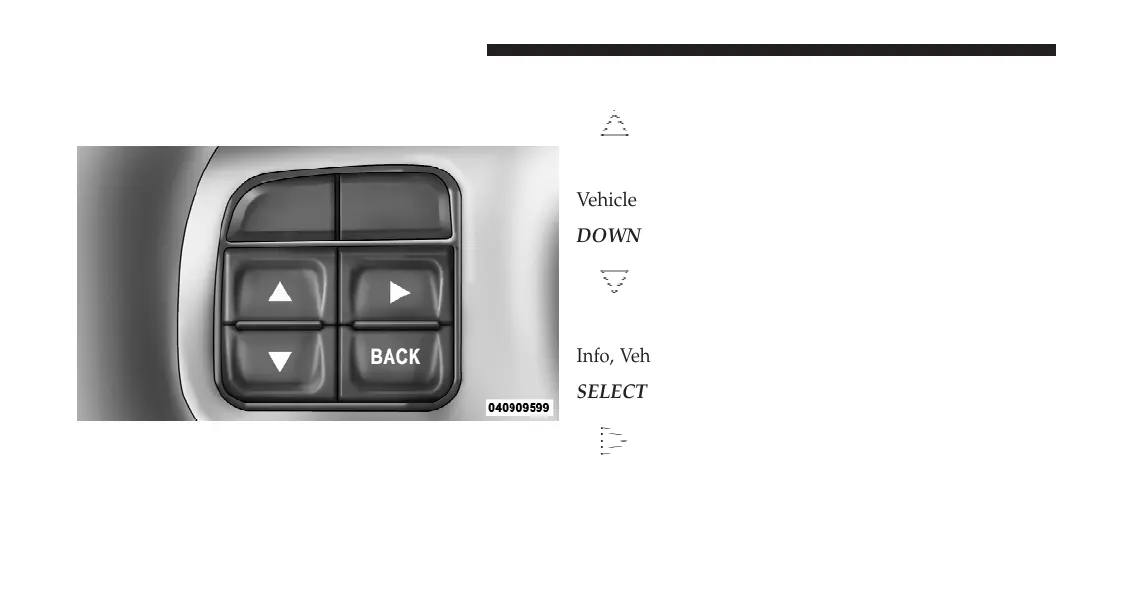
The system allows the driver to select information by
pressing the following buttons mounted on the steering
wheel:
UP Button
Press and release the UP button to scroll up-
ward through the main menu and Vehicle Info
and Trip Info sub-menus (Fuel Economy, Ve-
hicle Info, Tire PSI, Cruise, Messages, Trip Info,
Vehicle Speed, and Turn Menu OFF) and sub-menus.
DOWN Button
Press and release the DOWN button to scroll
downward through the main menu and Vehicle
Info and Trip Info sub-menus (Fuel Economy,
Vehicle Info, Tire PSI, Cruise, Messages, Trip
Info, Vehicle Speed, and Turn Menu OFF) and sub-menus.
SELECT Button
Press and release the SELECT button to access
the information screens or sub-menu screens of
a main menu item. Press and hold the SELECT
button for two seconds to reset displayed/
selected features that can be reset.
EVIC Steering Wheel Buttons
286 UNDERSTANDING YOUR INSTRUMENT PANEL














 To Next Page