NOTE: If the indicator message illuminates when you
start the vehicle, the oil change indicator system did not
reset. If necessary, repeat this procedure.
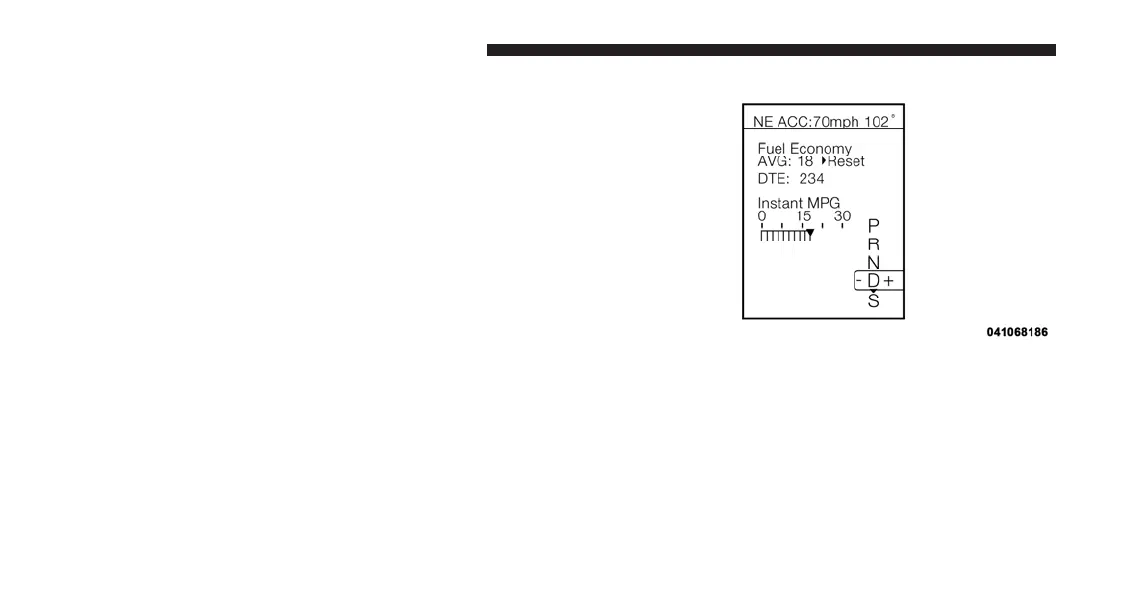
Fuel Economy
Press and release the UP or DOWN button until ⬙Fuel
Economy⬙ is highlighted. Press the SELECT button and
the next screen will display the following:
•
Average Fuel Economy/Miles Per Gallon
•
Distance To Empty (DTE)
•
Miles Per Gallon (MPG)
Average Fuel Economy / ECO Fuel Saver Mode —
If Equipped
Shows the average fuel economy since the last reset.
When Average Fuel Economy is selected, The word
⬙RESET>⬙ (with right arrow) appears next to it. Pressing
the right arrow button will reset Average Fuel Economy
Fuel Economy
294 UNDERSTANDING YOUR INSTRUMENT PANEL












 To Next Page