Adaptive Cruise Control
(ACC) — If Equipped
If your vehicle is equipped with Adaptive Cruise Con-
trol, the controls operate exactly the same as the
standard cruise control, with one difference. You can
set a specified distance you would like to maintain
between you and the vehicle in front of you.
• If the ACC sensor detects a vehicle ahead, ACC
will apply limited braking or acceleration automati-
cally to maintain a preset following distance while
matching the speed of the vehicle ahead.
NOTE:
Your vehicle will not exceed the cruise speed you have
set.
• If the sensor does not detect a vehicle directly
ahead of you, it functions like a standard cruise
control system, maintaining the speed you set.
For further information and applicable warnings and
cautions, please refer to your Owner’s Manual at
www.chrysler.com/en/owners/manuals.
Forward Collision Warning
With Mitigation — If
Equipped
The Forward Collision Warning (FCW) system pro-
vides the driver with active braking, audible and visual
warnings (within the instrument cluster display) and
may apply a brake jerk to warn the driver when it
detects a potential frontal collision. The warnings and
limited braking are intended to provide the driver with
enough time to react and avoid or mitigate the poten-
tial collision.
FCW monitors the information from the forward-
looking sensor, as well as the Electronic Brake Control-
ler (EBC) and wheel speed sensors, to calculate the
probability of a collision. When the system determines
that a collision is probable, a warning message (both
audible and visual) will be displayed within the cluster
display along with a brake jerk warning (previously
enabled in the Uconnect Settings). When the system
senses the driver applying the brakes to avoid a prob-
able collision, additional brake force will be provided
to the vehicle. When the system determines a collision
with the vehicle in front of you is no longer probable,
the warning message will be deactivated.
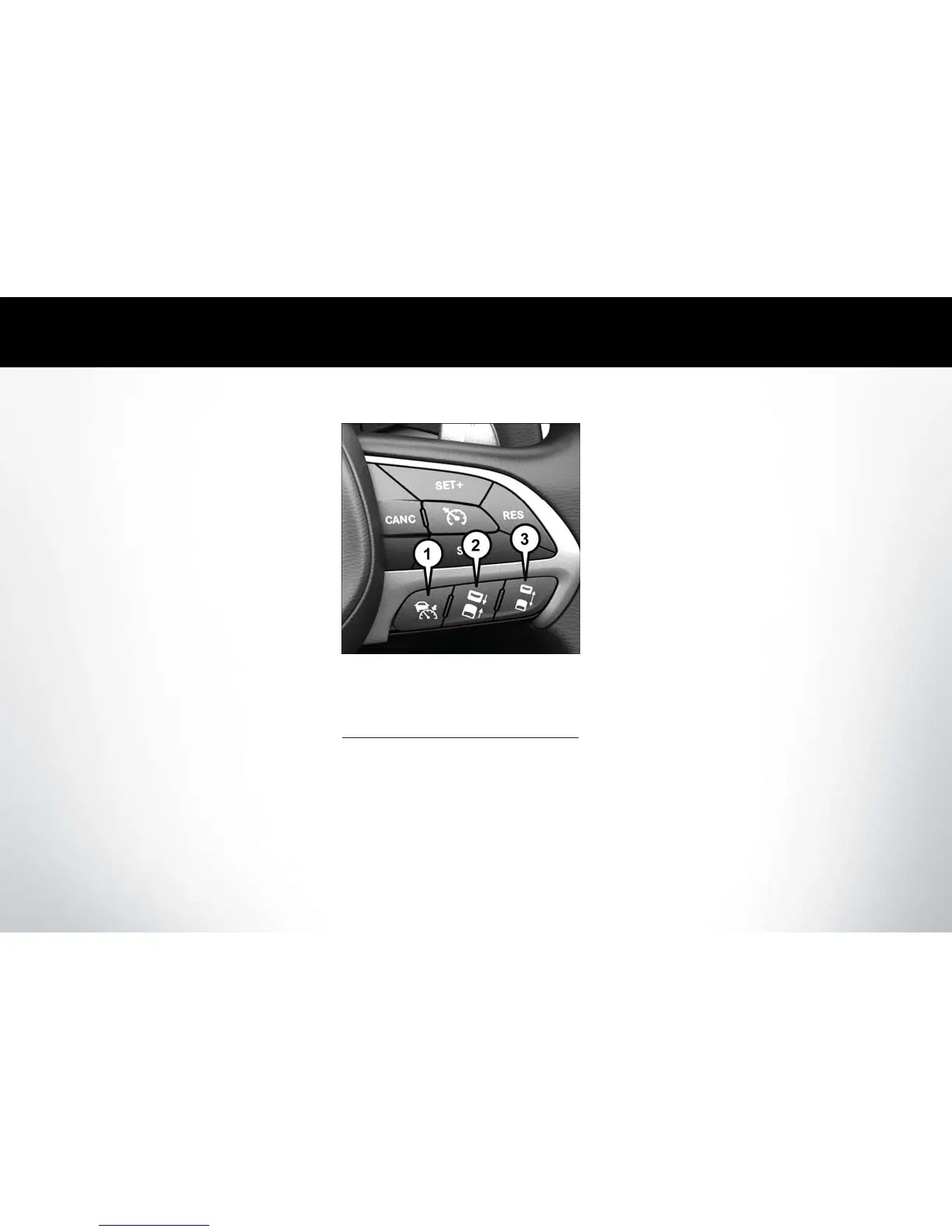
Adaptive Cruise Switches
1 — Adaptive Cruise Control (ACC) On/Off
2 — Distance Setting – Decrease
3 — Distance Setting – Increase
SPEED CONTROL
SAFETY FEATURES















 To Next Page