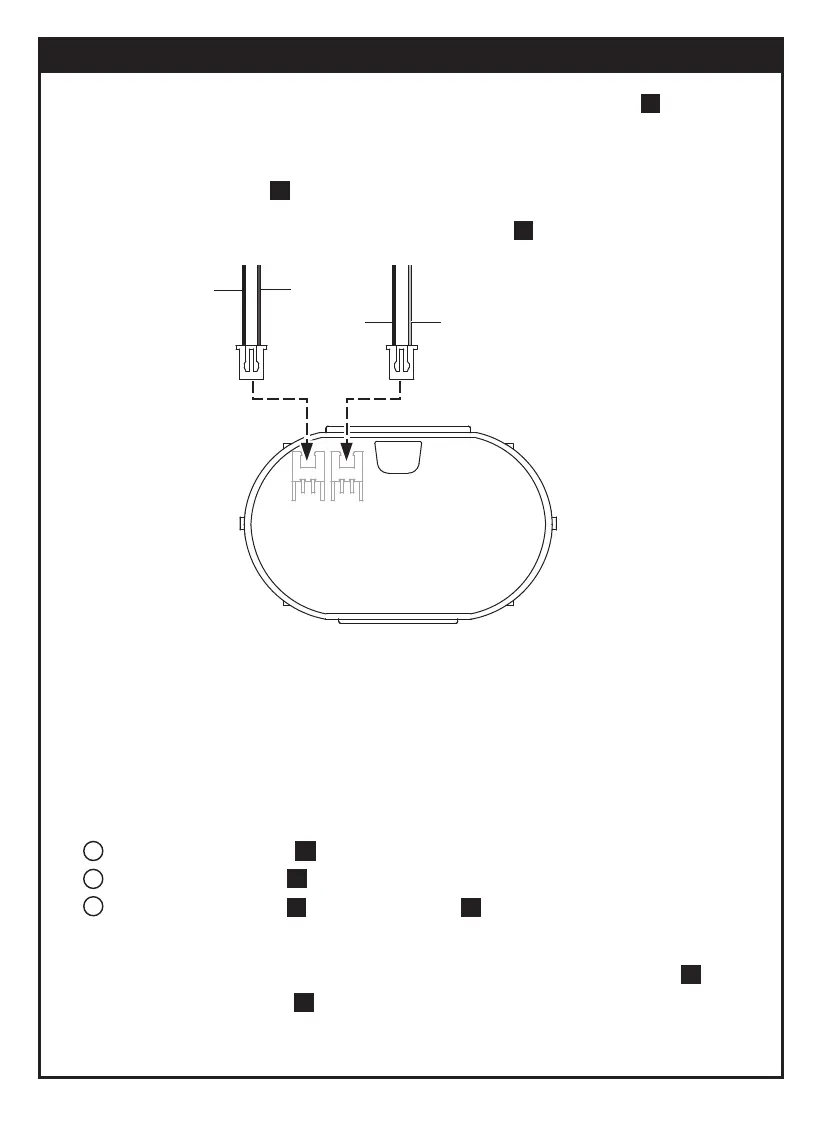
Red
Blue
Black
Black
Refer to page 21, step , check and ensure A19 is Installed correctly.
Refer to page 6, step , check and ensure A15 is removed.
Refer to page 6, step and page 11, step , check and ensure
all screws are fastened tightly.
20
8
7 3
22
16
1. Ensure batteries are placed in correct polarity. ( refer to page 13, step )
2. If Tobbie does not work ( LED doesn’t flash ) when pressing " power switch ",
Check and ensure the screws are fastened to the bottom entirely
( refer to page 11, step )
3. Ensure all wirings are correct ( refer to page 12, step wire configuration as below)
4. Do not play the Tobbie under direct sunlight or halogen lamp, it may cause the
robot to go wrong direction.
5. If Tobbie emitted a sound " Bee Bee Bee " while playing, it is on " low-battery " alert.
Replace new battery once it is exhausted.
6. Under " Explore " mode, if gearbox is still working but Tobbie does not move and
come with abnormal sound " Da Da Da ".
7. If Tobbie is walking unstably or tumbling, check if A1(refer to page 18, step ) &
A2 (refer to page 22, step ) are not mixed, ensure both parts are installed correctly.
7
5
3
1
2
3
Trouble Shooting
30



 To Next Page