BladeM LED Display System
Installation Manual
Cirrus | 200 West Rd, Portsmouth, NH 03801 | 877 636 2331 | contact@cirrusled.com | cirrusled.com
22
This document is confidential & proprietary to Cirrus Systems for distribution to direct customers and their installers only.
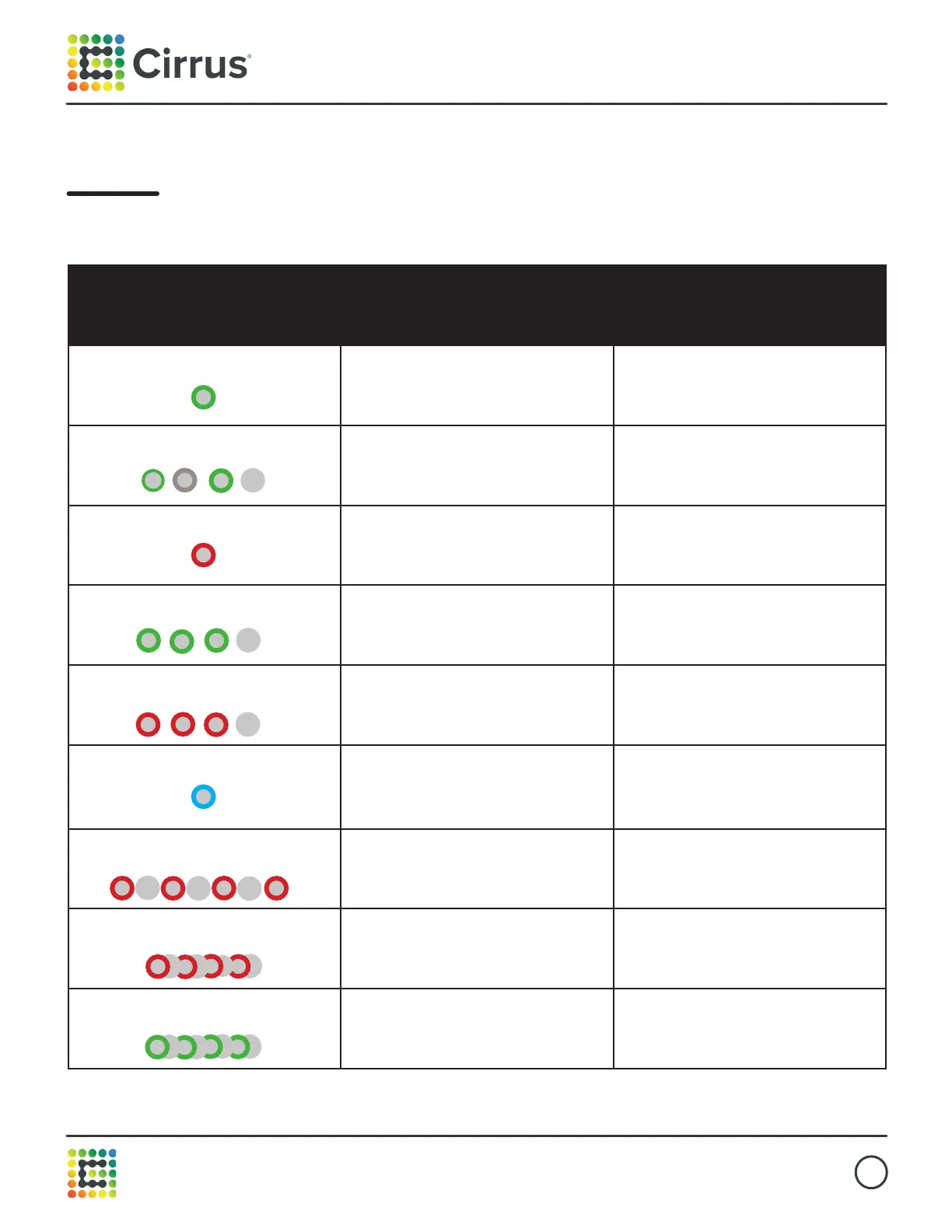
M1 Pro indicator codes
Indicator State Meaning Action
Steady green light
Power on n/a
Green light
flashes every 5 seconds
Power on, system
monitoring active
n/a
Steady red light
Power to modules
is disabled
To restore power- hold button
down for 2 seconds. Release when
light turns green
3 green flashes, followed
by a pause, for 10 seconds
Network connection
is active
Initiate network test -
Press button once quickly
3 red flashes, followed
by a pause, for 10 seconds
Network connection
is NOT active
Initiate network test -
Press button once quickly
Steady blue light
Automapping complete, test patterns
will show for 2 minutes or until
canceled
To initiate Automap - press and
hold button for 5 seconds.
To exit mode early - press button
once quickly
Flashing red
for 10 seconds
Automapping failed n/a
Flashing red every
0.5 seconds
Power issue detected. Panels shut
down
Contact Cirrus Support
Flashing green every
0.5 seconds
Power issue overridden
Contact Cirrus Support



 To Next Page