EasyManua.ls Logo

Cisco MERAKI Z4 - User Manual

Cisco MERAKI Z4
14 pages
Print Icon
To Next Page IconTo Next Page
Loading...
Z4 Installation Guide
About this Guide
This guide provides instructions on how to install and configure your Z4 series device. This guide also provides
mounting instructions and limited troubleshooting procedures. For more Z-series device installation guides, refer to the
Z-series installation guides section on our documentation website.
Product Overview
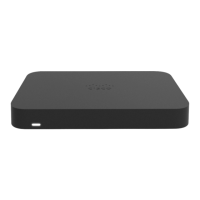
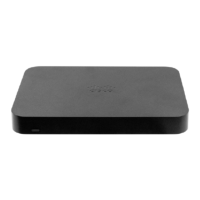
The Cisco Meraki Z-Series teleworker gateway is an enterprise class firewall, VPN gateway and router. Each model
offers wireless connectivity, five gigabit ethernet ports, including a built-in PoE-enabled port for VoIP phones and other
powered devices. Each model is designed to securely extend the power of Meraki cloud managed networking to almost
any location.
Features
Managed via Cisco Meraki Dashboard
Automatic Firmware upgrades
Automatic WAN Failover to Cellular Uplink
L3/L7 Stateful Firewall
1:1 and 1:Many NAT
Configurable VLANs / DHCP support
1
Question and Answer IconNeed help?

Do you have a question about the Cisco MERAKI Z4 and is the answer not in the manual?

Summary

Product Overview and Features

Product Details

Overview of the Z-Series teleworker gateway capabilities and design.

Key Features

Comprehensive list of the Z4's managed, security, and connectivity features.

Context and Comparisons

Physical Specifications

Accessories and Package Contents

Accessories

List of available accessories for the Z4 device.

Package Contents

Items included in the Z4 device package.

Front Panel Overview

Status Indicator LEDs

Explanation of the LED status lights on the front panel.

Back Panel Overview

Reset Button Functionality

Instructions for using the reset button for reboot or factory reset.

Bottom Panel Overview

Mounting Hardware and Safety

Mounting Hardware Details

Specifications for mounting the Z4 device using provided hardware.

Safety and Warnings

Critical safety precautions and warnings for installation and operation.

Pre-installation Preparation

Configure Dashboard Network

Steps to add the Z4 device to your Meraki network via the dashboard.

Firmware and Firewall Configuration

Check and Set Firmware

Guide to updating the Z4's firmware for optimal performance.

Configure Upstream Firewall Settings

Instructions for configuring upstream firewalls to allow Z4 communication.

Installation Instructions

Mounting Hardware

Detailed steps for physically mounting the Z4 device.

Connecting to WAN

Guidance on configuring local area network and WAN connectivity.

Setting up a Static IP Address

Procedure for configuring a static IP address for the Z4.

Setting up a DHCP IP Address

Default configuration to obtain an IP address via DHCP.

Additional Settings and Configuration

Setting VLANs

Instructions for configuring VLAN tagging if using a trunk port.

Setting PPPoE

Steps for PPPoE authentication required for DSL circuits.

Web Proxy Settings

Configuration options for enabling web proxy for fallback communication.

Configuring Physical Link Settings

Adjusting Ethernet port settings like duplex and speed.

Basic Troubleshooting and Warranty

Basic Troubleshooting

Common steps to resolve basic connectivity issues with the Z4.

Warranty Information

Details on warranty coverage periods for Z-series devices and accessories.

Support and Additional Information

Contacting Meraki Support

How to get help for installation or operational issues via the dashboard.

Important Usage and Safety Notes

Guidelines on equipment use, maintenance, disposal, storage, and transport.

Summary

Product Overview and Features

Product Details

Overview of the Z-Series teleworker gateway capabilities and design.

Key Features

Comprehensive list of the Z4's managed, security, and connectivity features.

Context and Comparisons

Physical Specifications

Accessories and Package Contents

Accessories

List of available accessories for the Z4 device.

Package Contents

Items included in the Z4 device package.

Front Panel Overview

Status Indicator LEDs

Explanation of the LED status lights on the front panel.

Back Panel Overview

Reset Button Functionality

Instructions for using the reset button for reboot or factory reset.

Bottom Panel Overview

Mounting Hardware and Safety

Mounting Hardware Details

Specifications for mounting the Z4 device using provided hardware.

Safety and Warnings

Critical safety precautions and warnings for installation and operation.

Pre-installation Preparation

Configure Dashboard Network

Steps to add the Z4 device to your Meraki network via the dashboard.

Firmware and Firewall Configuration

Check and Set Firmware

Guide to updating the Z4's firmware for optimal performance.

Configure Upstream Firewall Settings

Instructions for configuring upstream firewalls to allow Z4 communication.

Installation Instructions

Mounting Hardware

Detailed steps for physically mounting the Z4 device.

Connecting to WAN

Guidance on configuring local area network and WAN connectivity.

Setting up a Static IP Address

Procedure for configuring a static IP address for the Z4.

Setting up a DHCP IP Address

Default configuration to obtain an IP address via DHCP.

Additional Settings and Configuration

Setting VLANs

Instructions for configuring VLAN tagging if using a trunk port.

Setting PPPoE

Steps for PPPoE authentication required for DSL circuits.

Web Proxy Settings

Configuration options for enabling web proxy for fallback communication.

Configuring Physical Link Settings

Adjusting Ethernet port settings like duplex and speed.

Basic Troubleshooting and Warranty

Basic Troubleshooting

Common steps to resolve basic connectivity issues with the Z4.

Warranty Information

Details on warranty coverage periods for Z-series devices and accessories.

Support and Additional Information

Contacting Meraki Support

How to get help for installation or operational issues via the dashboard.

Important Usage and Safety Notes

Guidelines on equipment use, maintenance, disposal, storage, and transport.

Cisco MERAKI Z4 Specifications

General IconGeneral
ModelCisco Meraki Z4
CategoryNetwork Router
Form FactorDesktop
Maximum Data RateUp to 1.7 Gbps
Max Clients50+
Concurrent VPN tunnels50
VPN throughput100 Mbps
Cloud ManagementYes
Operating Temperature32 °F to 104 °F (0 °C to 40 °C)
WAN Ports1 x 10/100/1000BASE-T Ethernet (RJ45)
LAN Ports4 x 10/100/1000BASE-T Ethernet (RJ45)
Wireless Standards802.11ac
VPN SupportYes
Power Supply12V DC

Related product manuals