5-33
Cisco 7600 Series Router Installation Guide
OL-4503-24
Chapter 5 Removal and Replacement Procedures
Removing and Replacing the Power Supply
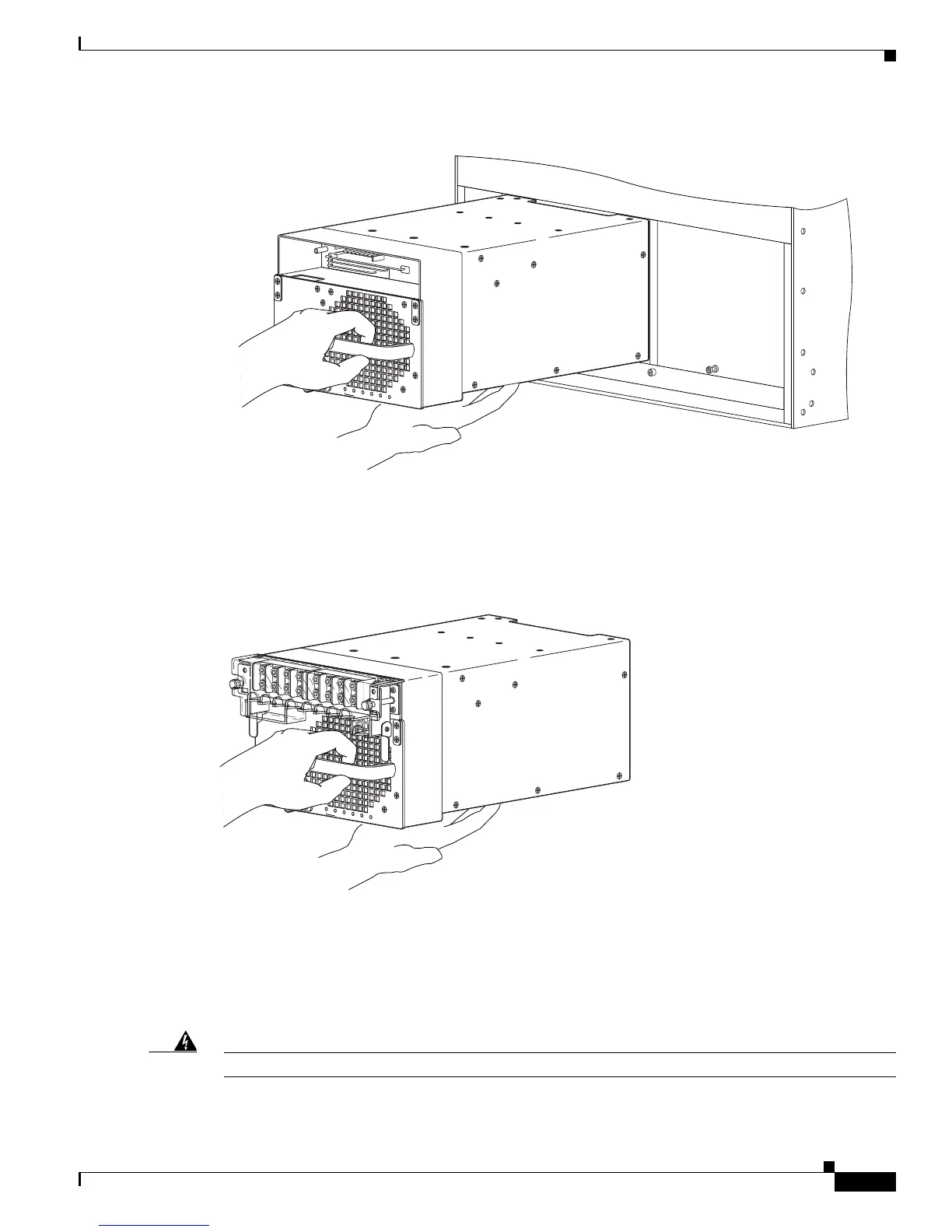
Figure 5-36 Handling a DC-Input Power Supply without IPM
Figure 5-37 Handling a DC-Input Power Supply with IPM
If the power supply bay is to remain empty, install a blank power supply filler plate (Cisco part number
700-03104-01) over the opening, and secure it with the captive installation screws.
Removing a PWR-4000-DC Power Supply from a Cisco 7613 Router
Warning
Before performing any of the following procedures, ensure that power is removed from the DC circuit.
191308
R
U
N
I
N
S
T
A
L
L
CISCO SYSTEMS, INC
1
2
3
4
IN
P
U
T
O
K
F
A
N
O
K
O
U
T
P
U
T
F
A
IL
R
U
N
I
N
S
T
A
L
L
CISCO SYSTEMS, INC
1
2
3
4
I
N
P
U
T
O
K
F
A
N
O
K
O
U
T
P
U
T
F
A
IL



 To Next Page