20
USB
0011E611A756
SABKJNXPJ N0023447426
CATV CONVERTER
AUDIO
OUT
L
R
OPTICAL
AUDIO OUT
TEST
VCR
TV
MULTI TV
ETHERNET
RF BYPASSCABLE IN
220-240V~
35W 0.5A
CAUTION
VOORZICHTIG
GEVAAR VOOR ELEKTRISCHE
SCHOK. NIET OPENEN.
RISK OF ELECTRIC SHOCK
DO NOT OPEN
1
2
3
5
4
T14901
PVR
Cable Outlet
Power Outlet
High-Definition TV
DVD
Recorder/Player
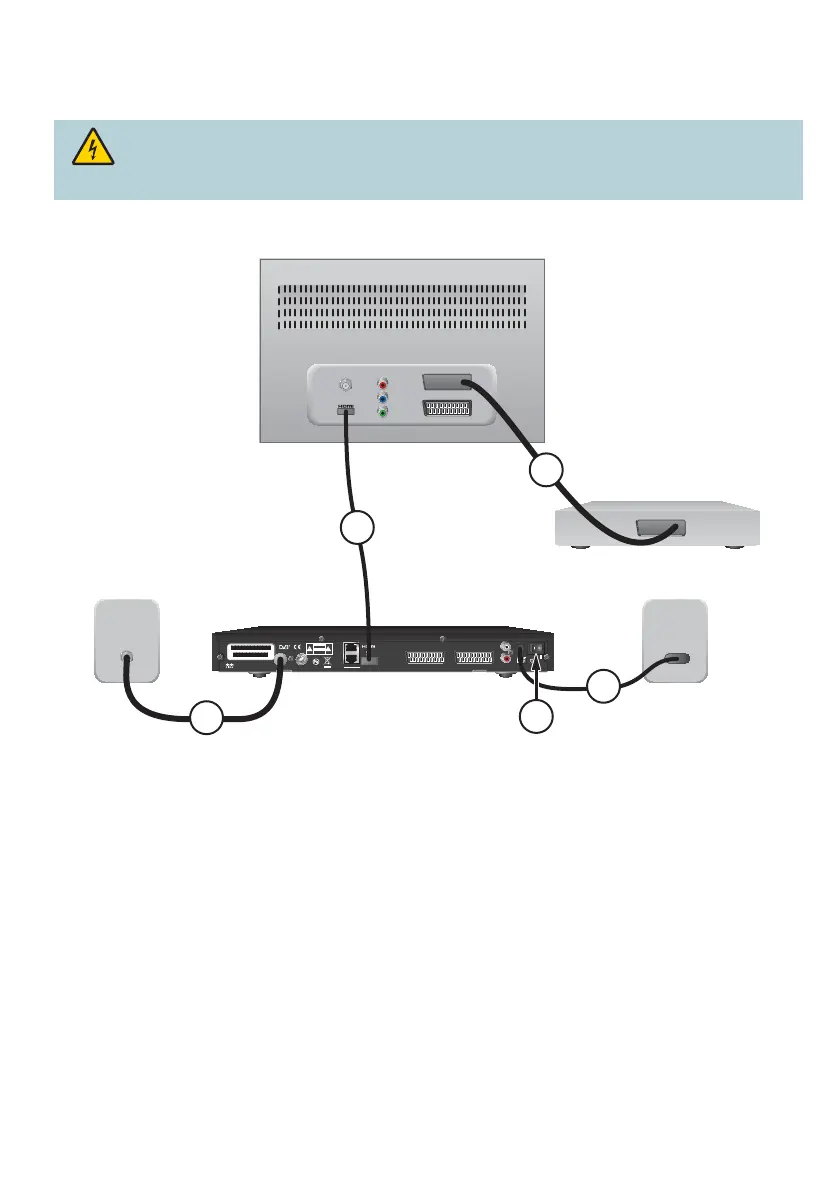
Connect the PVR to Your TV
PVR to HDTV and DVD (HDMI Connection)
1. Connect the RF coaxial cable to the PVR and to the cable outlet.
2. Connect the HDMI cable to the PVR and to the HDTV HDMI port.
3. Connect a SCART cable to the HDTV and to the DVD recorder/player.
4. Connect the power supply cable to the power outlet.
5. Press the Power switch to the ON ( | ) position to power on the PVR.
Tips:
• This connection gives you the best picture quality.
• To receive all the analogue channels, connect an additional RF coaxial cable to the RF BYPASS
port on the PVR with the RF INPUT port on the TV.
Warning: Electric shock hazard. Unplug all electronic devices before connecting or
disconnecting any device cables to the PVR.



 To Next Page