21
USB
0011E611A756
SABKJNXPJ N0023447426
CATV CONVERTER
AUDIO
OUT
L
R
OPTICAL
AUDIO OUT
TEST
VCR
TV
MULTI TV
ETHERNET
RF BYPASSCABLE IN
220-240V~
35W 0.5A
CAUTION
VOORZICHTIG
GEVAAR VOOR ELEKTRISCHE
SCHOK. NIET OPENEN.
RISK OF ELECTRIC SHOCK
DO NOT OPEN
2
3
1
5
4
T14902
PVR
Cable Outlet
Power Outlet
Standard-Definition TV
DVD
Recorder/Player
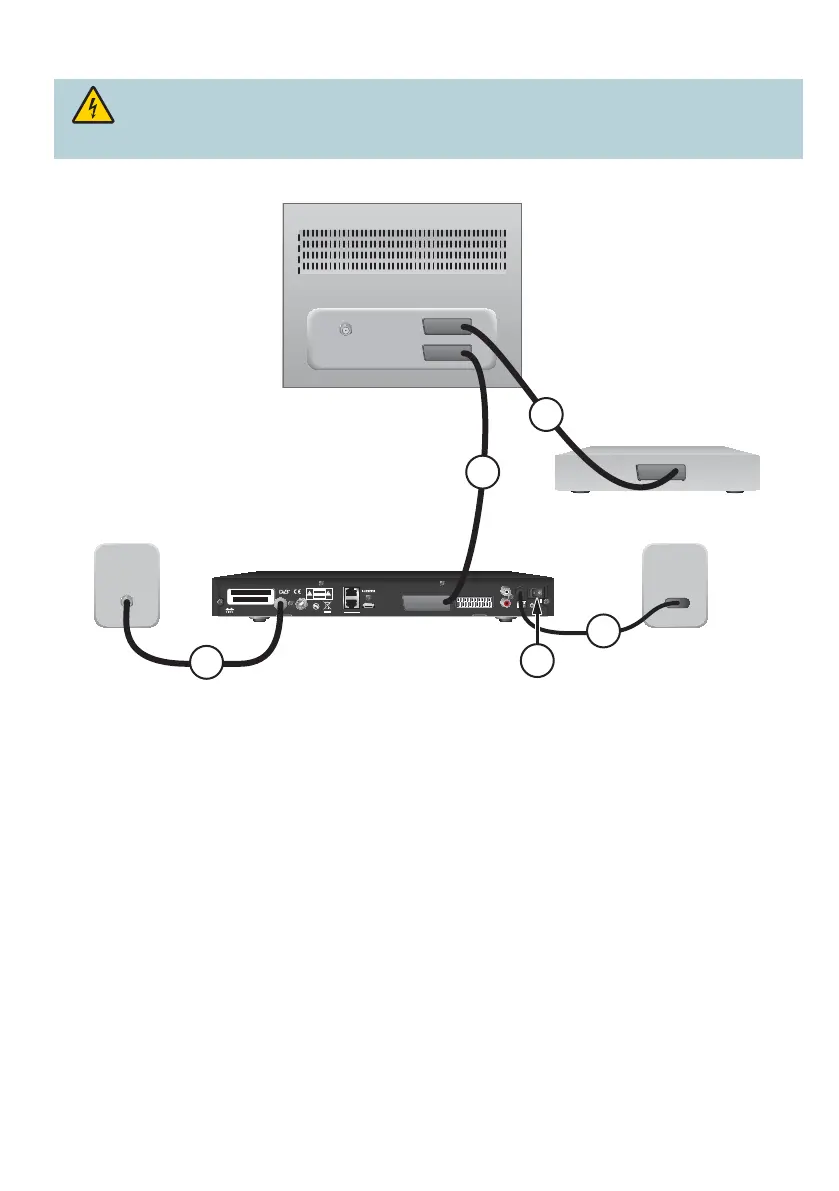
PVR to Standard TV and DVD
1. Connect the RF coaxial cable to the PVR and to the cable outlet.
2. Connect a SCART cable to the PVR and to the TV.
3. Connect a SCART cable to the TV and to the DVD recorder/player.
4. Connect the power supply cable to the power outlet.
5. Press the Power switch to the ON ( | ) position to power on the PVR.
Tip: To receive all the analogue channels, connect an additional RF coaxial cable to the RF BYPASS port on
the PVR with the RF INPUT port on the TV.
Warning: Electric shock hazard. Unplug all electronic devices before connecting or
disconnecting any device cables to the PVR.



 To Next Page