EasyManua.ls Logo

Cisco Blower Module Cisco 10000 ESR - Page 8

Cisco Blower Module Cisco 10000 ESR
22 pages
Print Icon
To Next Page IconTo Next Page
To Previous Page IconTo Previous Page
Loading...
Adding or Replacing an AC PEM
8
Cisco 10000 ESR AC Power Entry Module Installation
78-10832-01
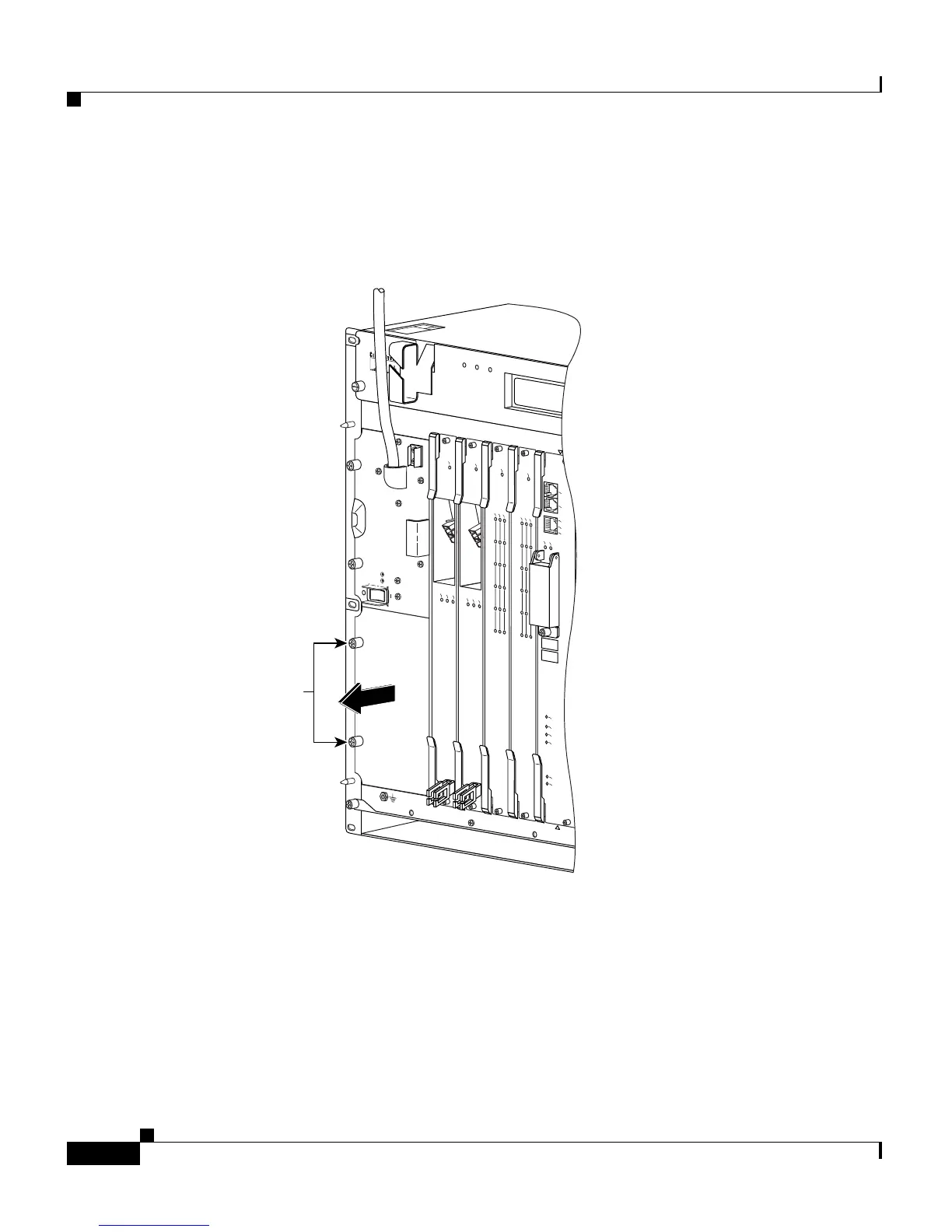
Step 2 Loosen the captive screws to remove the blank cover from the bottom power bay
(Figure 5).
Figure 5 Removing the Blank Cover
1
3
2
4
0A
PROCESSOR
PROCESSOR
FANS
OK
FAN
FAILURE
MULTI-
FAN
FAILURE
W
h
e
n
h
o
t s
w
a
p
p
in
g
th
is
fa
n
tra
y
,
re
m
o
v
a
l a
n
d
re
p
la
c
e
m
e
n
t m
u
s
t
b
e
d
o
n
e
in
u
n
d
e
r
tw
o
m
in
u
te
s
o
r
s
y
s
te
m
s
h
u
td
o
w
n
w
ill o
c
c
u
r.
C
A
U
T
IO
N
Captive
screws
P
O
W
E
R
F
A
U
L
T
CISCO
10000
L
IN
K
T
X
R
X
F
A
IL
GIGABIT ETHERNET
CISCO
10000
C
A
R
R
IE
R
A
L
A
R
M
L
O
O
P
F
A
IL
CH OC-12-DSO SM-IR
C
IS
C
O
1
0
0
0
0
C
A
R
R
IE
R
A
L
A
R
M
LO
O
P
FAIL
6XCT3–DS0
0
5
4
3
2
1
C
IS
C
O
1
0
0
0
0
C
A
R
R
IE
R
A
L
A
R
M
L
O
O
P
FAIL
6XCT3–DS0
0
5
4
3
2
1
F
A
IL
C
ON
SO
LE
S
T
A
T
U
S
A
C
O
C
R
IT
IC
A
L
M
IN
O
R
M
A
J
O
R
E
THE
RN
ET
LIN
K
AC
TIV
ITY
AU
X
SLOT 0
SLOT 1
C
IS
C
O
1
0
0
0
0
32692

Related product manuals