7
Cisco 10000 ESR AC Power Entry Module Installation
78-10832-01
Adding or Replacing an AC PEM
Installing a Second AC PEM
Use the following procedure to install a second AC PEM in the bottom power bay
for redundancy.
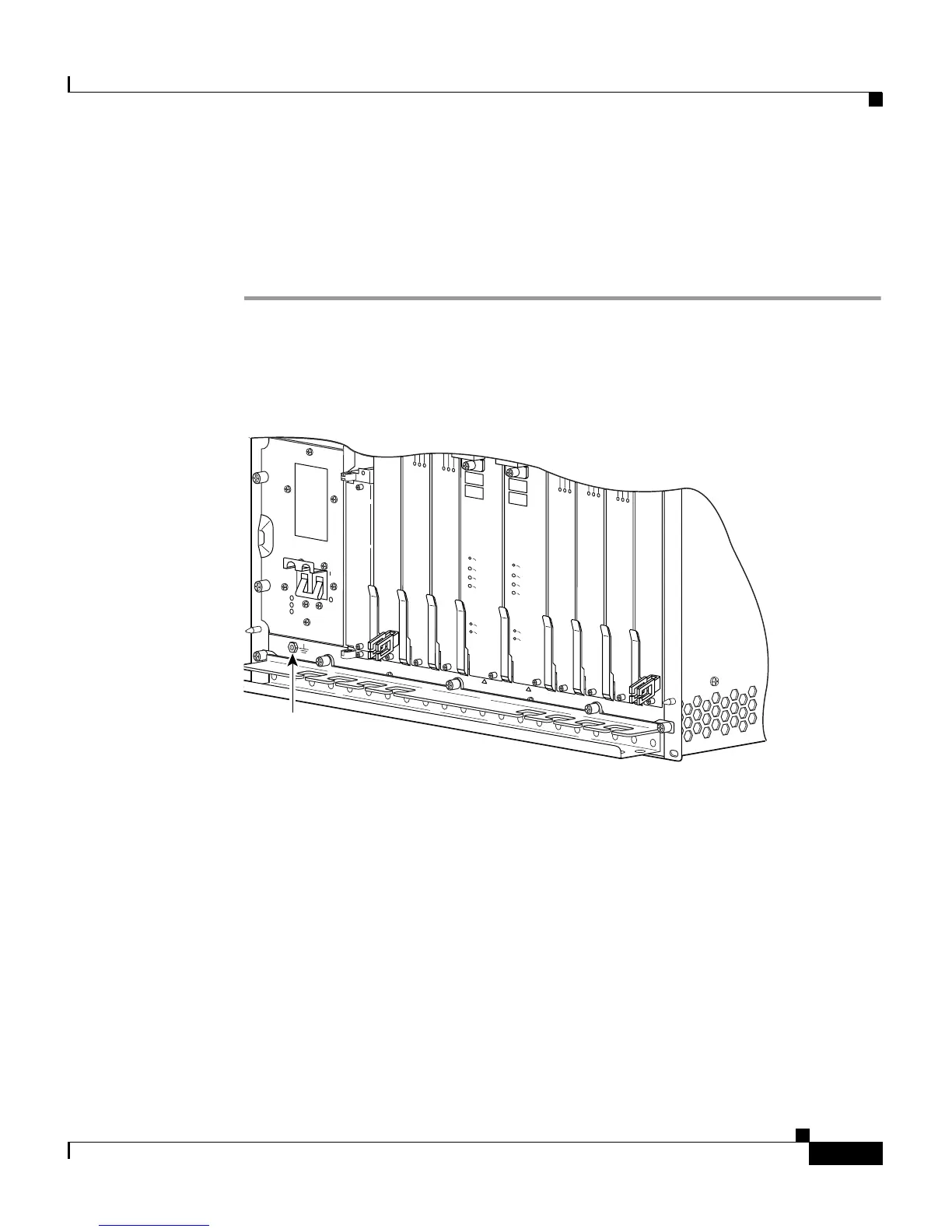
Step 1 Attach an antistatic wrist strap to your wrist and to an ESD socket on the chassis,
or to a bare metal surface on the chassis or frame (Figure 4).
Figure 4 ESD Chassis Connection
PROCESSOR ONLY
POWER
FAULT
MISWIRE
CISCO
10000
CH OC-12-DSO SM-IR
6XCT3–DS0
5
6XCT3–DS0
5
F
A
IL
PERFORMANCE ROUTING ENGINE
S
T
A
T
U
S
A
C
O
C
R
IT
IC
A
L
M
IN
O
R
M
A
J
O
R
F
A
IL
PERFORMANCE ROUTING ENGINE
S
T
A
T
U
S
A
C
O
C
R
IT
IC
A
L
M
IN
O
R
M
A
J
O
R
6XCT3–DS0
5
6XCT3–DS0
5
6XCT3–DS0
5
OC–12/STM–4 POS SM–IR
32236
ESD
socket







 To Next Page