Before using this watch
7
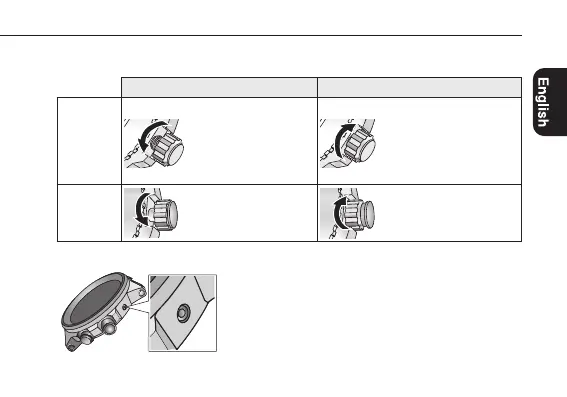
Screw down crown/button
Unlock the crown/button prior to operate your watch.
UnlockLock
Screw down
crown
Rotate the crown
counterclockwise until it
releases from the case.
Push the crown in to the
case. With gentle pressure
towards the case, rotate the
crown clockwise to secure
it to the case. Be sure to
tighten firmly.
Screw down
push button
Rotate the locking screw
counterclockwise, and
loosen until it stops.
Rotate the locking screw
clockwise, and tighten
fi rm ly.
Recessed buttons
Press the button with a non-marring narrow-tipped
object such as a wooden toothpick.
•Metalobjectsmaycausemarringorscratchingof
the button.






 To Next Page